Black Myth: Wukong has a fairly compact control scheme, but there is much more going on than light attack, heavy attack and dodge. The Destined One can switch staff stances, use spells, activate Spirits, consume quick items, spin the staff to deal with projectiles and build Focus for stronger attacks.
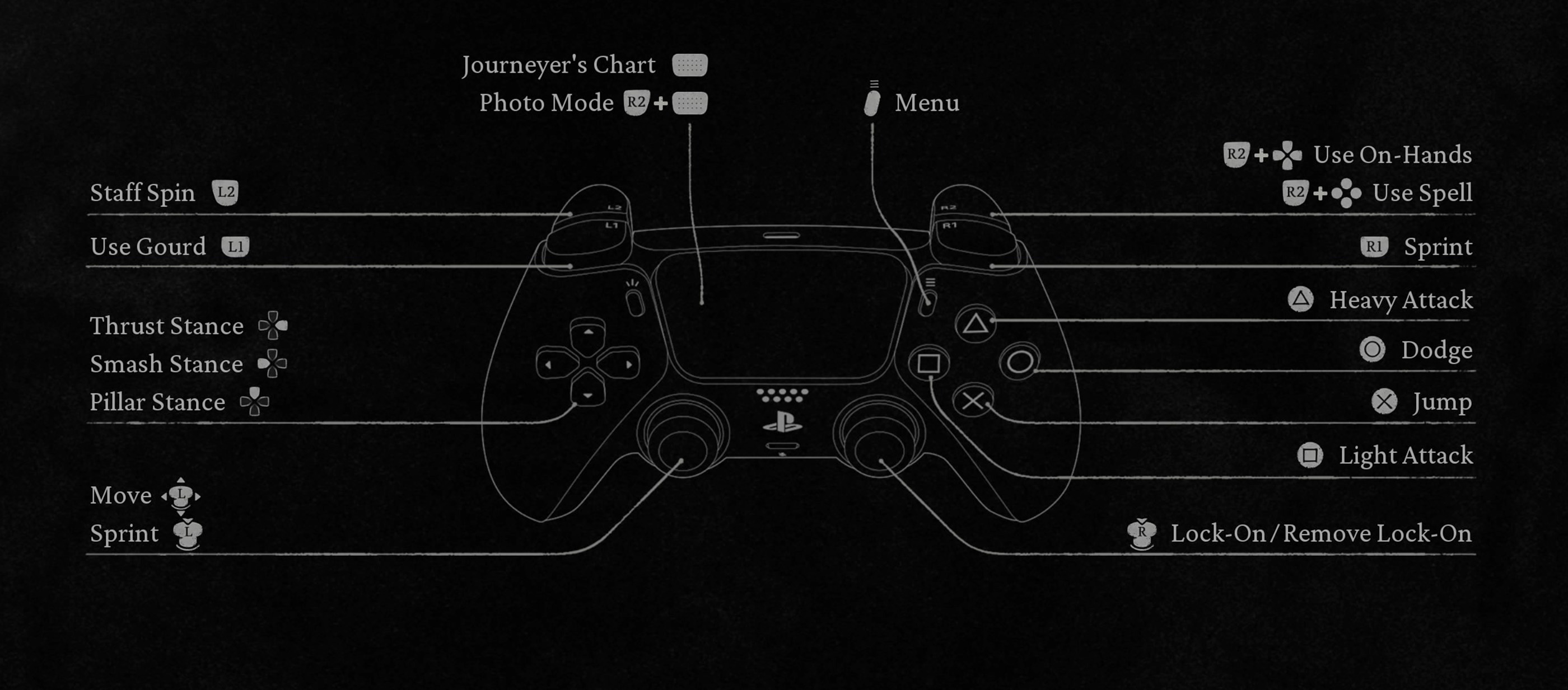
The controls below use the default Type A layout shown in the PlayStation controller settings. Black Myth: Wukong also includes a Type B controller layout, so some combat buttons will move if you switch input type.
Black Myth Wukong PS5 Controls
| Action | PS5 Control |
|---|---|
| Move | Left Stick |
| Move Camera | Right Stick |
| Sprint | R1 or Press Left Stick |
| Lock On / Remove Lock On | R3 |
| Light Attack | Square |
| Heavy Attack | Triangle |
| Dodge | Circle |
| Jump | Cross |
| Use Gourd | L1 |
| Staff Spin | L2 |
| Interact | R2 |
| Use Spell | R2 + Face Button |
| Use On Hand Item | R2 + D Pad Direction |
| Use Spirit | L2 + R2 |
| Smash Stance | D Pad Left |
| Pillar Stance | D Pad Up |
| Thrust Stance | D Pad Right |
| Journeyer's Chart | Touch Pad |
| Photo Mode | R2 + Touch Pad |
| Menu | Options |
Your screenshot also confirms that Type A lets you swap Dodge and Jump in the controller settings. This is worth checking if Cross for jump and Circle for dodge does not match your usual action game muscle memory.
Black Myth Wukong Xbox Controls
| Action | Xbox Control |
|---|---|
| Move | Left Stick |
| Move Camera | Right Stick |
| Sprint | RB or Press Left Stick |
| Lock On / Remove Lock On | Right Stick Click |
| Light Attack | X |
| Heavy Attack | Y |
| Dodge | B |
| Jump | A |
| Use Gourd | LB |
| Staff Spin | LT |
| Use Spell | RT + Face Button |
| Use On Hand Item | RT + D Pad Direction |
| Smash Stance | D Pad Left |
| Pillar Stance | D Pad Up |
| Thrust Stance | D Pad Right |
| Menu | Menu Button |
Black Myth Wukong PC Controls
| Action | Keyboard and Mouse |
|---|---|
| Move | W, A, S, D |
| Sprint | Shift |
| Light Attack | Left Mouse Button |
| Heavy Attack | Right Mouse Button |
| Dodge | Space |
| Jump | Ctrl |
| Lock On / Remove Lock On | Middle Mouse Button |
| Use Gourd | R |
| Staff Spin | V |
| Interact | E |
| Use On Hand Item | Q |
| Use Spirit | F |
| Use Spells | 1, 2, 3, 4 |
| Smash Stance | Z |
| Pillar Stance | X |
| Thrust Stance | C |
| Photo Mode | P |
Type A and Type B Controls
Black Myth: Wukong provides two main controller input types. Type A puts light and heavy attacks on the face buttons, with Square for light attack and Triangle for heavy attack on PlayStation.
Type B moves the main attacks toward the shoulder buttons. Players coming from action RPGs that use R1 and R2 for attacks may find Type B more comfortable.
Neither option changes the underlying combat system, so choose the layout that lets you dodge, heal and attack without thinking about the controller.
How Light Attacks Work
Square on PS5 or X on Xbox performs a light attack. Repeated presses create a staff combo that builds Focus while dealing steady damage.
Completing the entire combo can be powerful, but it also leaves you committed for longer. Against bosses, shorter strings are often safer until you understand their attack timing.
How Heavy Attacks and Focus Work
Triangle on PS5 or Y on Xbox performs a heavy attack. Holding the button allows the Destined One to charge the attack and build Focus.
Focus can also be generated during normal combat. Spending accumulated Focus on heavy or varied attacks significantly improves their effectiveness.
The important part is finding a real opening. A fully charged attack is wasted if the boss simply moves away or interrupts you before it lands.
How to Dodge
Press Circle on PlayStation or B on Xbox to dodge.
Dodging is your main defensive action through most of Black Myth: Wukong. There is no standard permanent block button that you can rely on throughout normal combat, so learning enemy timing matters enormously.
Perfect Dodge
Dodging immediately before an attack connects can trigger a Perfect Dodge. The Destined One leaves an afterimage behind, and certain upgrades make successful Perfect Dodges even more valuable.
Do not spam dodge unnecessarily. Repeated evasions consume stamina and can leave you with nothing available when the dangerous attack actually arrives.
How Staff Spin Works
Hold or use L2 on PS5 or LT on Xbox to spin the staff.
Staff Spin has several uses, but one of its most valuable early functions is dealing with incoming projectiles. Against archers and other ranged attackers, it can be much safer than repeatedly rolling toward them.
Skills can improve Staff Spin further, so do not ignore it just because normal melee attacks deal more obvious damage.
How to Heal with the Gourd
Press L1 on PlayStation or LB on Xbox to drink from the equipped Gourd.
Healing is not instant, so avoid using it directly in front of an attacking boss. Create distance, wait for a lengthy recovery animation or use a spell such as Immobilize to manufacture a safer opportunity.
How Spells Work
Hold R2 on PlayStation or RT on Xbox and press the assigned face button to cast a spell.
Your available spell categories expand throughout the journey. Depending on progression and loadout, these can include abilities such as Immobilize, Cloud Step, Rock Solid, A Pluck of Many and transformations.
Spells consume mana and usually have cooldowns, so they are strongest when used for a clear purpose rather than immediately whenever they become available.
How to Use Spirits
After gaining access to Spirit abilities, you can equip a defeated enemy's Spirit and temporarily perform its special move.
On the Type A PlayStation layout, the Spirit action uses L2 + R2.
Spirit skills can provide burst damage, stagger, defensive utility or other useful effects depending on what you equip.
How On Hand Items Work
Hold R2 and use the D Pad to activate equipped On Hand items.
These slots are useful for medicines and consumables that can improve damage, defense, resistance or other attributes during difficult fights.
Prepare your quick slots before entering a boss arena so you are not searching through menus when you actually need them.
Smash, Pillar and Thrust Stances
The Destined One eventually gains access to three staff stances. Each changes how heavy attacks behave and gives you different ways to spend Focus.
Smash Stance
Press D Pad Left. Smash Stance is available early and works well for aggressive close range play. Its charged heavy attack can be prepared while moving once the appropriate skills are available.
Pillar Stance
Press D Pad Up. Pillar Stance lets the Destined One climb the staff during charged attacks, helping avoid some ground level threats while preparing a downward strike.
Thrust Stance
Press D Pad Right. Thrust Stance specializes in reach and direct attacks from greater distance, making it useful against enemies that are difficult to approach safely.
How Lock On Works
Press R3 to lock onto an enemy or remove the current lock.
Lock on is excellent during boss fights because it keeps the camera focused on your main target. Against groups, however, free camera control may be better because enemies can approach from several directions.
Journeyer's Chart
The current version of Black Myth: Wukong includes the Journeyer's Chart, accessible through the Touch Pad on PlayStation.
This gives you a much clearer way to understand explored areas and navigate compared with relying entirely on environmental memory.
How to Open Photo Mode
Press R2 + Touch Pad on PS5. On PC, the default Photo Mode key is P.
Photo Mode is separate from the Journeyer's Chart, so a normal Touch Pad press and the R2 combination perform different actions.
Black Myth Wukong Controls FAQ
What button attacks in Black Myth Wukong?
With Type A controls, Square performs a light attack and Triangle performs a heavy attack on PS5. Xbox uses X and Y.
How do you dodge?
Press Circle on PlayStation or B on Xbox.
How do you heal?
Press L1 on PlayStation or LB on Xbox to drink from your equipped Gourd.
How do you use spells?
Hold R2 on PS5 or RT on Xbox and press the corresponding face button.
How do you change stance?
Use D Pad Left for Smash Stance, D Pad Up for Pillar Stance and D Pad Right for Thrust Stance.
How do you lock onto an enemy?
Press R3 or the Right Stick.
Can you swap jump and dodge?
Yes. The controller settings include a Swap Dodge / Jump option.
Which controller layout is better, Type A or Type B?
Type A is comfortable for players who prefer attacks on the face buttons. Type B is worth trying if you prefer shoulder button attacks similar to many other action RPGs.
Get Comfortable with the Modifier Controls
The easiest buttons to memorize are Square, Triangle and Circle. The part worth practicing is R2 because it acts as a modifier for spells and On Hand items.
Once you can cast a spell, change stance, heal and return to attacking without looking at the controller, Black Myth: Wukong becomes considerably easier to read during fast boss fights.
Comments
No comments yet. Be the first to share your thoughts!