Learning the controls in Valor Mortis is especially important because blocking, dodging and attacking all depend on precise timing. The game offers five controller schemes, so the correct button for an action depends on which layout you have selected.
This guide covers the PlayStation controls shown in the game, their corresponding Xbox buttons, and the differences between all five presets. It also explains the sensitivity and deadzone settings that can make movement and aiming feel more comfortable.
Valor Mortis Default Controls
The Default scheme places parrying and blocking on the left bumper, dodging on the right bumper, and attacks on the right trigger. The table below follows the game's controller menu. Xbox buttons are the equivalent inputs for the same layout.
| Action | PlayStation | Xbox |
|---|---|---|
| Move / Walk | Left Stick | Left Stick |
| Look Around | Right Stick | Right Stick |
| Sprint | L3 | LS |
| Switch Locked Target | Right Stick | Right Stick |
| Target Lock On / Off | R3 | RS |
| Parry / Hold to Block | L1 | LB |
| Aim / Cast | L2 | LT |
| Dodge | R1 | RB |
| Attack / Hold for Heavy Attack | R2 | RT |
| Jump | Cross | A |
| Interaction / Crouch | Circle | B |
| Reload | Square | X |
| Swap Weapon / Hold for Weapon Wheel | Triangle | Y |
| Heal | D Pad Down | D Pad Down |
| Inventory | Touchpad | View |
| Pause Menu | Options | Menu |
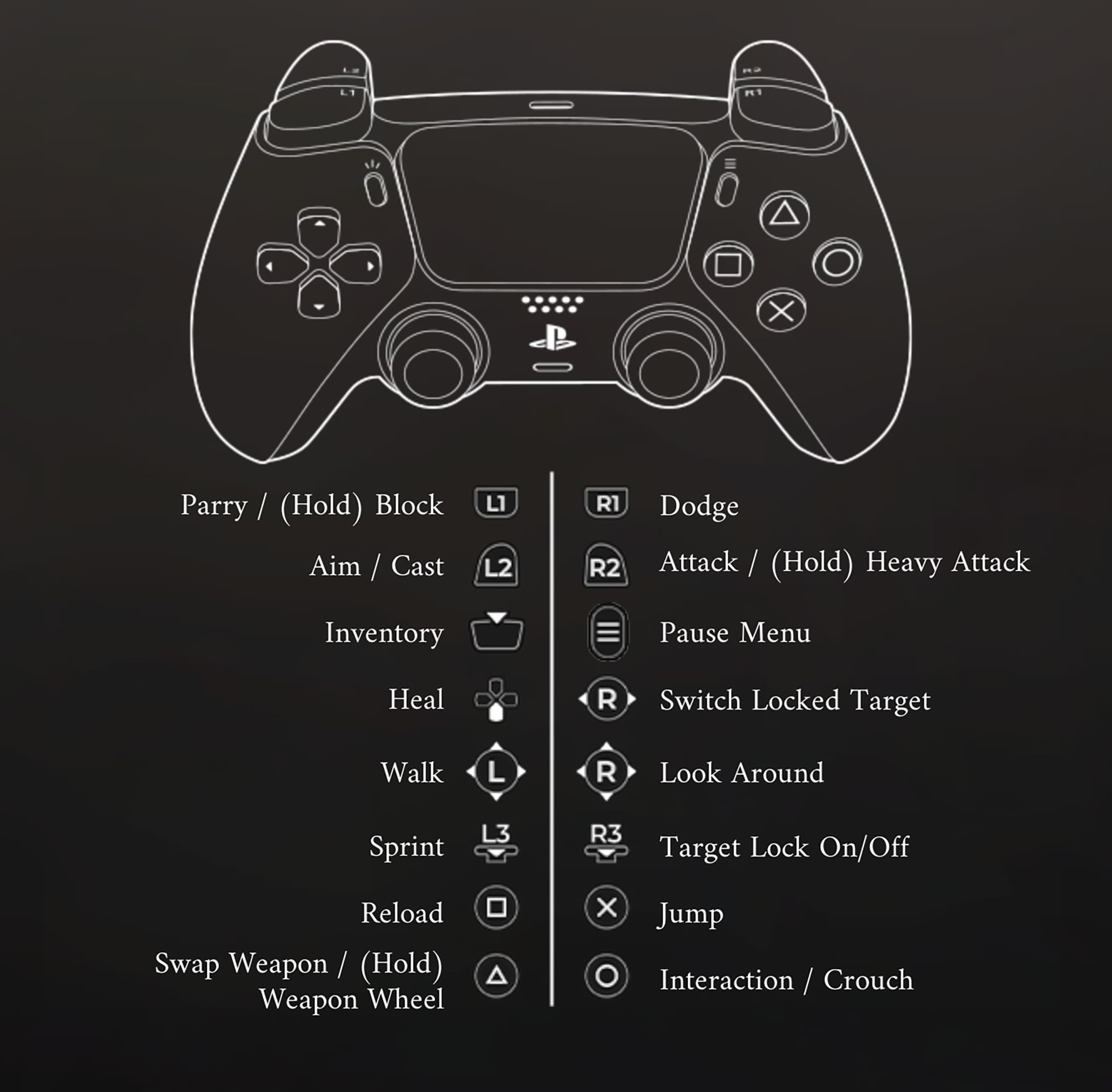
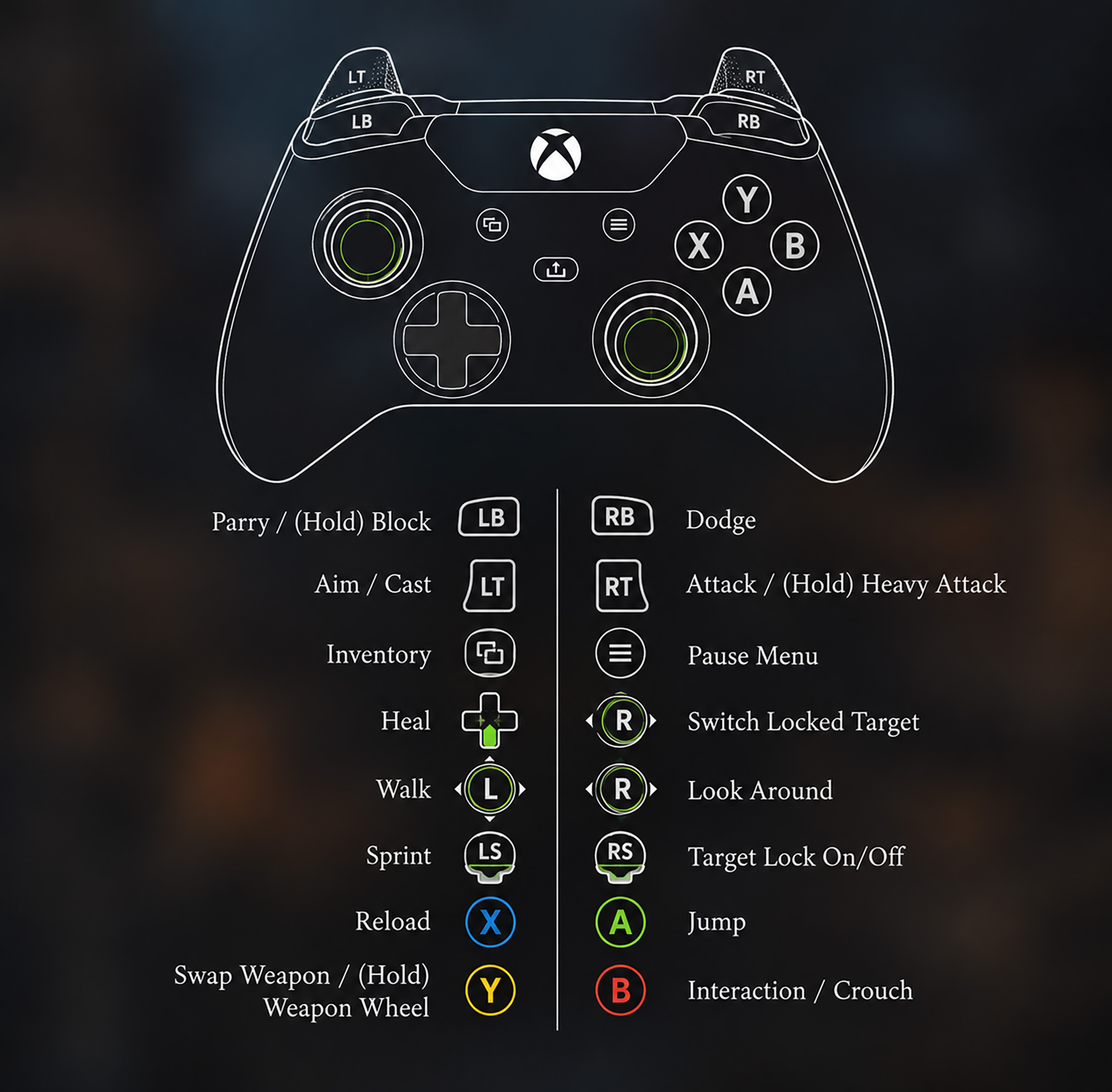
The directional pad also handles healing and other quick actions. The screenshot confirms healing on D Pad Down, while the other directions should be read from the selected control scheme rather than assumed to perform the same action in every situation.
All Valor Mortis Controller Schemes Compared
You can change the control scheme in the controller settings. These presets are not merely cosmetic: they move important defensive and utility actions to different buttons.
| Action | Default | Classic | Dodge/Block Swap | Shoulder Jumper | Shoulder Jumper 2 |
|---|---|---|---|---|---|
| Parry / Block | L1 / LB | L1 / LB | R1 / RB | L1 / LB | L1 / LB |
| Dodge | R1 / RB | Circle / B | L1 / LB | Circle / B | Circle / B |
| Jump | Cross / A | Cross / A | Cross / A | R1 / RB | R1 / RB |
| Reload | Square / X | R1 / RB | Square / X | Square / X | Triangle / Y |
| Heal | D Pad Down | Square / X | D Pad Down | D Pad Down | Square / X |
| Interact / Crouch | Circle / B | Triangle / Y | Circle / B | Cross / A | Cross / A |
| Swap Weapon / Weapon Wheel | Triangle / Y | D Pad Down | Triangle / Y | Triangle / Y | D Pad Down |
All five schemes retain L2 / LT for Aim or Cast, R2 / RT for Attack or Heavy Attack, L3 / LS for Sprint and R3 / RS for Target Lock. The right stick controls the camera and switches between locked targets.
Which Control Scheme Should You Choose?
Default is a sensible starting point if you want separate shoulder buttons for blocking and dodging. Dodge/Block Swap reverses those defensive inputs without changing the face buttons.
Classic puts dodge on Circle / B and reload on R1 / RB. Shoulder Jumper and Shoulder Jumper 2 move jump to R1 / RB, allowing you to jump without taking your thumb off the right stick. The two Shoulder Jumper layouts differ mainly in how reload, healing and weapon selection are arranged.
Try each layout against an early enemy before committing. The best scheme is the one that lets you react to an incoming attack without searching for the right button.
Controller Sensitivity and Deadzone Settings
Valor Mortis includes separate controller sensitivity and aiming sensitivity settings, plus left and right stick deadzones. The screenshots show controller sensitivity at 1.00, aiming sensitivity at 0.30, left stick deadzone at 20% and right stick deadzone at 30%. These are the displayed settings, not values every player must use.
If your camera feels sluggish, experiment with a slightly higher sensitivity. If the character or camera moves without deliberate input, increasing the relevant stick deadzone may help. Excessively high deadzones can make small movements harder to register, so adjust them gradually.
The menu also provides vibration, adaptive triggers and horizontal or vertical axis inversion options. Adaptive triggers are a DualSense feature and may not apply to other controllers.
Does Valor Mortis Support Keyboard and Mouse?
The screenshots provided show the PlayStation controller menu, not the PC keyboard bindings. Because keyboard assignments may differ from controller inputs and can be changed in settings, this guide does not list unverified PC keys. On PC, open the game's controls menu to view the bindings for your current input device.
How Do You Heal in Valor Mortis?
In the Default, Dodge/Block Swap and Shoulder Jumper schemes, press D Pad Down to heal. In Classic and Shoulder Jumper 2, healing moves to Square on PlayStation or X on Xbox. Make sure you have a healing item available before relying on the input during combat.
Comments
No comments yet. Be the first to share your thoughts!