Flying in VORON: Raven's Story is more than simply moving a character through the air. You control a young raven learning to navigate a beautiful world inspired by Norse mythology, where climbing, diving, gliding and maintaining momentum are all part of the experience.
Developed by Merk Games, VORON combines exploration, puzzles and an emotional story about family and guiding lost souls. The flight system is easy to understand at first, but mastering it takes practice.
This VORON: Raven's Story controls guide explains the flight mechanics, controller inputs, camera movement and speed controls. It also covers keyboard support and the most important things to understand before attempting difficult aerial challenges.
VORON: Raven's Story Controls for PC, Xbox and PlayStation Controllers
VORON is available on PC and supports controller gameplay. The Xbox controller instructions below include inputs confirmed by the game's flight tutorial. PlayStation buttons are equivalent controller mappings, not confirmation of a separate PlayStation console release.
| Action | PC Keyboard and Mouse | Xbox Controller | PlayStation Controller |
|---|---|---|---|
| Move and Steer | W, A, S, D | Left Stick | Left Stick |
| Control Camera | Mouse | Right Stick | Right Stick |
| Fly Higher | Move Camera Upward | Move Right Stick Upward | Move Right Stick Upward |
| Fly Faster | Check Flight Controls | Hold LS | Hold L3 |
| Descend | Angle Camera Downward | Move Right Stick Downward | Move Right Stick Downward |
| Flap Wings | Check Flight Controls | Check In Game Controls | Check In Game Controls |
| Fold Wings | Check Flight Controls | Check In Game Controls | Check In Game Controls |
| Interact | Check Interaction Controls | Follow Interaction Prompt | Follow Interaction Prompt |
| Caw | Check Interaction Controls | Follow Interaction Prompt | Follow Interaction Prompt |
| Use Unlocked Abilities | Follow Ability Prompt | Follow Ability Prompt | Follow Ability Prompt |
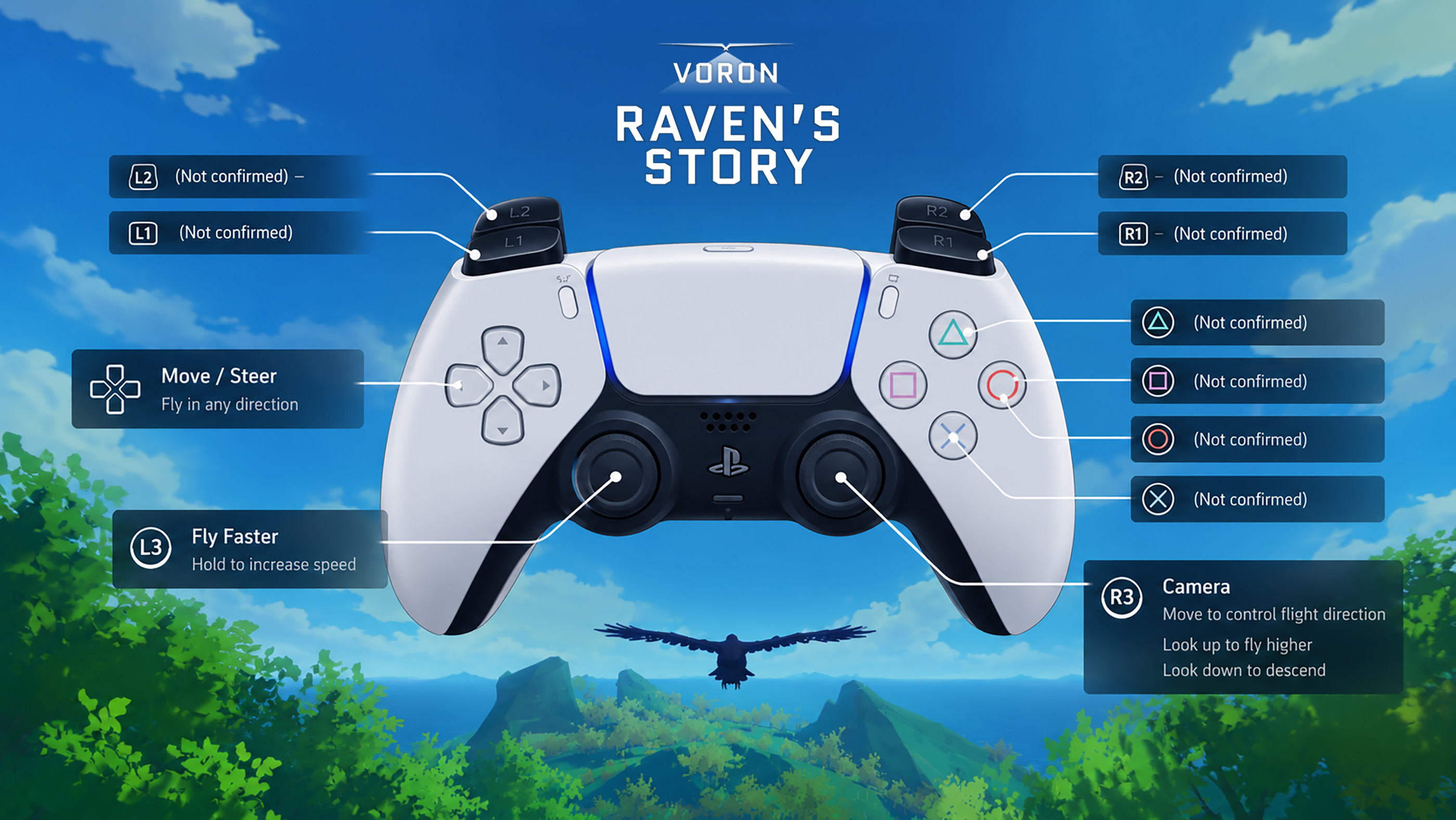
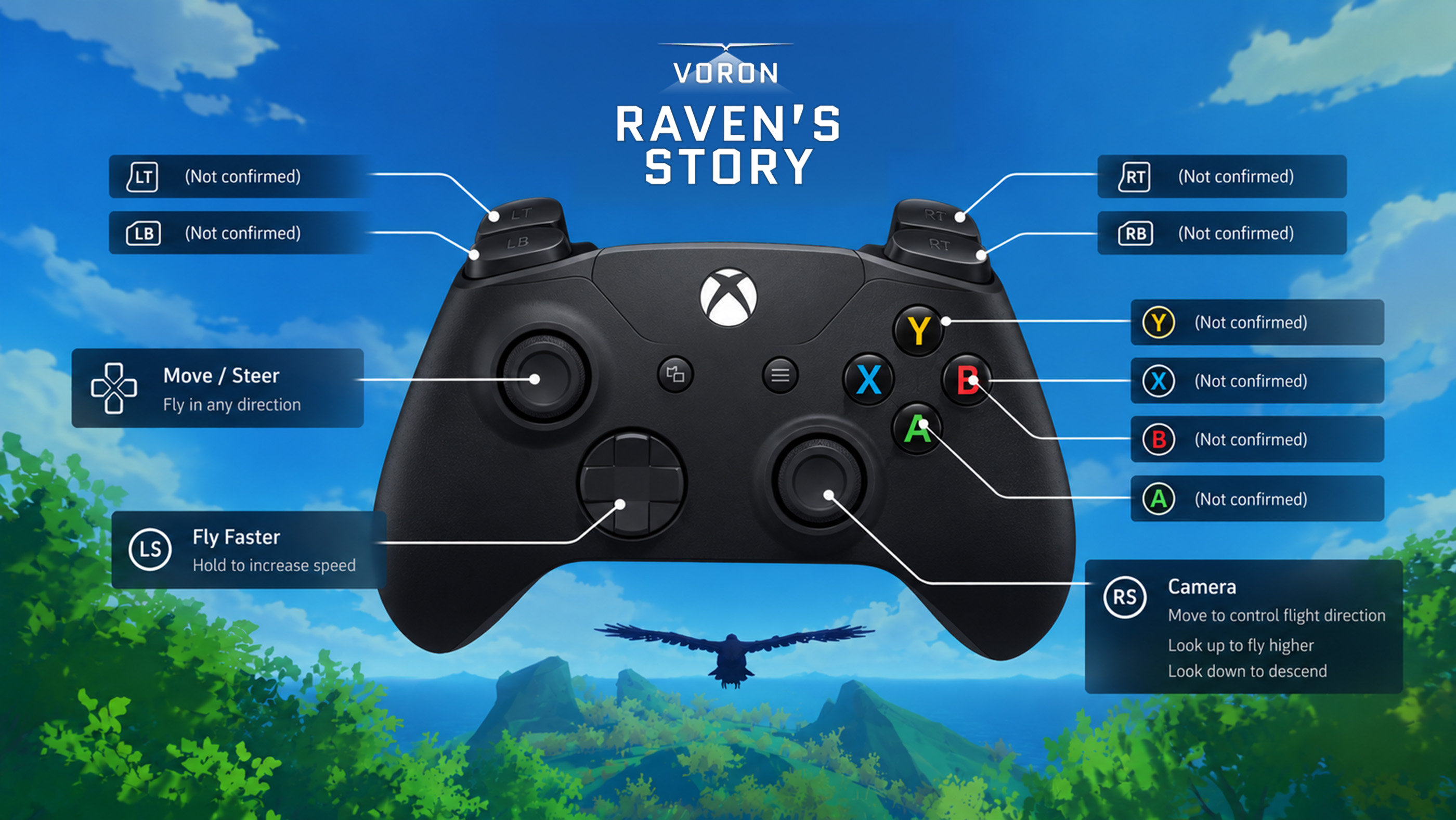
The screenshot confirms that moving the camera upward makes the raven fly higher and holding the left stick button increases flight speed. Other actions, including flapping, folding wings and using abilities, are part of the game but their exact default buttons are not established by the supplied screenshot.
Keyboard and mouse controls are supported on PC. If you use a controller, the game's flight tutorial is the best place to learn the active button assignments.
How to Fly in VORON: Raven's Story
Flight is the central mechanic in VORON. Unlike games where a character simply moves upward when you press a jump button, your raven's movement depends on direction, speed and the position of the camera.
Use the left stick to steer and the right stick to adjust the camera. When you move the camera upward, the raven begins climbing.
The same principle helps you descend. Pointing the camera downward changes the raven's flight direction, allowing you to approach lower areas.
Avoid making large, sudden adjustments when flying near trees or rocks. Small corrections are easier to control.
How to Fly Higher
To gain altitude, move the camera upward while flying.
On an Xbox controller, use the right analog stick to look upward. The raven will respond by climbing.
Climbing is particularly useful when you need to clear tall obstacles or reach an elevated destination.
Remember that gaining height affects your momentum. If your raven begins losing speed, adjust your flight and build momentum before attempting another steep climb.
How to Fly Faster
The flight tutorial explains that holding the left stick button makes the raven fly faster.
On an Xbox controller, press and hold LS while flying. On a PlayStation controller connected to PC, the equivalent input is L3.
Speed also depends on how you manage your wings, flight angle and surrounding conditions.
Flying faster is useful when travelling across open spaces, but excessive speed can make precise turns and landings more difficult.
How to Glide and Maintain Momentum
VORON uses a flight system where flapping, gliding and wing position affect how the raven moves.
You do not need to flap continuously in every situation. Learning when to glide can make longer journeys smoother and help manage stamina.
Pay attention to the raven's speed while climbing and descending.
A controlled descent can help build momentum, while a steep climb can slow you down.
The most comfortable flight pattern often involves alternating between gaining height and using that height to travel forward.
How to Turn Without Losing Control
Sharp turns can be surprisingly difficult when you first begin flying.
Instead of moving both sticks aggressively, make gradual adjustments to your direction.
Give yourself more space when turning around trees, cliffs and other obstacles.
If you need to change direction quickly, try slowing your approach before making the turn.
Learning to anticipate obstacles is more reliable than attempting to correct your flight at the last moment.
How to Land Safely
Landing requires more precision than flying across open terrain.
Approach your destination from a comfortable height and avoid diving directly toward a small landing area.
Reduce your speed as you get closer and use small steering adjustments to line up with the surface.
If you miss the landing, do not worry. VORON does not use a traditional health bar, and collisions are not permanent failures.
You can recover and attempt the landing again.
How to Change Inverted Flight Controls
Some players find flight controls confusing because looking upward and downward can feel different from other games.
If the raven seems to respond in the opposite direction from what you expect, open the settings and check the camera or vertical inversion options.
Try both configurations and keep the one that feels most natural.
A comfortable camera setup makes climbing, diving and landing much easier.
How to Unlock and Use New Abilities
As you progress through VORON: Raven's Story, the raven gains additional abilities.
These include shooting thunder and performing aerial acrobatics.
New abilities become relevant during exploration, puzzles and challenges.
Pay attention to the instructions displayed when an ability is introduced, since the required inputs may differ from basic flight controls.
Does VORON: Raven's Story Support Controllers?
Yes. The PC version supports controller gameplay, including Xbox controllers.
The game is also playable with a keyboard and mouse.
Controller support on Steam is listed as partial, so some interface interactions may still require additional input.
If you prefer analog movement, a controller can make steering and gradual flight adjustments feel more natural.
VORON: Raven's Story Controls FAQ
How do you fly higher in VORON?
Move the camera upward while flying. On an Xbox controller, use the right stick.
How do you fly faster?
Hold the left stick button while flying. On Xbox, this is LS. On a PlayStation controller, the equivalent button is L3.
Can you play VORON with a keyboard?
Yes. The PC version supports keyboard and mouse controls.
Does VORON support Xbox controllers?
Yes. Xbox controllers are supported on PC.
Can you change inverted flight controls?
The game has offered a vertical inversion option. Check the current control settings if the camera movement feels reversed.
What happens if you crash?
Crashing does not cause a traditional game over. The raven can recover and continue exploring.
Are there special flight abilities?
Yes. Progression introduces abilities such as thunder attacks and aerial acrobatics.
Comments
No comments yet. Be the first to share your thoughts!