Creepy Tale: Snow Child takes players into a dark, snowy world where careful exploration, mysterious objects and environmental puzzles are essential to survival. Knowing how to interact with your surroundings is especially important because even a small detail can reveal the solution to a difficult puzzle.
Fortunately, the controls are straightforward. Rather than overwhelming players with complicated combat commands, the game focuses on movement, interaction, inventory management and using abilities at the right moment.
This Creepy Tale: Snow Child controls guide covers the PlayStation button layout shown in the game's settings, the corresponding Xbox controller buttons and what PC players should know about keyboard controls.
Creepy Tale: Snow Child Controls for PC, PlayStation and Xbox
The following table contains the controller assignments displayed in the game's controls menu. Xbox inputs are translated from the PlayStation layout using the equivalent button positions.
The supplied screenshot does not display keyboard bindings, so PC shortcuts are not listed as confirmed defaults.
| Action | PC | PlayStation | Xbox Equivalent |
|---|---|---|---|
| Movement | Keyboard movement controls | Left Stick | Left Stick |
| Action | Keyboard action control | Square | X |
| Skill | Keyboard skill control | Cross | A |
| Use Item | Keyboard item control | Triangle | Y |
| Back | Keyboard back control | Circle | B |
| Inventory | Keyboard inventory control | L2 | LT |
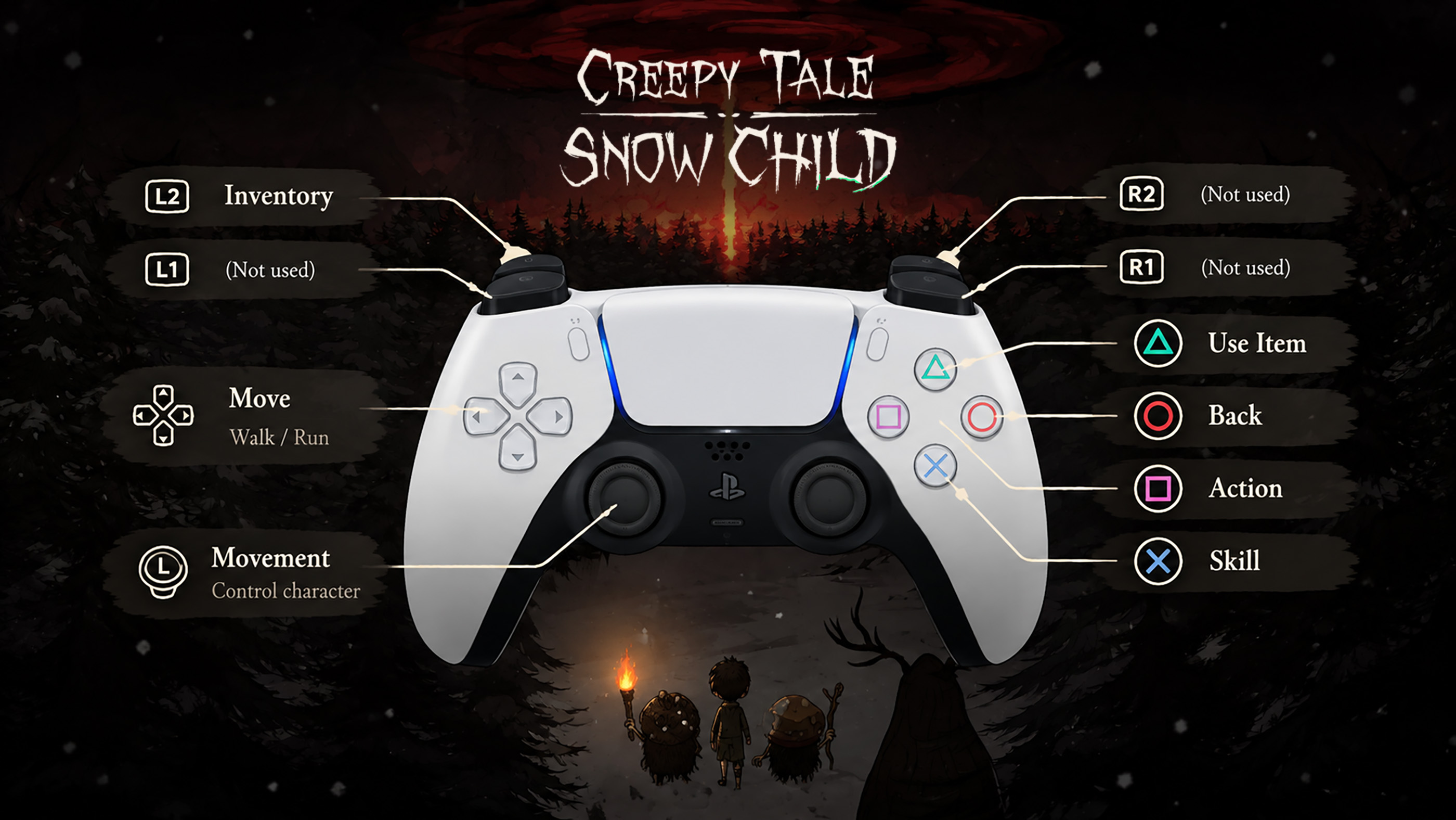
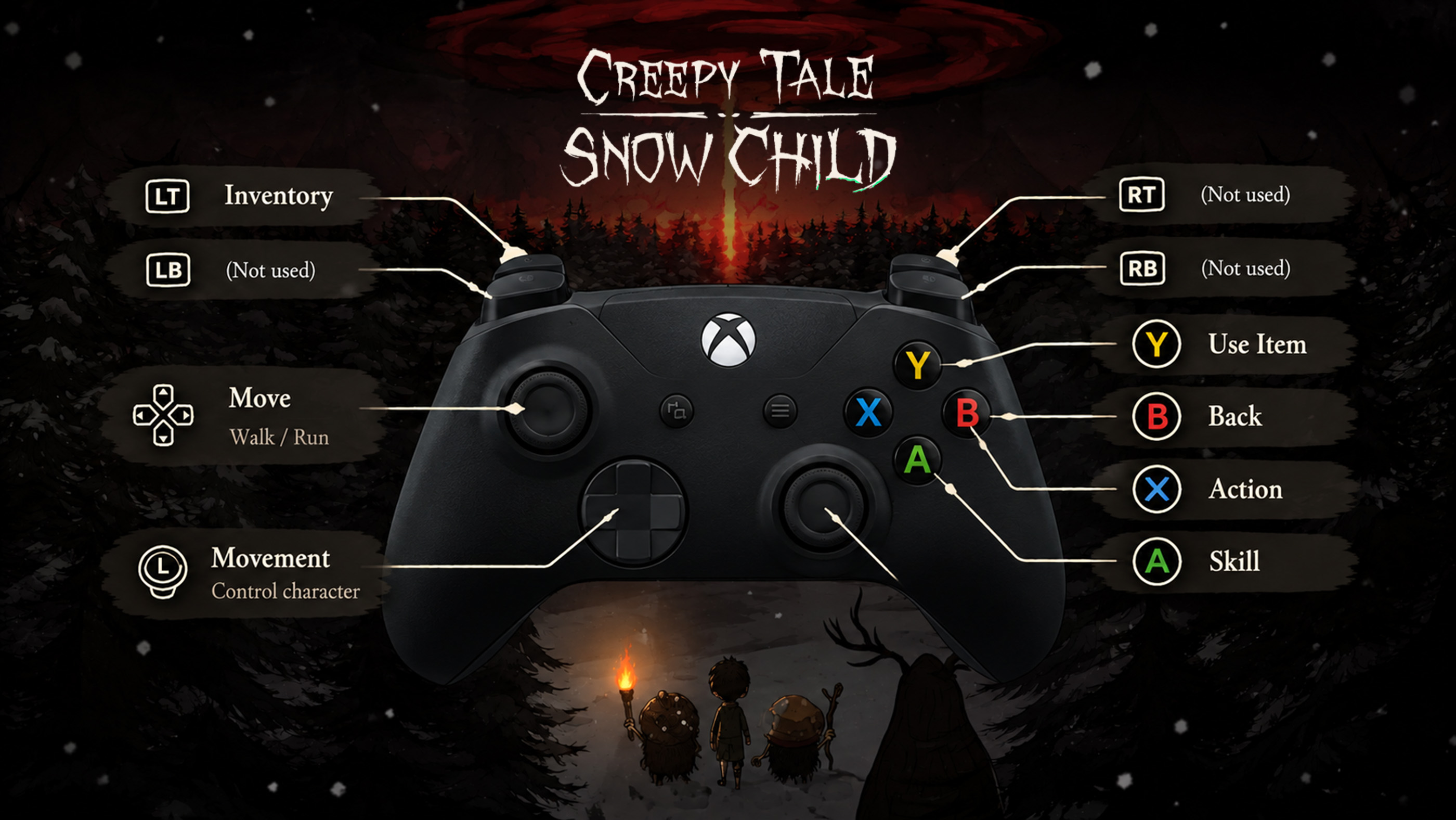
The PlayStation controls are confirmed by the in game screenshot. The Xbox column shows the equivalent controller layout rather than independently verified Xbox settings.
If you are playing on PC, check the game's controls menu for the exact keyboard assignments used by your version.
How to Move Your Character
Movement is controlled with the left analog stick on PlayStation and Xbox controllers.
Use the stick to explore the environment, approach interactive objects and position your character near puzzle elements.
Precise positioning can be important when an object is difficult to interact with. If an action does not work immediately, move slightly closer and try again.
How to Interact With Objects
The Action button is one of the most important controls in Creepy Tale: Snow Child.
On PlayStation, press Square. The equivalent Xbox button is X.
Use Action when investigating objects, operating mechanisms and interacting with elements of the environment.
When exploring a new area, approach anything that looks unusual and test whether it can be interacted with.
Not every object is immediately useful, but remembering its location may help you solve a puzzle later.
How to Open Your Inventory
Your inventory helps you keep track of objects collected during the adventure.
On PlayStation, press L2 to access the inventory. The equivalent Xbox input is LT.
Check your inventory whenever you become stuck. An object collected earlier may be exactly what you need to progress.
The game separates opening the inventory from using an item, so remember that these are different actions.
How to Use Items
Collected objects often play an important role in environmental puzzles.
On PlayStation, press Triangle to use an item. On Xbox, the corresponding button is Y.
If an item does not work, consider whether you are standing in the correct location or whether another step must be completed first.
Try to understand what each object is intended for rather than using everything randomly.
How to Use Skills
Creepy Tale: Snow Child has a separate Skill command.
On PlayStation, press Cross. The equivalent Xbox button is A.
This control is distinct from Action and Use Item, so remember the difference when attempting puzzles.
If a situation appears to require something other than a normal interaction, consider whether the Skill command is relevant.
How to Go Back or Cancel
The Back command lets you leave the current interaction or return from a menu.
On PlayStation, press Circle. On Xbox, use B.
This is particularly useful when examining your inventory or navigating the game's interface.
What Is the Difference Between Action, Skill and Use Item?
These three commands may seem similar at first, but the controls menu lists them separately.
Action is your general interaction command. Use it when approaching objects or mechanisms in the environment.
Use Item is associated with objects you have collected, while Skill activates the character's available ability when appropriate.
Understanding these differences can save time when solving puzzles. If pressing Action does nothing, the situation may require an item or skill instead.
How to Check the Controls in Game
If you forget a button, return to the controls screen from the game's menu.
The controller reference displays the available actions alongside their corresponding PlayStation button symbols.
It is worth reviewing this screen before beginning the adventure, particularly if you are unfamiliar with the Creepy Tale series.
Creepy Tale: Snow Child Controls FAQ
What button opens the inventory?
Press L2 on PlayStation. The equivalent Xbox button is LT.
How do you interact with objects?
Press Square on PlayStation or X on Xbox using the equivalent controller layout.
How do you use an item?
Press Triangle on PlayStation. The corresponding Xbox button is Y.
What button activates a skill?
Press Cross on PlayStation or A on Xbox.
How do you cancel an action?
Press Circle on PlayStation or B on Xbox.
Are Action and Use Item the same command?
No. The game assigns separate buttons to Action and Use Item.
What are the PC keyboard controls?
The provided controls screen shows a PlayStation controller rather than keyboard bindings. PC players should check the keyboard controls in their game settings for the exact assignments.
Comments
No comments yet. Be the first to share your thoughts!