The Sinking City 2 combines survival horror, investigation, and exploration in a flooded city inspired by Lovecraftian horror. Knowing the controls is especially important when you need to escape a dangerous encounter, examine your surroundings, or navigate the streets by boat.
This guide covers The Sinking City 2 controller buttons for PlayStation and their Xbox equivalents, including movement, combat, inventory management, investigation, and boat controls. The PlayStation bindings are taken directly from the game's control settings.
The Sinking City 2 Controls for PlayStation and Xbox
The following table shows the controller layout with the default Run setting selected. Xbox buttons are mapped to their corresponding positions on the PlayStation controller.
| Action | PlayStation | Xbox Controller |
|---|---|---|
| Move Character | Left Stick | Left Stick |
| Steer Boat | Left Stick | Left Stick |
| Move Camera / Look | Right Stick | Right Stick |
| Run | L3 | LS |
| Aim Weapon | L2 | LT |
| Fire Weapon While Aiming | R2 | RT |
| Stomp | R2 | RT |
| Melee Attack | R1 | RB |
| Dodge | Circle | B |
| Reload Weapon | Square | X |
| Interact | Cross | A |
| Open Inventory | Triangle | Y |
| Select Quick Slot | D-Pad | D-Pad |
| Focus Camera (Contextual) | L1 | LB |
| Toggle Flashlight | R3 | RS |
| Investigation | Touch Pad, Left Side | View Button Equivalent |
| Map | Touch Pad, Right Side | View Button Equivalent |
| Pause | Options Button | Menu Button |
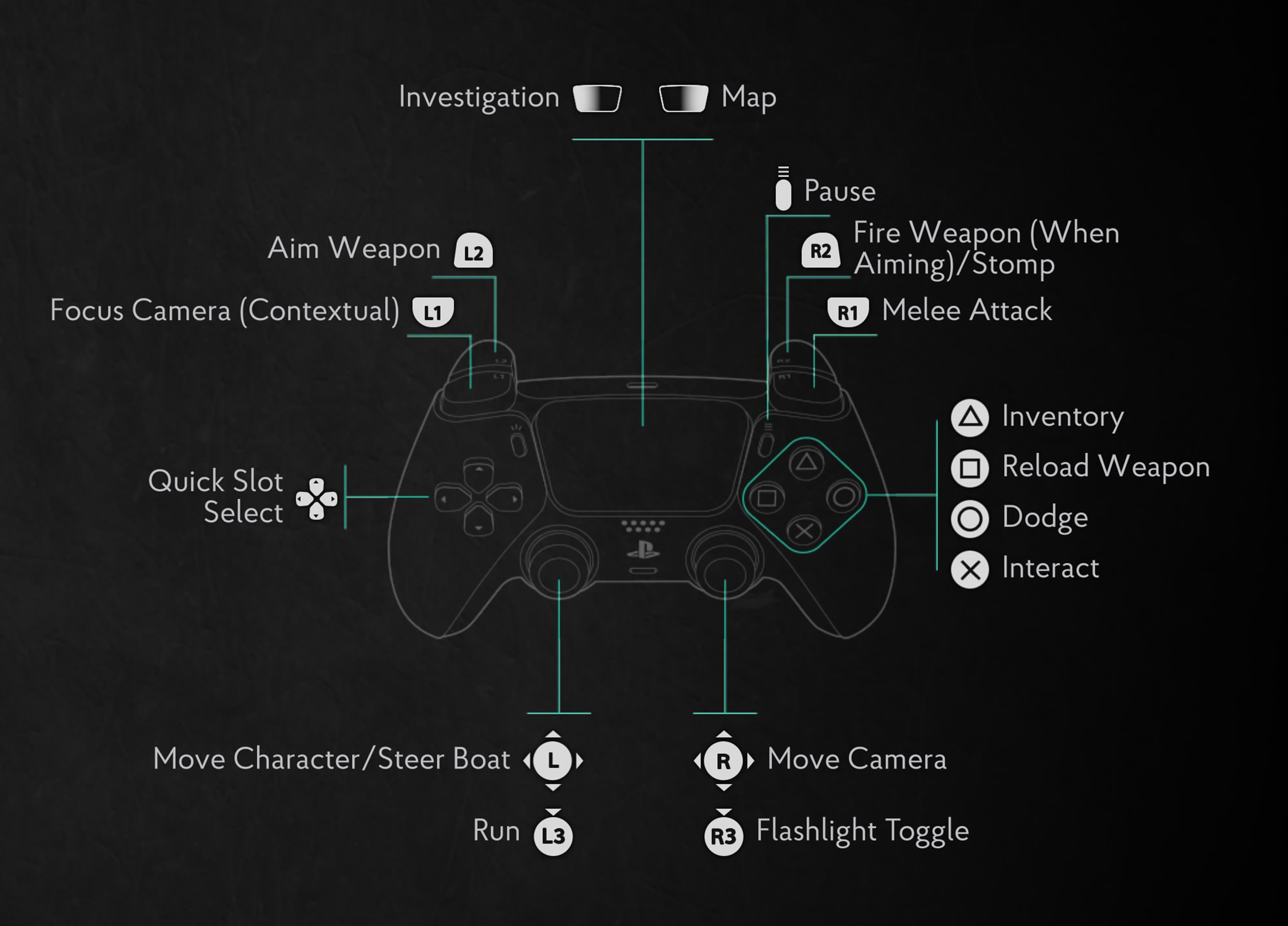
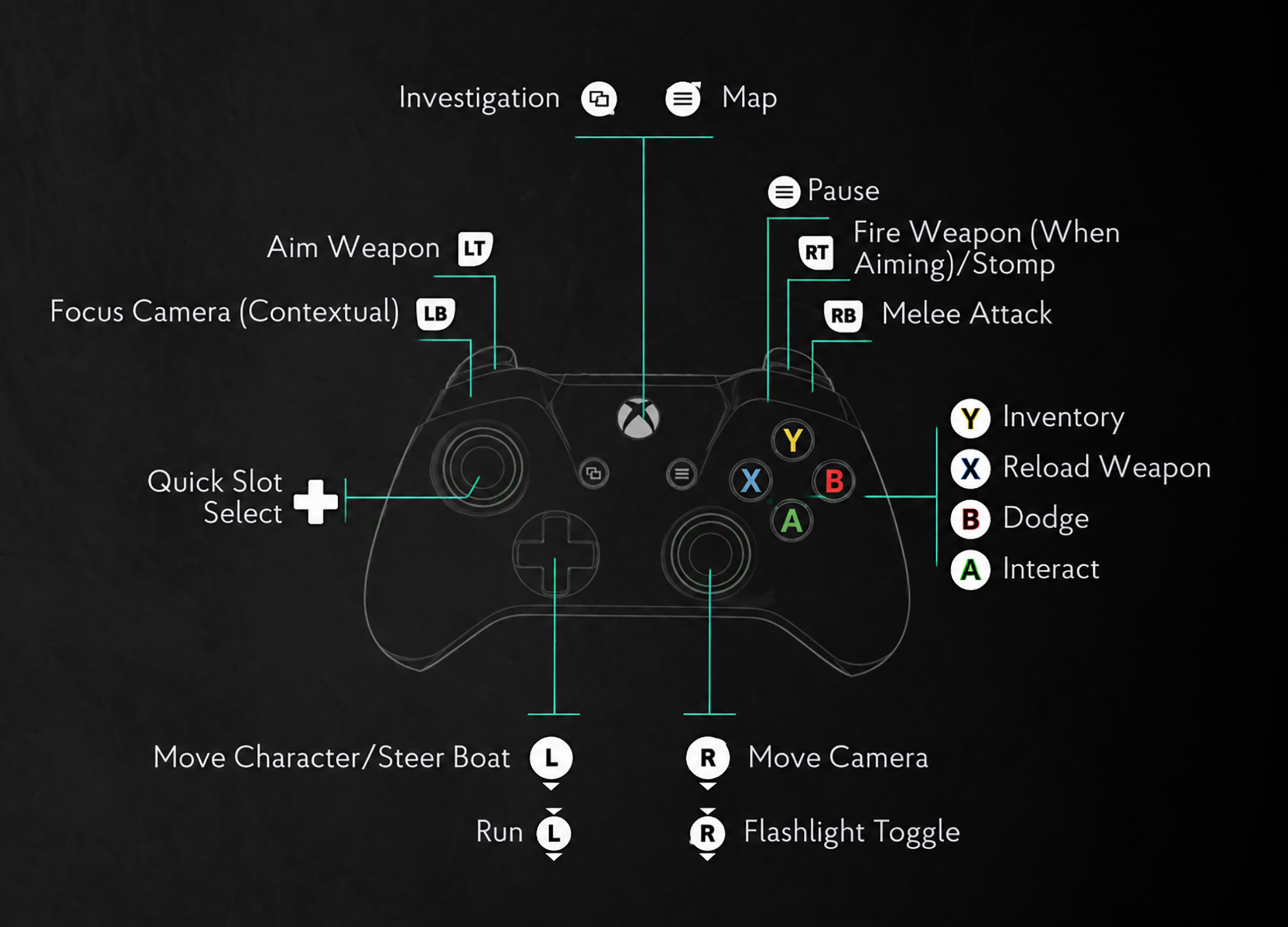
The Xbox column provides the corresponding controller inputs. The exact Xbox mapping for the two PlayStation touch pad actions should be checked in the game's Xbox control settings, since an Xbox controller does not have a split touch pad.
Movement and Exploration Controls
Use the left stick to move your character and the right stick to look around. Press L3 on PlayStation or LS on Xbox to run with the default control configuration.
Running is useful when moving through open areas or escaping danger, but slowing down can make it easier to notice objects, entrances, and details in the environment.
When travelling by boat, the left stick controls steering while the right stick controls the camera. The gameplay interface also displays L2 and R2 as boat movement inputs, so pay attention to the prompts when entering a boat.
Combat Controls and How to Survive
Combat in The Sinking City 2 requires you to switch between firearms, melee attacks, and defensive movement.
Hold L2 or LT to aim your weapon, then use R2 or RT to fire. The same right trigger is also assigned to stomping when the appropriate action is available.
For close encounters, press R1 or RB to perform a melee attack. Use Circle or B to dodge when an enemy gets too close, and reload with Square or X whenever you have a safe opportunity.
How do you dodge in The Sinking City 2?
Press Circle on PlayStation or B on Xbox. Try to dodge when an enemy begins an attack rather than repeatedly pressing the button without watching its movements.
How do you turn on the flashlight?
Press R3 on PlayStation or RS on Xbox by clicking the right analog stick. The flashlight is useful when searching dark interiors and poorly lit areas.
Investigation, Map, and Inventory Controls
The Sinking City 2 is not only about fighting monsters. Exploration and investigation are important parts of the experience.
On PlayStation, the touch pad provides separate Investigation and Map functions. The game also includes a contextual camera focus action assigned to L1.
Press Triangle to open your inventory, and use the directional pad to select quick slots. Learning these controls early makes it easier to manage equipment without getting distracted during dangerous situations.
How do you interact with objects?
Press Cross on PlayStation or A on Xbox when an interaction is available. Look carefully around rooms and investigation areas for objects you can examine.
How do you open the inventory?
Press Triangle on PlayStation or Y on Xbox. The directional pad is used for quick slot selection.
Can You Change the Controls in The Sinking City 2?
Yes. The game's Controls menu includes several controller configuration options.
You can change the Run setting, swap the touch pad button actions, and swap the analog sticks.
The screenshot shows Run set to L1 by default in the configuration selector, while the controller diagram identifies L3 as the run input. If your running controls behave differently from the table, check the Run option in your current settings.
Swapping sticks changes which analog stick handles movement and camera control. The touch pad option changes the arrangement of its assigned actions.
The Sinking City 2 Controls FAQ
What button is melee attack in The Sinking City 2?
Melee attack is R1 on PlayStation and the corresponding RB button on Xbox.
How do you reload a weapon?
Press Square on PlayStation or X on Xbox.
How do you open the map?
The PlayStation control diagram assigns the map to one side of the touch pad. Xbox players should check their in-game controller layout for the corresponding map input.
Can you change the analog sticks?
Yes. The Controls menu includes a Swap Sticks option.
Does The Sinking City 2 have separate boat controls?
Yes. The game uses the left stick for steering and displays additional boat movement inputs during gameplay.
Comments
No comments yet. Be the first to share your thoughts!