Chained Echoes keeps its exploration controls simple, but several buttons gain extra functions once battles, the Reward Board, Sky Armor and the airship become available. That is where the layout can become easy to forget, especially if you return to the game after a break.
The PlayStation controls below match the in game help screen and current console version. Xbox and Nintendo Switch use the same functions with their equivalent buttons, while PC supports keyboard remapping from the options menu.
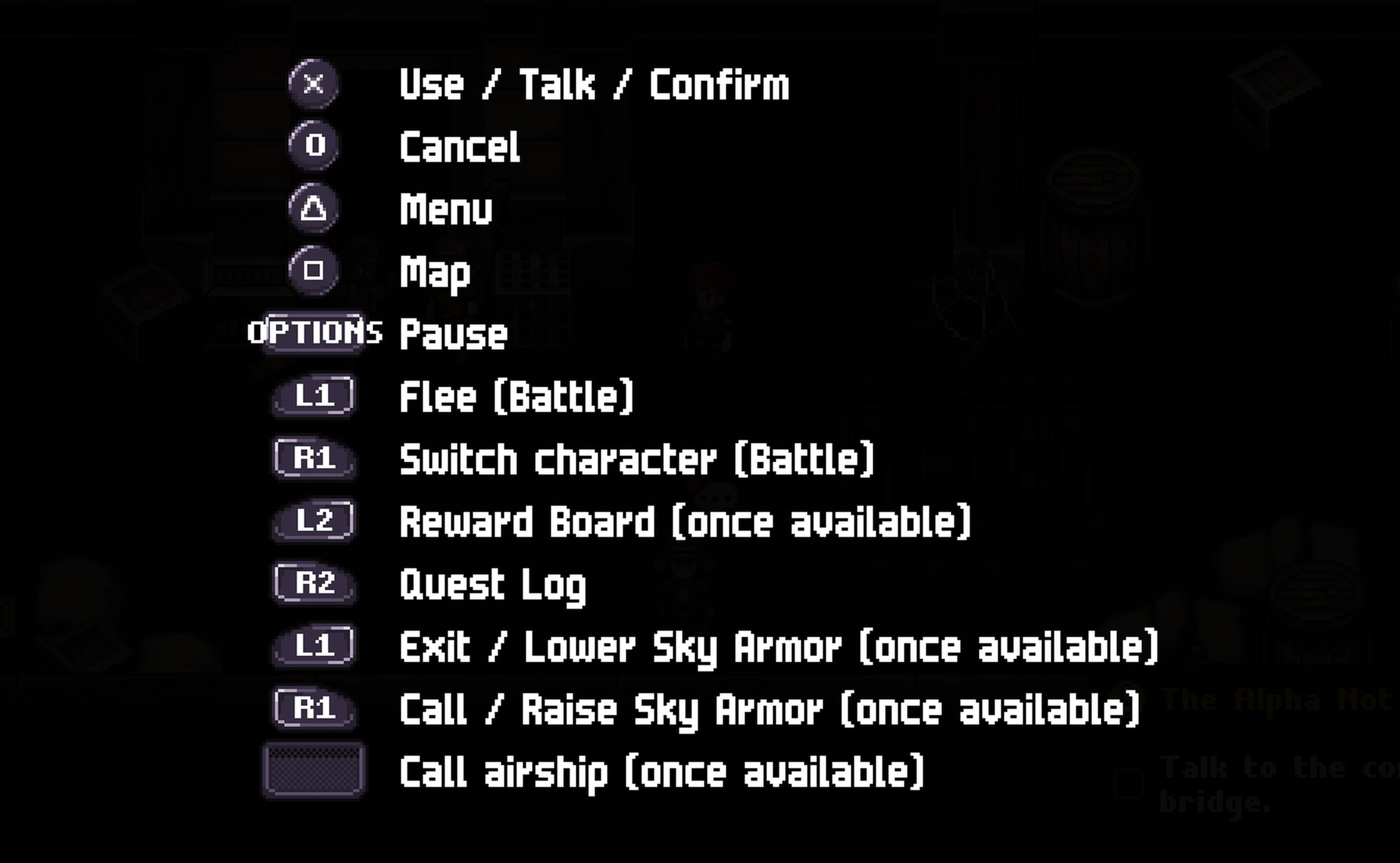
Chained Echoes PlayStation Controls
| Action | PlayStation Control |
|---|---|
| Move Character | Left Stick or D Pad |
| Menu Navigation | Left Stick or D Pad |
| Move Camera in supported areas | Right Stick |
| Use / Talk / Confirm | Cross |
| Cancel | Circle |
| Open Menu | Triangle |
| Open Map | Square |
| Pause | Options |
| Flee during battle | L1 |
| Switch Character during battle | R1 |
| Open Reward Board | L2 |
| Open Quest Log | R2 |
| Exit / Lower Sky Armor | L1 |
| Call / Raise Sky Armor | R1 |
| Call Airship | Touch Pad |
Several of these shortcuts only become active after the relevant feature has been unlocked. For example, L2 does not open the Reward Board until that system is available, and the Sky Armor commands appear later in the story.
Chained Echoes Xbox Controls
| Action | Xbox Control |
|---|---|
| Move Character | Left Stick or D Pad |
| Menu Navigation | Left Stick or D Pad |
| Move Camera in supported areas | Right Stick |
| Use / Talk / Confirm | A |
| Cancel | B |
| Open Menu | Y |
| Open Map | X |
| Pause | Menu Button |
| Flee during battle | LB |
| Switch Character during battle | RB |
| Open Reward Board | LT |
| Open Quest Log | RT |
| Exit / Lower Sky Armor | LB |
| Call / Raise Sky Armor | RB |
Chained Echoes Nintendo Switch Controls
| Action | Nintendo Switch Control |
|---|---|
| Move Character | Left Stick or Directional Buttons |
| Menu Navigation | Left Stick or Directional Buttons |
| Use / Talk / Confirm | A |
| Cancel | B |
| Open Menu | X |
| Open Map | Y |
| Pause | Plus |
| Flee during battle | L |
| Switch Character during battle | R |
| Open Reward Board | ZL |
| Open Quest Log | ZR |
| Exit / Lower Sky Armor | L |
| Call / Raise Sky Armor | R |
| Call Airship / Skip supported scenes | Minus |
Chained Echoes PC Controls
| Action | Default PC Control |
|---|---|
| Move | W A S D |
| Use / Talk / Confirm | Space |
| Open Menu | I |
| Open Reward Board | L |
| Switch Character during battle | E |
| Pause and show current bindings | P |
PC players can change the keyboard bindings in the options menu. If you cannot remember a key, open the pause screen because the game displays the currently mapped actions there.
Chained Echoes does not use the mouse as its main movement method. Keyboard play is built around directional keys and button style inputs, so a controller can feel more natural if you prefer traditional JRPG controls.
How to Switch Characters in Battle
Press R1 on PlayStation, RB on Xbox or R on Nintendo Switch during the active character's turn.
The game then shows the character linked to that party slot. Confirm the switch to bring the reserve character into battle.
Party members can only switch with the character paired to them in the formation screen. The chain between two portraits shows which characters are linked.
Switching is also useful for Overdrive
Changing characters is not only about getting a different skill set. Switching moves the Overdrive cursor backward, which can help prevent the party from entering Overheat.
How to Flee from Battle
Press L1 on PlayStation, LB on Xbox or L on Nintendo Switch while in battle.
Escaping resets the encounter. Enemies return to full health and rewards from partially defeated enemies in that fight are lost.
Some important battles cannot be escaped.
How to Open the Reward Board Quickly
Once the Reward Board has been unlocked, press L2 on PlayStation, LT on Xbox or ZL on Nintendo Switch while exploring.
On PC, the default shortcut is L.
This is one of the most useful shortcuts in Chained Echoes because Reward Board objectives are a major source of money, items, Sacred Water and Grimoire Shards.
How to Open the Quest Log
Press R2 on PlayStation, RT on Xbox or ZR on Nintendo Switch.
The Quest Log is useful when you return to the game after a break because it shows your current story and side quest objectives without requiring you to dig through several menu pages.
How Sky Armor Controls Work
After Sky Armor becomes available, the shoulder buttons gain another function while exploring compatible areas.
| Action | PlayStation | Xbox | Switch |
|---|---|---|---|
| Call / Raise Sky Armor | R1 | RB | R |
| Exit / Lower Sky Armor | L1 | LB | L |
Sky Armor can cross terrain your party cannot handle on foot, but certain locations restrict where it can be summoned or landed.
How to Call the Airship
On PlayStation, press the Touch Pad once the airship has been unlocked.
Calling the airship lets you travel across the world much more quickly and becomes particularly valuable when returning to older regions for side quests, clan recruits and Reward Board objectives.
Battle Controls Are Mostly Menu Based
Chained Echoes uses turn based combat, so attacks and skills do not have dedicated action buttons. During a character's turn, choose Attack, Skills, Items, Defend or another available command from the battle menu and confirm your selection.
The controls may be simple, but your choice of command has a major effect on the Overdrive gauge.
How the Overdrive Gauge Changes Your Controls
Almost every combat action moves the Overdrive cursor. Attacking and using many skills push it forward, while Defend, switching characters and certain matching skill types move it backward.
The goal is to keep the cursor inside the green Overdrive section without letting it reach the red Overheat area.
Use the highlighted skill type
When a skill type icon appears beside the Overdrive gauge, using a skill of that type moves the cursor backward significantly.
This is often better than wasting a turn purely defending because you can control Overdrive while still healing, attacking or applying a useful buff.
Can You Change the Controls?
PC keyboard bindings can be changed through the input settings. Console versions use their standard controller layouts, and the pause screen is the quickest place to check the active controls if you forget a contextual shortcut.
Chained Echoes Controls FAQ
What button opens the map on PlayStation?
Press Square.
What button opens the menu?
Press Triangle on PlayStation, Y on Xbox or X on Nintendo Switch.
How do I switch party members during combat?
Press R1 on PlayStation, RB on Xbox or R on Nintendo Switch during the active character's turn.
How do I open the Reward Board?
Press L2 on PlayStation, LT on Xbox or ZL on Nintendo Switch after the Reward Board has been unlocked.
How do I open the Quest Log?
Press R2 on PlayStation, RT on Xbox or ZR on Nintendo Switch.
How do I flee from combat?
Press L1 on PlayStation, LB on Xbox or L on Switch. Some story battles do not allow escape.
Why does R1 do different things?
Its function depends on context. R1 switches paired party members during battle and later calls or raises Sky Armor while exploring.
Does Chained Echoes support controller play on PC?
Yes. Controller support is available, including PlayStation controllers. If Steam shows Xbox prompts with a PlayStation controller, changing the Steam Input setting can affect which button prompts are displayed.
The Shortcuts Worth Remembering
If you only memorize a few extra buttons, make them L2 for the Reward Board, R2 for the Quest Log, R1 for party switching and L1 for fleeing. Those four shortcuts save a lot of unnecessary menu navigation and become increasingly useful as Valandis opens up.
Comments
No comments yet. Be the first to share your thoughts!