The Zone is dangerous enough without pressing the wrong button when a mutant charges at you. This S.T.A.L.K.E.R. 2: Heart of Chornobyl controls guide covers movement, combat, inventory management, weapon handling, and exploration on PC, PlayStation, and Xbox.
The controller layout follows the game's control settings. Several buttons perform different actions depending on the situation, so pay particular attention to the controls for reloading, weapon selection, and using the anomaly detector.
STALKER 2 Controls for PC, PlayStation, and Xbox
These are the main controls you'll use while exploring the Zone. Keyboard bindings reflect the standard PC layout, while controller buttons follow the layout shown in the game.
| Action | PC | PlayStation | Xbox |
|---|---|---|---|
| Move | W, A, S, D | Left Stick | Left Stick |
| Look / Camera | Mouse | Right Stick | Right Stick |
| Jump / Vault | Space | Cross (X) | A |
| Crouch | Ctrl | Circle | B |
| Run / Sprint | Shift | L3 | Left Stick Click |
| Aim | Right Mouse Button | L2 | LT |
| Fire Weapon | Left Mouse Button | R2 | RT |
| Reload Weapon | R | Square | X |
| Interact | F | Square | X |
| Melee Attack | V | R3 | Right Stick Click |
| Flashlight | L | R1 | RB |
| Lean Left | Z | L1 | LB |
| Lean Right | C | R1 | RB |
| Weapon Radial Menu | Tab | L1 | LB |
| Inventory | I | D-Pad Down | D-Pad Down |
| Quick Slot Items | Quick Slot Keys | D-Pad Left / Right | D-Pad Left / Right |
| Swap Weapon / Hide Weapon | Weapon Selection Keys | Triangle | Y |
| Open PDA / Map | M | Touchpad | View Button |
| Pause / Main Menu | Esc | Options | Menu Button |
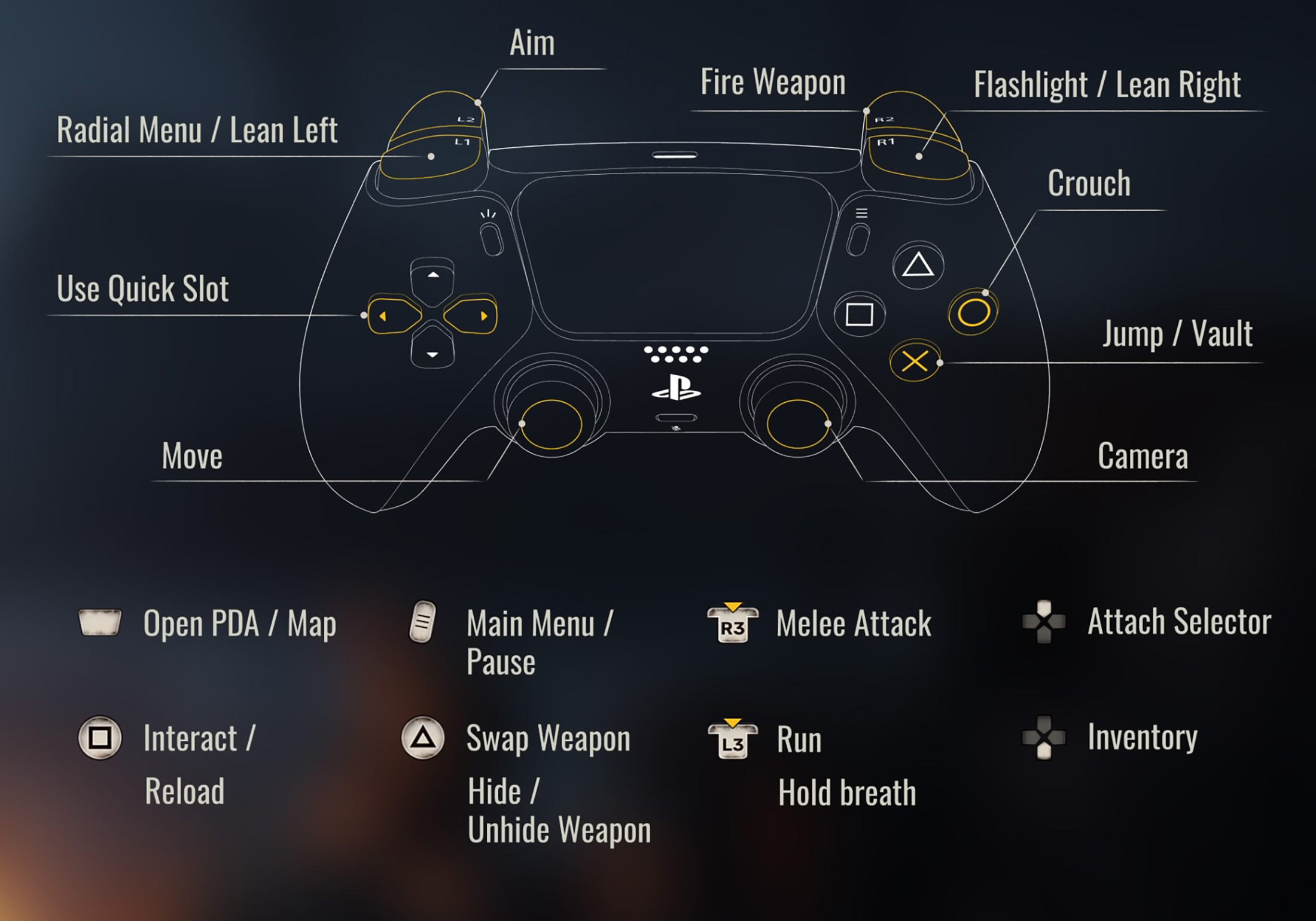
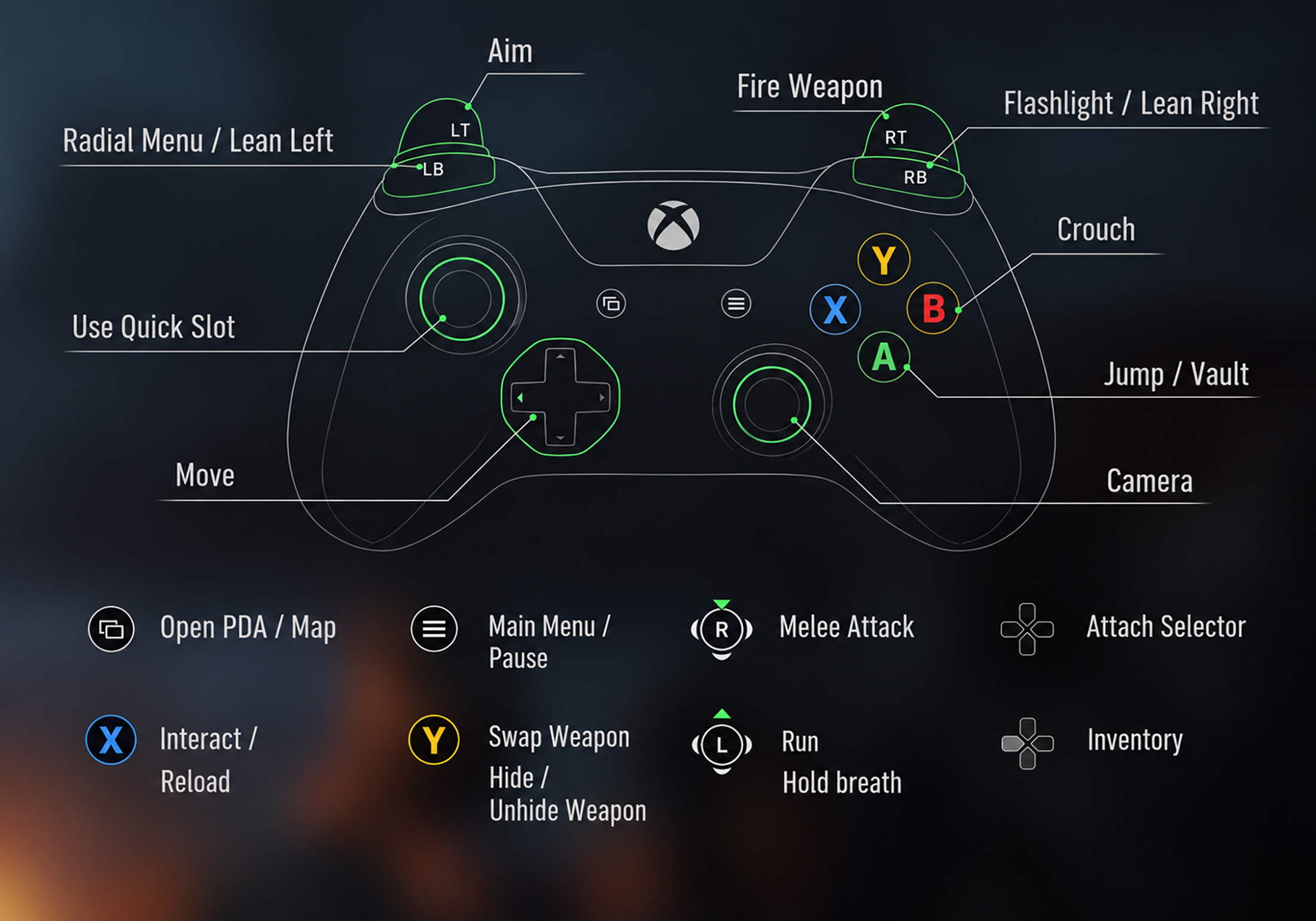
Some controls have additional functions. For example, R1 or RB operates the flashlight during normal exploration but also serves as the right lean button in the appropriate situation. Similarly, Square or X handles both interaction and reloading.
How to Use Weapons and Combat Controls
Combat in STALKER 2 rewards preparation more than reckless shooting. Use L2 or LT to aim and R2 or RT to fire. On PC, aim with the right mouse button and shoot with the left mouse button.
Reload before entering a dangerous area whenever possible. If an enemy gets too close, use the melee attack to create an opening rather than attempting to reload while exposed.
How do you switch weapons in STALKER 2?
On a controller, use Triangle on PlayStation or Y on Xbox for weapon swapping and hiding your weapon. Hold the radial menu button, L1 on PlayStation or LB on Xbox, to access your equipment selection. PC players can use their assigned weapon selection keys or the radial menu.
How do you lean around corners?
Leaning helps you check dangerous angles while reducing how much of your character is exposed. On a controller, use L1 or LB to lean left and R1 or RB to lean right in the appropriate aiming context. On PC, the standard lean keys are Z and C.
Inventory, Quick Slots, and Equipment
Managing your equipment is a major part of surviving the Zone. Keep healing items, ammunition, and essential supplies accessible before entering buildings or approaching hostile locations.
On PlayStation and Xbox, the D-pad provides access to quick slot items and inventory functions. The control screen identifies the D-pad as the shortcut area for both quick slots and inventory, so check the prompts when assigning or using consumables.
How do you turn on the flashlight?
Press R1 on PlayStation or RB on Xbox while exploring. On PC, the standard flashlight key is L. A flashlight is useful inside dark buildings, but remember that visibility works both ways when enemies are nearby.
Can you change the controller settings?
Yes. Open Options and select Controls to adjust controller sensitivity, aiming sensitivity, vibration, and camera inversion. The game also provides motion sensor assistance settings on supported controllers.
Recommended Controller Settings
There is no single sensitivity setting that suits every player. Start with a comfortable camera speed, then lower aiming sensitivity if you struggle to keep your sights on distant targets. If turning feels sluggish while exploring, increase general controller sensitivity without necessarily changing your aim sensitivity.
The Controls menu also includes aiming acceleration and motion sensor options. Test changes in a safe area before heading into a firefight, and adjust one setting at a time so you can tell what actually improves your aim.
Frequently Asked Questions
What button is sprint in STALKER 2?
Press the left stick, L3, on PlayStation or Xbox. On PC, use Shift while moving.
What button is crouch in STALKER 2?
Press Circle on PlayStation, B on Xbox, or Ctrl on PC.
How do you reload on a controller?
Press Square on PlayStation or X on Xbox. These buttons also handle interactions when you are near an object or another usable element.
How do you open the map?
Use the touchpad on PlayStation or the View button on Xbox. On PC, press M.
Comments
No comments yet. Be the first to share your thoughts!