Snow Bros. Wonderland keeps the classic idea of freezing enemies and kicking snowballs, but the move to a 3D battlefield gives movement, evasion and positioning much more importance. The PlayStation version includes two controller presets, Type A and Type B, so you can choose the layout that feels more natural.
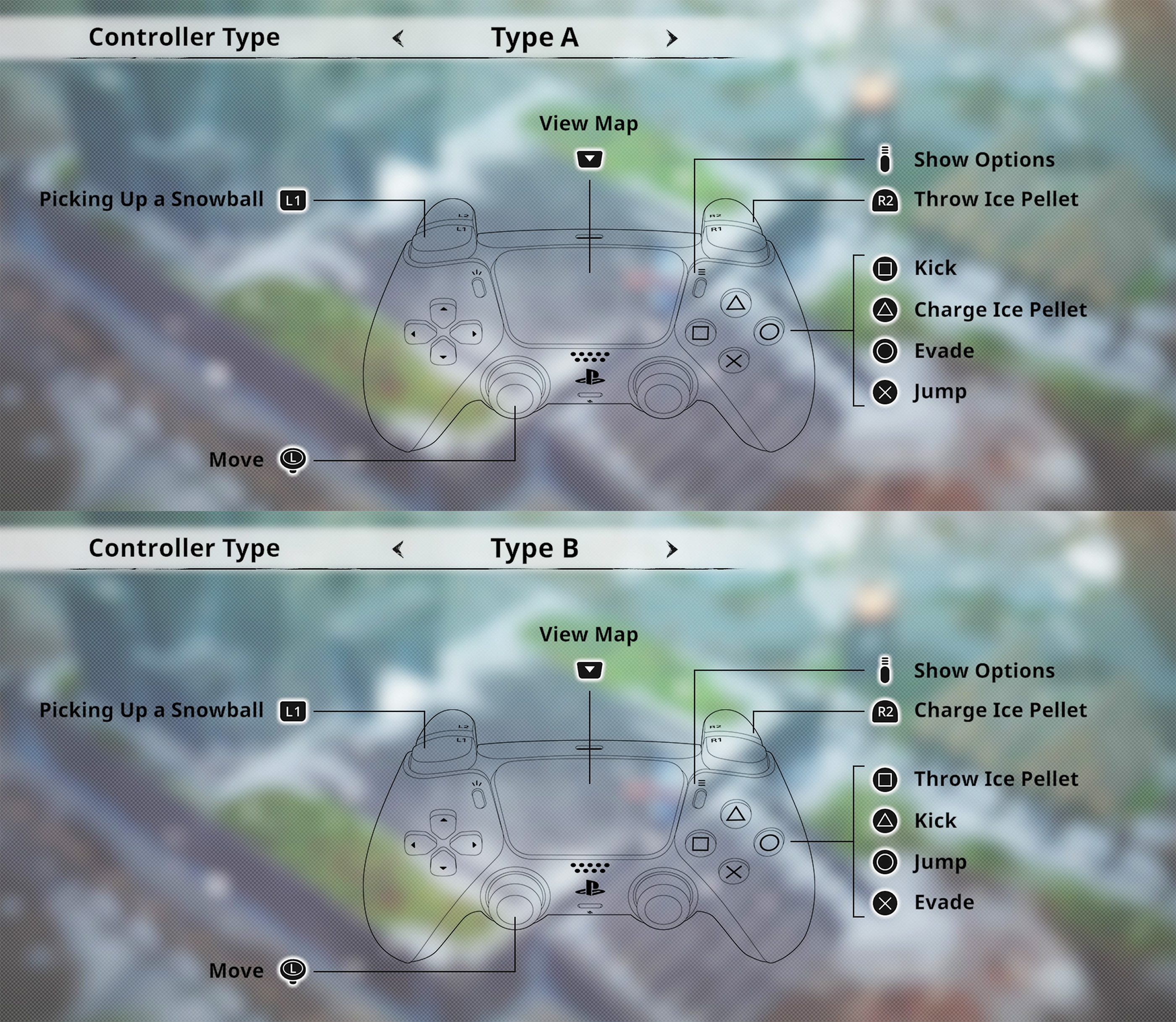
The controls below are based directly on the in game PlayStation controller screen. Type A is the default style shown first, while Type B rearranges the main action buttons and changes how the ice pellet attack works.
Snow Bros. Wonderland Type A Controls
| Action | PlayStation Control |
|---|---|
| Move | Left Stick |
| View Map | Touch Pad |
| Show Options | Options Button |
| Pick Up a Snowball | L1 |
| Throw Ice Pellet | R2 |
| Kick | Square |
| Charge Ice Pellet | Triangle |
| Evade | Circle |
| Jump | Cross |
Snow Bros. Wonderland Type B Controls
Type B keeps movement, map access and snowball pickup in the same places but rearranges the combat buttons. It can feel more familiar if you prefer jump and evade on different face buttons or want charged ice pellets on a trigger.
| Action | PlayStation Control |
|---|---|
| Move | Left Stick |
| View Map | Touch Pad |
| Show Options | Options Button |
| Pick Up a Snowball | L1 |
| Charge Ice Pellet | R2 |
| Throw Ice Pellet | Square |
| Kick | Triangle |
| Jump | Circle |
| Evade | Cross |
Which Controller Type Should You Use?
Type A is a good starting point if you want R2 to act as your regular ice pellet attack. Square handles kicking, Triangle charges an ice pellet, Circle evades and Cross jumps.
Type B changes the rhythm. R2 becomes Charge Ice Pellet, Square becomes Throw Ice Pellet, Triangle handles Kick, Circle handles Jump and Cross handles Evade.
Neither preset changes what your character can do. The difference is purely where the important actions sit on the controller, so try both before settling on one.
How to Throw Ice Pellets
Ice pellets are the foundation of combat. In Type A, press R2 to throw an ice pellet. In Type B, press Square.
Repeated hits build snow around enemies. Once an enemy has been turned into a snowball, the fight changes from simply attacking that enemy to using the snowball itself as a weapon.
How to Charge an Ice Pellet
Type A places Charge Ice Pellet on Triangle. Type B moves it to R2.
Charged attacks are useful when you have enough room to prepare them. Avoid standing still in the middle of a crowded group just to force a charge. Create space first, then use the stronger attack when the opening appears.
How to Kick Snowballs
Once an enemy has been fully covered in snow, you can send the resulting snowball rolling through the stage.
Use Square to Kick with Type A or Triangle with Type B.
The direction matters. A well placed snowball can travel through several enemies rather than hitting only the target directly in front of you. Try to line up groups before kicking whenever the battlefield gives you enough room.
How to Pick Up a Snowball
L1 is used for Picking Up a Snowball in both Type A and Type B.
This makes L1 one of the easiest inputs to remember because it remains unchanged between the two presets. Picking up and repositioning snowballs can help you create much stronger attacks than immediately kicking every snowball where it was created.
How to Evade
Evade is Circle on Type A and Cross on Type B.
Evasion becomes increasingly important when several enemies attack from different directions. Use it to escape through openings rather than repeatedly dodging without a destination.
How to Jump
Jump is Cross on Type A and Circle on Type B.
Jumping is useful for navigating the 3D environments and avoiding certain hazards. It is worth remembering which preset you selected because Jump and Evade swap positions between Type A and Type B.
How to Open the Map
Press the Touch Pad to View Map.
The map input remains the same on both controller presets, so you do not need to relearn it when switching between Type A and Type B.
How to Open Options
Press the Options button to open the options screen.
You can return to the Controls section whenever you want to review the layout or switch between the available controller types.
Type A and Type B Differences at a Glance
| Action | Type A | Type B |
|---|---|---|
| Throw Ice Pellet | R2 | Square |
| Charge Ice Pellet | Triangle | R2 |
| Kick | Square | Triangle |
| Evade | Circle | Cross |
| Jump | Cross | Circle |
| Pick Up Snowball | L1 | L1 |
Frequently Asked Questions
What is the default Snow Bros. Wonderland control type?
The control screen presents Type A as the first layout. Type B is available as an alternative preset.
How do you shoot ice pellets?
Use R2 with Type A or Square with Type B.
How do you charge an ice pellet?
Use Triangle with Type A or R2 with Type B.
How do you kick a snowball?
Press Square with Type A or Triangle with Type B.
How do you pick up a snowball?
Press L1 with either controller preset.
How do you dodge in Snow Bros. Wonderland?
Evade is Circle on Type A and Cross on Type B.
How do you jump?
Jump is Cross on Type A and Circle on Type B.
How do you open the map?
Press the Touch Pad.
Can you change the controller layout?
Yes. The Controls menu provides Type A and Type B controller presets.
Get Comfortable with Snowball Positioning
The individual buttons are easy to learn. The real skill comes from understanding when to freeze an enemy, when to pick up the resulting snowball and when to kick it through a group.
Try both controller presets, choose the one that lets you jump and evade instinctively, then concentrate on creating good snowball angles instead of simply attacking whatever happens to be closest.
See our Snow Bros. Wonderland Tips and Tricks Guide for combat advice, snowball chains, bosses and practical beginner strategies.
Comments
No comments yet. Be the first to share your thoughts!