Silent Hill 2's 2024 remake replaces the original game's distant camera angles with a modern over-the-shoulder view, and that change makes the controls considerably more hands-on. James can sprint, dodge, quick-turn, aim firearms, attack with melee weapons, reload manually, heal from dedicated shortcuts and switch directly between his main firearms.
The layout is intentionally compact. L1 or LB handles sprinting, L2 or LT aims ranged weapons, R2 or RT attacks, Circle or B dodges and Cross or A handles most contextual movement and interactions. Several buttons also change function during investigation sequences, rowing and other contextual moments.
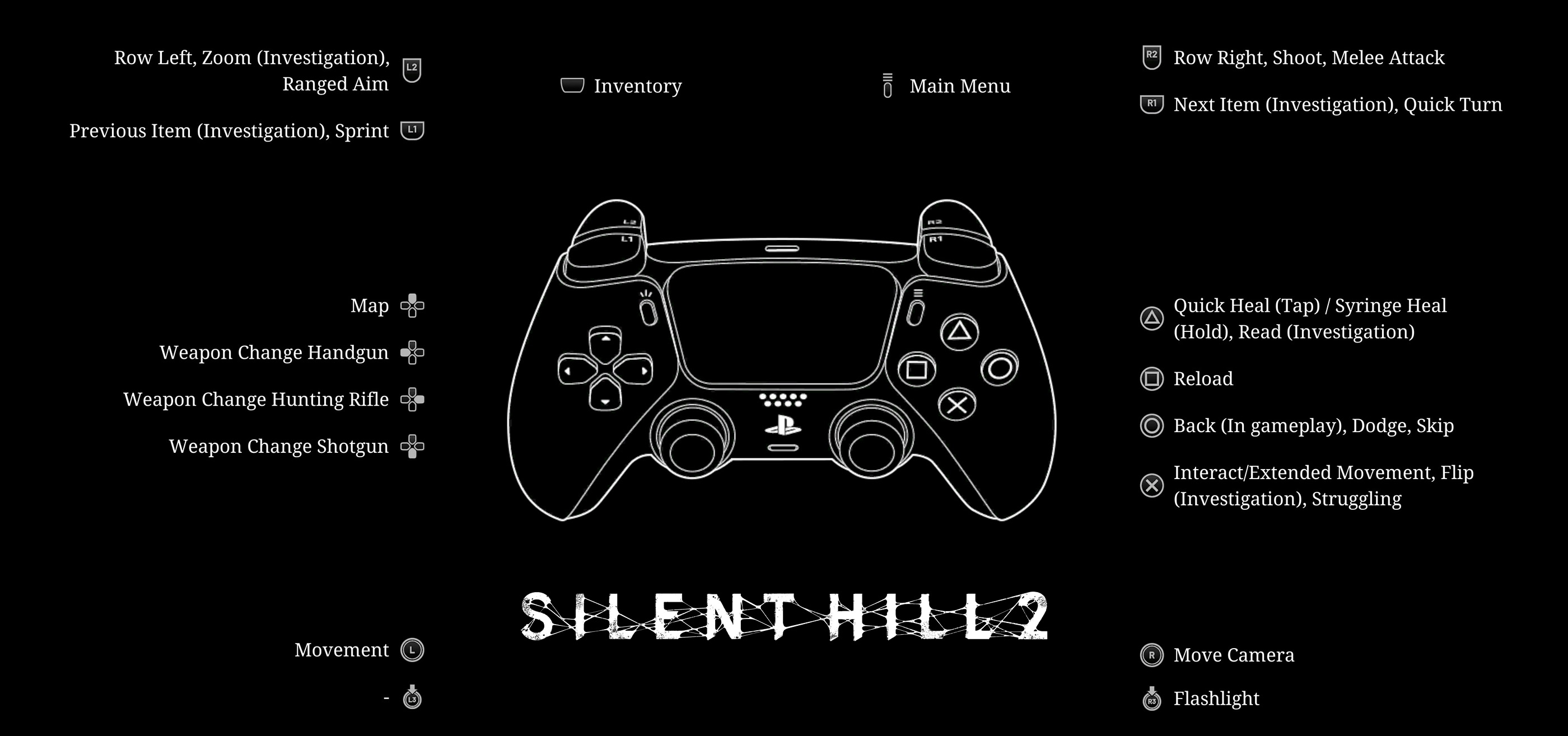
This guide covers the default PlayStation layout shown in the in-game Controls View, matching Xbox controller buttons, combat controls, healing, weapon switching, exploration, investigation sequences and important contextual inputs. PC players using a controller can follow the corresponding gamepad layout; custom bindings may differ from the defaults shown here.
Silent Hill 2 Basic Controls
| Action | PlayStation | Xbox |
|---|---|---|
| Move | Left Stick | Left Stick |
| Move Camera | Right Stick | Right Stick |
| Sprint | L1 | LB |
| Ranged Aim | L2 | LT |
| Shoot / Melee Attack | R2 | RT |
| Quick Turn | R1 | RB |
| Dodge | Circle | B |
| Interact / Contextual Movement | Cross | A |
| Reload | Square | X |
| Quick Heal | Tap Triangle | Tap Y |
| Syringe Heal | Hold Triangle | Hold Y |
| Flashlight | R3 | Press Right Stick |
| Inventory | Touchpad | View Button |
| Main Menu / Pause | Options | Menu Button |
The table follows the default controller layout. Context can change what a button does, particularly during investigations, struggles, rowing and special interactions.
Movement Controls
Use the left stick to move James and the right stick to control the over-the-shoulder camera.
Walk when You Are Searching a Room
Silent Hill 2 rewards careful observation. Moving slowly makes it easier to notice doors, drawers, holes, notes, ammunition and small environmental details that are easy to pass while sprinting.
Use the Camera as Part of Exploration
Turn the camera toward shelves, corners and unusual objects. James may react visually to something worth examining, and many useful items are placed slightly outside the most obvious path.
Face the Direction You Intend to Escape
In narrow rooms, orient James toward an open route before provoking an enemy. A clear escape line makes dodging and sprinting away much safer.
How to Sprint
Hold L1 on PlayStation or LB on Xbox while moving to sprint.
Sprint through Cleared Areas
Once you know a corridor or street is safe, sprinting saves considerable time when backtracking between puzzle locations.
Slow Down near Doorways
Enemies frequently occupy awkward angles around rooms and corridors. Charging blindly through every opening can put James directly inside melee range.
Sprint instead of Fighting When Possible
You do not need to eliminate every monster in Silent Hill. If the route is open and the enemy is not guarding something important, conserving ammunition and health can be the better choice.
Quick Turn
Press R1 or RB during normal gameplay to perform a quick turn.
Use It after Running past an Enemy
Instead of slowly rotating the camera and character separately, quick-turn lets you immediately face a threat that you have just passed.
Combine Quick Turn with a Shot
Create distance, turn, hold Aim and fire once the enemy enters a reliable range.
Do Not Confuse R1 with Its Investigation Function
During certain examination screens, the same button changes to Next Item rather than Quick Turn.
Melee Attacks
Press R2 or RT when using a melee weapon to attack.
Wait for an Opening
Swinging continuously is dangerous because enemies can interrupt James during an attack. Watch their movement, dodge the incoming strike and counter once they finish.
Fight from the Side after a Dodge
A lateral dodge often leaves you in a better position than backing straight away, especially inside apartments and narrow corridors.
Do Not Trade Hits
Silent Hill 2 is survival horror, not a brawler. Taking damage merely to land another melee attack can consume healing supplies faster than the encounter is worth.
Use Melee on Manageable Enemies
When you have room to dodge safely, melee attacks can preserve ammunition for more dangerous encounters.
Dodging
Press Circle on PlayStation or B on Xbox to dodge.
React to the Attack, Not the Enemy's Presence
Dodging too early can leave James vulnerable when the actual strike arrives. Learn the enemy's wind-up and move as the attack commits.
Dodge Sideways in Tight Combat
Backing directly into furniture, walls or another monster can trap you. A sideways dodge often keeps the camera clearer and opens a counterattack angle.
Reset after Every Exchange
Attack once or twice, reassess the enemy and prepare to dodge again. Greedy attack strings are one of the easiest ways to lose health.
Ranged Aiming
Hold L2 or LT to raise the currently equipped firearm and aim.
Stop Moving before Precision Shots
A stable position makes it easier to place shots accurately instead of wasting ammunition while turning sharply.
Create Distance First
Aiming at point-blank range is risky because an enemy can interrupt James before you fire or follow up.
Aim at Exposed Targets
Wait until the enemy is clearly visible rather than firing through awkward environmental clutter.
Shooting
Hold L2 or LT to aim and press R2 or RT to fire.
Make Each Bullet Count
Ammunition is valuable. Fire deliberately rather than unloading a full magazine into an enemy that could have been finished with a melee strike.
Use Guns to Create an Opening
A firearm does not always need to deliver the final hit. Staggering or weakening a monster before moving in with melee can be economical.
Keep Distance from Multiple Enemies
Aiming narrows your attention. If several monsters are active, reposition before committing to a long shooting sequence.
Reloading
Press Square on PlayStation or X on Xbox to reload your equipped firearm.
Reload after the Encounter
Entering the next room with a partially empty magazine can force a reload at the worst possible time.
Do Not Reload beside an Active Enemy
Move away, dodge or leave the room first if necessary.
Check Your Weapon before a Boss Encounter
A full magazine gives you much more flexibility during the opening moments of a difficult fight.
Weapon Switching
Weapon Shortcuts
| Action | PlayStation | Xbox |
|---|---|---|
| Open Map | D-Pad Up | D-Pad Up |
| Switch to Handgun | D-Pad Left | D-Pad Left |
| Switch to Hunting Rifle | D-Pad Right | D-Pad Right |
| Switch to Shotgun | D-Pad Down | D-Pad Down |
Once the relevant firearms are obtained, the D-Pad provides direct weapon shortcuts so you do not have to open the inventory in the middle of combat.
Use the Handgun for General Encounters
Its combination of range and comparatively manageable ammunition supply makes it a practical choice when you want distance without committing heavier ammunition.
Save the Shotgun for Close Threats
The shotgun is most useful when you need substantial stopping power at close range.
Reserve Rifle Ammunition for High-Value Shots
Use the hunting rifle when its range and power provide a genuine advantage rather than treating it as an everyday weapon.
Switch before the Enemy Reaches You
Choose the weapon appropriate for the next encounter while you still have space.
Healing Controls
Triangle or Y provides direct access to healing without requiring the inventory.
| Healing Action | PlayStation | Xbox |
|---|---|---|
| Quick Heal | Tap Triangle | Tap Y |
| Syringe Heal | Hold Triangle | Hold Y |
Use the Smaller Heal for Moderate Damage
Do not automatically spend your strongest recovery item whenever James takes a hit.
Use a Syringe when You Need Significant Recovery
Holding Triangle or Y provides a separate shortcut for the stronger healing option.
Heal somewhere safe
If an enemy is still within striking distance, escape or create room before committing to recovery.
Flashlight
Press R3 or the right stick to toggle the flashlight after it becomes available.
Use It to Search Interiors Properly
Many supplies and interactable objects are difficult to identify in dark rooms without illumination.
Turn It Back On after Cinematic Moments
If an area suddenly feels unusually dark, check whether your flashlight state changed.
Search behind Furniture and Corners
The flashlight is not only atmospheric. Sweep it around the room while watching James and the interaction prompt for useful objects.
Interacting and Contextual Movement
Press Cross or A to interact with doors, objects, notes and environmental points. The same button handles Extended Movement when a contextual traversal action is available.
Try the Door Even If It Looks Ordinary
Checking doors is central to navigating Silent Hill. A locked or blocked door can still provide useful map information.
Move Close to the Interaction Point
If a prompt refuses to appear, adjust James's position and turn the camera toward the specific object.
Watch for Contextual Traversal
Cross or A can also help James move through particular gaps, climb or perform other prompted environmental actions.
Using the Map
Press D-Pad Up to open the map quickly.
Check It after Every Locked Door
Silent Hill 2's map is more useful than a simple floor plan. James records information as you explore, making it an important tool for eliminating dead ends.
Use Markings to Plan Backtracking
When a puzzle requires several objects or rooms, map information can prevent you from repeatedly checking the same blocked route.
Study Multiple Floors
Apartment buildings, hospitals and other large interiors are easier to understand when you compare stairs and floor layouts rather than treating each corridor in isolation.
Inventory
Press the touchpad on PlayStation or View button on Xbox to open the inventory.
Read Key Items Carefully
The object's description or appearance may contain information useful for a nearby puzzle.
Inspect before Assuming an Item Has One Purpose
Some puzzle objects make more sense once examined rather than simply selected from the inventory.
Check Ammunition and Healing Supplies
Before entering an unexplored section, knowing what you actually have can influence whether you fight or avoid the next enemy.
Investigation Controls
Certain objects enter a dedicated investigation view with a slightly different control scheme.
| Investigation Action | PlayStation | Xbox |
|---|---|---|
| Previous Item | L1 | LB |
| Next Item | R1 | RB |
| Zoom | L2 | LT |
| Read | Triangle | Y |
| Flip / Examine Other Side | Cross | A |
| Back | Circle | B |
Flip Important Objects
If an item appears incomplete, use the Flip command. Information can be placed on another side rather than directly facing you.
Zoom before Leaving
Small writing, symbols and visual details can matter. Inspect suspicious areas before closing the view.
Cycle through Every Available Item
If the investigation contains several pieces, L1/LB and R1/RB let you review them without repeatedly backing out.
Struggling
Cross or A becomes the Struggling input during particular contextual sequences.
Follow the Prompt
Do not assume the ordinary Interact behavior applies when James is grabbed or caught in a scripted struggle.
Keep the Button Accessible
If you remap controls, make sure important contextual actions remain comfortable during sudden sequences.
Rowboat Controls
During the rowing sequence, the trigger functions change.
| Rowing Action | PlayStation | Xbox |
|---|---|---|
| Row Left | L2 | LT |
| Row Right | R2 | RT |
Alternate the Triggers
Balanced rowing helps maintain a useful heading rather than constantly correcting after drifting to one side.
Watch Your Direction
Use environmental orientation rather than rapidly pressing both controls without checking where the boat is pointing.
Combat and Puzzle Difficulty
Silent Hill 2 lets you choose puzzle difficulty separately from combat difficulty. This is useful because being good at dodging monsters does not necessarily mean you want obscure puzzle clues, and vice versa.
Lower Combat Difficulty without Changing Puzzles
If resource pressure or enemy timing is interfering with exploration, you can choose a more forgiving action experience while preserving puzzle challenge.
Choose Puzzle Difficulty for the Amount of Guidance You Want
Players who enjoy decoding clues independently can choose a harder puzzle setting, while those primarily interested in atmosphere and story can reduce the complexity.
Can You Change Silent Hill 2 Controls?
Controller and input settings can be adjusted from the game's options. PC players additionally have keyboard and mouse configuration available.
Keep Dodge Easy to Reach
Circle or B is one of the most important combat inputs. Any custom layout should preserve fast access to it.
Keep Aim and Attack on Separate Comfortable Inputs
Ranged combat repeatedly uses L2/LT and R2/RT together, so avoid a configuration that creates unnecessary strain.
Remember Contextual Inputs
Buttons such as Cross/A, Triangle/Y and the shoulder buttons perform additional actions during investigations and special sequences.
Frequently Asked Questions
How do you sprint in Silent Hill 2?
Hold L1 on PlayStation or LB on Xbox while moving.
How do you dodge?
Press Circle or B. Time the dodge around an enemy's actual attack rather than pressing it continuously.
How do you perform a quick turn?
Press R1 on PlayStation or RB on Xbox during normal gameplay.
How do you melee attack?
Press R2 or RT while a melee weapon is equipped.
How do you aim and shoot?
Hold L2 or LT to aim and press R2 or RT to fire.
How do you reload?
Press Square on PlayStation or X on Xbox.
How do you heal quickly?
Tap Triangle or Y for a quick heal.
How do you use a syringe?
Hold Triangle on PlayStation or Y on Xbox.
How do you turn on the flashlight?
Press R3 or the right stick.
How do you open the map?
Press D-Pad Up.
How do you open the inventory?
Press the touchpad on PlayStation or View button on Xbox.
How do you switch to the handgun?
Press D-Pad Left once the handgun is available.
How do you switch to the hunting rifle?
Press D-Pad Right once the hunting rifle is available.
How do you switch to the shotgun?
Press D-Pad Down once the shotgun is available.
How do you inspect the other side of an item?
Press Cross or A during an Investigation view when Flip is available.
Can combat and puzzle difficulty be different?
Yes. Silent Hill 2 allows its action/combat difficulty and puzzle difficulty to be configured separately.
Is the Silent Hill 2 remake available on Xbox?
Yes. The remake is available on Xbox Series X|S as well as PlayStation 5 and PC.
Final Control Advice
Memorise six inputs first: L1 or LB for sprint, Circle or B for dodge, R2 or RT for melee, L2 or LT plus R2 or RT for shooting, Triangle or Y for healing and D-Pad Up for the map. Those commands cover most situations where reacting quickly matters.
After that, make the shortcuts part of your survival routine. Reload after encounters, switch weapons before an enemy reaches you, use quick-turn instead of wrestling with the camera and consult the map whenever exploration begins looping back on itself.
Most importantly, do not treat every monster as a mandatory fight. The controls give you tools for fighting, but sprinting, dodging and simply choosing another route are equally important parts of surviving Silent Hill.
See our Silent Hill 2 Tips and Tricks Guide for spoiler-light combat advice, exploration strategies, ammo conservation, healing, puzzles, bosses and New Game Plus preparation.
Comments
No comments yet. Be the first to share your thoughts!