Getting comfortable with the controls in Hail to the Rainbow makes a real difference when you are exploring abandoned buildings, solving machinery puzzles or fighting hostile robots. Some buttons also change their purpose depending on whether Ignat is walking, fighting or driving.
This guide covers the PlayStation controller layout, corresponding Xbox controller buttons and documented keyboard controls for the Windows version. It also explains the controls that are easy to confuse, especially the triggers and the interaction buttons.
Hail to the Rainbow Controls for PC, PlayStation and Xbox Controllers
The PlayStation mappings below follow the game's controller screen. The Xbox column translates the same controller layout to Xbox button names. PC shortcuts are included where their assignments are documented; the remaining keyboard assignments should be checked in the game's Controls menu rather than assumed.
| Action | PC Keyboard and Mouse | PlayStation Controller | Xbox Controller |
|---|---|---|---|
| Move | W, A, S, D | Left Stick | Left Stick |
| Look Around | Mouse | Right Stick | Right Stick |
| Jump / Brake While Driving | Space for Jump | Triangle | Y |
| Interact / Action | E | Cross | A |
| Attack / Accelerate While Driving | Left Mouse Button for Attack | R2 | RT |
| Block / Reverse While Driving | Check Controls Menu | L2 | LT |
| Inventory | Check Controls Menu | L1 | LB |
| Crouch | Check Controls Menu | R1 | RB |
| Reload | Check Controls Menu | Square | X |
| Heal | Check Controls Menu | Circle | B |
| Flashlight | Check Controls Menu | R3 | Right Stick Click |
| Select | Check Controls Menu | D Pad | D Pad |
| Menu | Check Controls Menu | Options | Menu Button |
| Select Equipped Item Slots | 1, 2, 3, 4 | Use Selection Controls | Use Selection Controls |
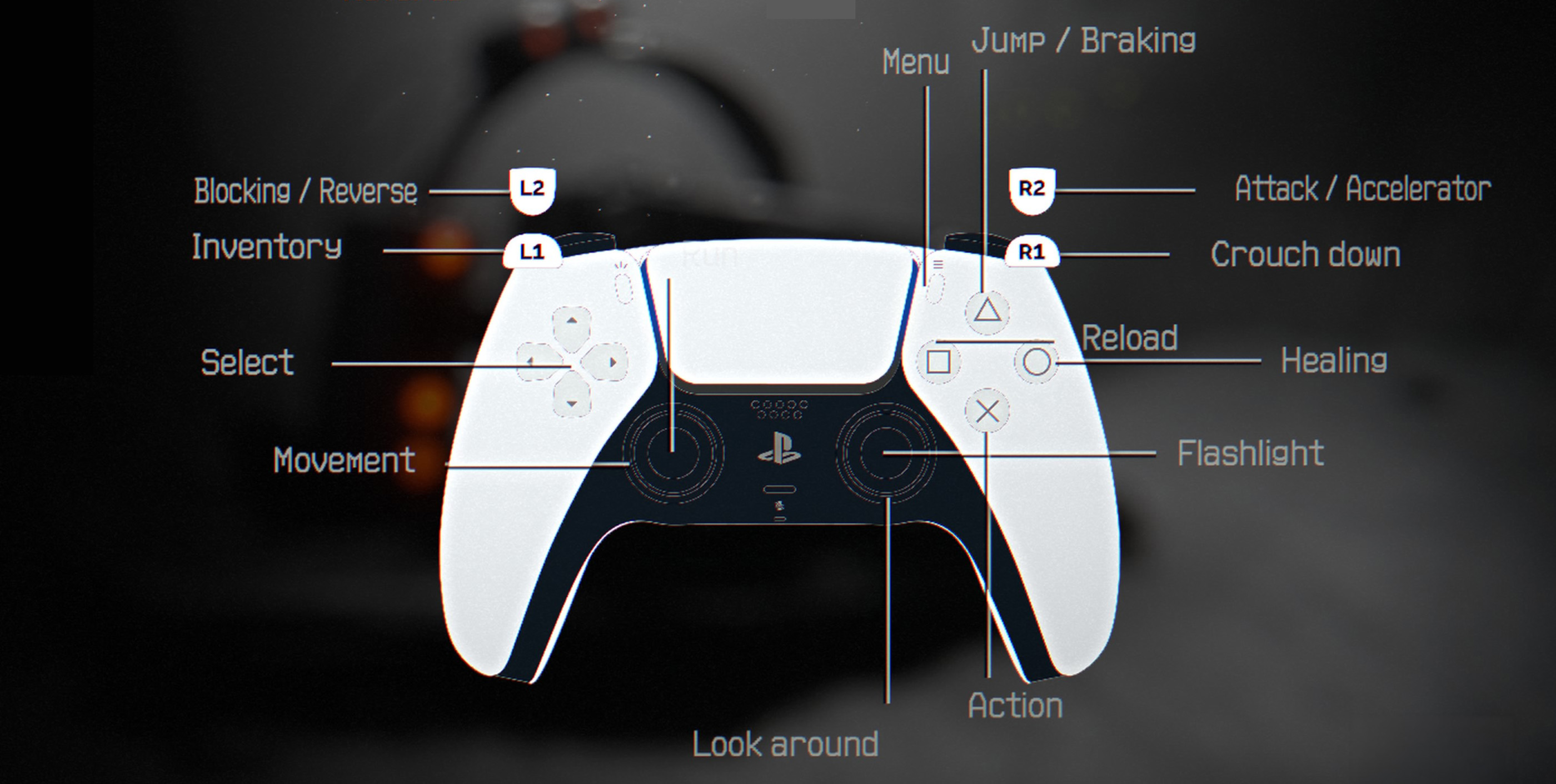
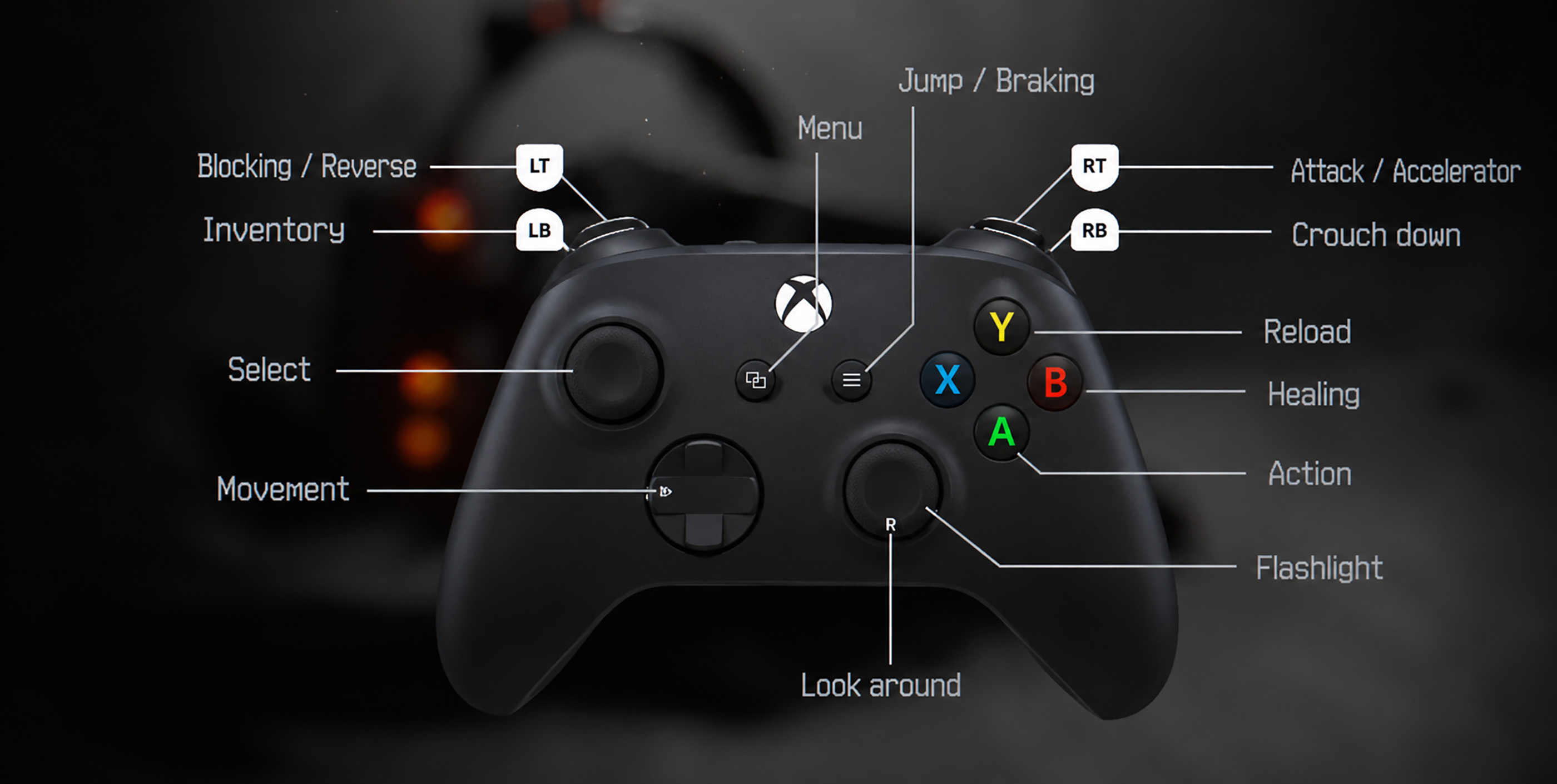
The screenshot also shows separate controller settings for vibration, acceleration and reverse. Those driving controls are especially important because R2 and L2 perform different actions when you are outside the vehicle.
Understanding the Controls That Change During Gameplay
Hail to the Rainbow mixes exploration, combat and vehicle sequences, so the same input does not always mean the same thing.
Attack and Accelerate
R2 on a PlayStation controller, or RT on Xbox, is used for attacking on foot and accelerating while driving. On PC, the left mouse button is used for weapon attacks.
Block and Reverse
L2 on PlayStation, or LT on Xbox, serves as the blocking input in combat and reverse when driving. Remember this distinction when switching between a fight and a vehicle section.
Jump and Brake
Triangle on PlayStation, or Y on Xbox, is labelled Jump / Braking. The button's purpose depends on the current situation.
Flashlight and Camera
The Right Stick controls the camera, while pressing it activates the flashlight. Moving the stick and clicking it are two different inputs.
How to Change or Check Controls
Open Settings and find the Controls section to inspect the current keyboard assignments. The controller page also shows the gamepad layout and its driving inputs.
If your controller behaves unexpectedly, first check whether the game is displaying the correct button prompts. Hail to the Rainbow received an input system update that improved gamepad support, including DualSense compatibility.
The game is available on Windows and supports keyboard and mouse as well as compatible controllers. A PlayStation controller diagram does not mean that a native PlayStation console edition is available.
Frequently Asked Questions
Here are quick answers to common Hail to the Rainbow control questions.
What is the interact button in Hail to the Rainbow?
Press E on the keyboard, Cross on a PlayStation controller or A on an Xbox controller to interact with objects.
How do you turn on the flashlight?
Press the Right Stick, also called R3, on a PlayStation controller. On Xbox, click the Right Stick.
How do you reload a weapon?
Press Square on PlayStation or X on Xbox. For the keyboard assignment, check the Controls menu.
How do you heal with a controller?
Press Circle on PlayStation or B on Xbox when healing is available.
Does Hail to the Rainbow support controllers on PC?
Yes. The Windows version supports PlayStation and Xbox controllers, and its controller support was improved through a postrelease update.
Why does R2 accelerate instead of attack?
The controls are contextual. R2 attacks during combat but accelerates when you are driving.


Comments
No comments yet. Be the first to share your thoughts!