The RuneScape: Dragonwilds controls have a lot to cover. You are gathering resources one moment, fighting a dragon the next, then switching to building, spells or ranged ammunition without leaving the same control scheme. Once the shortcuts become familiar, exploring Ashenfall feels considerably smoother.
This guide covers the default PlayStation controls shown in the current game, plus the main keyboard and mouse controls for PC. RuneScape: Dragonwilds 1.0 is available on PC, PS5, Xbox Series X|S and Nintendo Switch 2.
RuneScape Dragonwilds PS5 Controls
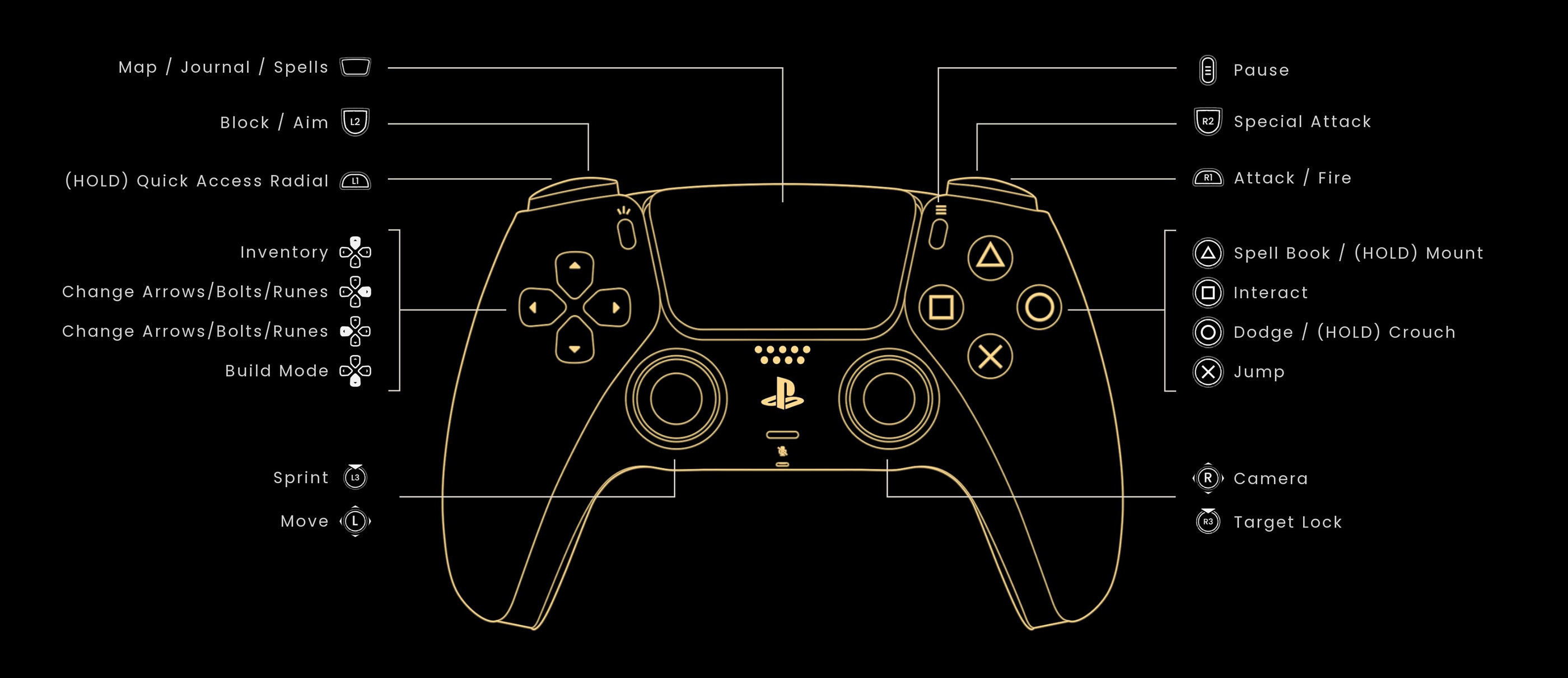
The PlayStation layout below is based on the current PS5 controller screen. Several buttons have a second function when held, so learning those shortcuts saves plenty of trips through menus.
| Action | PS5 Control |
|---|---|
| Move | Left Stick |
| Sprint | L3 |
| Camera | Right Stick |
| Target Lock | R3 |
| Jump | X |
| Dodge | Circle |
| Crouch | Hold Circle |
| Interact | Square |
| Spell Book | Triangle |
| Mount | Hold Triangle |
| Attack / Fire | R1 |
| Special Attack | R2 |
| Block / Aim | L2 |
| Quick Access Radial | Hold L1 |
| Map / Journal / Spells | Touch Pad |
| Inventory | D Pad Up |
| Change Arrows / Bolts / Runes | D Pad Left / Right |
| Build Mode | D Pad Down |
| Pause | Options Button |
RuneScape Dragonwilds PC Controls
Keyboard and mouse gives important menus their own shortcuts, which is useful in a survival game where you regularly move between inventory management, building, skills, spells and combat.
| Action | PC Control |
|---|---|
| Move Forward | W |
| Move Left | A |
| Move Backward | S |
| Move Right | D |
| Sprint | Shift |
| Crouch | C |
| Jump | Space |
| Primary Action | Left Mouse Button |
| Secondary Action | Right Mouse Button |
| Special Action | Middle Mouse Button |
| Interact | E |
| Secondary Interact | F |
| Evade | Ctrl |
| Inventory | Tab |
| Spells Menu | Q |
| Journal | J |
| Skills | K |
| Map | M |
| Build Mode | B |
| Emote Menu | H |
| Quick Access Slots | 1 to 8 |
How Combat Controls Change With Your Weapon
The shoulder buttons are contextual. With a melee weapon equipped, your primary input attacks while the secondary action is used defensively. Equip a bow or another ranged weapon and the same controls become your firing and aiming actions.
This makes weapon switching much easier to learn than memorising a completely separate layout for melee and ranged combat. The important control to remember is the Special Attack. Weapon types can offer different special actions, making it worth experimenting whenever you craft something new.
How to Dodge, Crouch and Lock Onto Enemies
On PS5, tapping Circle dodges, while holding Circle makes your character crouch. Clicking R3 activates target lock, which is particularly useful when a single dangerous enemy needs your full attention.
Do not rely on target lock in every situation. Against several enemies, manually controlling the camera can make it easier to see attacks coming from the side and create an escape route.
How the Quick Access Radial Works
PlayStation players can hold L1 to open the Quick Access Radial. This is one of the most useful controller shortcuts because Dragonwilds regularly asks you to swap between combat equipment, tools and other frequently used items.
Set up your quick access choices before travelling into a dangerous region. Digging through the inventory while something is attacking you is rarely a good survival strategy.
How to Change Arrows, Bolts and Runes
Ranged and magic users should learn the D Pad shortcuts early. The left and right directions are used to cycle compatible arrows, bolts and runes on the PlayStation layout.
Check the selected ammunition or rune before starting a serious fight. Having several types available is much more useful when you can switch between them without opening the full inventory.
Spell Book and Mount Controls
Triangle has two important uses on PS5. A normal press opens the Spell Book, while holding Triangle calls or accesses your mount functionality when available.
Magic is woven into gathering, exploration and combat rather than existing only as another damage type. As you unlock more spells, becoming comfortable with quick spell access saves a surprising amount of time around Ashenfall.
Building Controls You Should Know
Press D Pad Down on PlayStation or B on PC to enter building. On keyboard, Q and E move between building tabs, Y enables free placement, T repairs and Esc cancels the current building action.
Building has enough commands to feel like a separate control mode, so spend a minute learning it when you establish your first proper base. It becomes much faster than repeatedly hunting through every construction category.
Can You Remap RuneScape Dragonwilds Controls?
Yes. Dragonwilds allows inputs to be reassigned through the Settings and Controls menu. PC players in particular may want frequently used actions such as evade, interact or spells closer to their normal movement keys.
If you change several bindings and want the original layout back, the Controls menu also provides an option to reset the bindings to their defaults.
Which Controls Are Most Important to Learn?
For exploration, get comfortable with sprint, interact and your quick access controls. For combat, learn the difference between your primary, secondary and special actions, then practise dodging without losing track of the enemy.
Dragonwilds becomes much easier to control when you stop treating every tool, weapon and spell as a separate system. The same small group of contextual inputs follows you through most of Ashenfall, leaving you free to concentrate on what is trying to eat you.


Comments
No comments yet. Be the first to share your thoughts!