Resident Evil Requiem combines two very different styles of survival. Grace Ashcroft's chapters emphasize stealth, limited inventory space, puzzle-solving and carefully rationed ammunition. Leon S. Kennedy's chapters are more aggressive, giving him a larger arsenal, a combat hatchet, parries, melee follow-ups and stronger crowd-control options.
Both characters use the same basic movement, aiming, inventory and weapon controls, but several buttons behave differently according to the character and currently equipped item. L1, for example, prepares Leon's hatchet and performs a timed parry, while Grace has fewer close-combat options and must rely more heavily on positioning, firearms and avoidance.
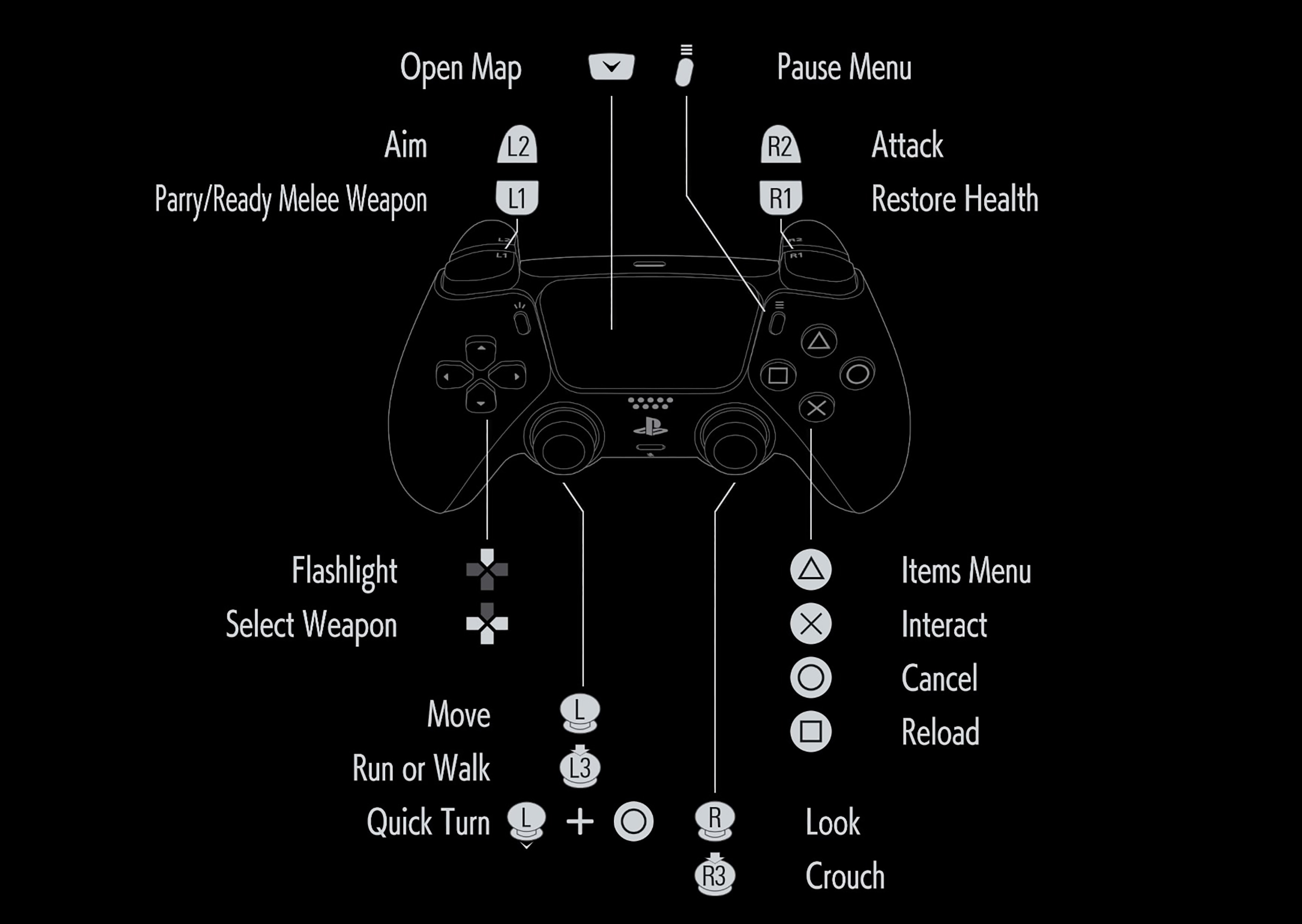
The default PlayStation layout shown below is taken from the in-game controller screen supplied with this guide. Xbox and Nintendo Switch 2 inputs follow the equivalent physical button positions, while the PC column lists the standard keyboard-and-mouse bindings.
Resident Evil Requiem Controls
| Action | PlayStation 5 | Xbox Series | Nintendo Switch 2 | PC Default |
|---|---|---|---|---|
| Move | Left Stick | Left Stick | Left Stick | W / A / S / D |
| Run / Walk | Press L3 | Press Left Stick | Press Left Stick | Toggle through movement setting / Assigned Key |
| Look Around | Right Stick | Right Stick | Right Stick | Mouse |
| Crouch | Press R3 | Press Right Stick | Press Right Stick | Left Ctrl |
| Aim | Hold L2 | Hold LT | Hold ZL | Right Mouse Button |
| Attack / Fire Weapon | R2 while aiming | RT while aiming | ZR while aiming | Left Mouse Button |
| Hip Attack / Contextual Attack | R2 | RT | ZR | Left Mouse Button |
| Ready Melee Weapon | Hold L1 | Hold LB | Hold L | Space |
| Parry as Leon | Press L1 near impact | Press LB near impact | Press L near impact | Press Space near impact |
| Melee Hatchet Attack | Hold L1 + R2 | Hold LB + RT | Hold L + ZR | Hold Space + Left Mouse Button |
| Sharpen Leon's Hatchet | Hold L1 + Square | Hold LB + X | Hold L + Y | E |
| Restore Health | R1 | RB | R | Q |
| Reload | Square | X | Y | R |
| Interact / Pick Up / Confirm | Cross | A | B | F |
| Cancel / Back | Circle | B | A | Right Mouse Button / Esc |
| Quick Turn | Left Stick Down + Circle | Left Stick Down + B | Left Stick Down + A | X |
| Open Items Menu | Triangle | Y | X | Tab |
| Open Map | Touch Pad | View | Minus | M |
| Flashlight | D-Pad Up | D-Pad Up | D-Pad Up | G |
| Select Weapon Slot | D-Pad Left / Down / Right | D-Pad Left / Down / Right | D-Pad Left / Down / Right | Mouse Wheel / Number Keys |
| Pause Menu | Options | Menu | Plus | P / Esc |
| Change Camera Perspective | Pause Menu / Camera Settings | Pause Menu / Camera Settings | Pause Menu / Camera Settings | Pause Menu / Camera Settings |
| Photo Mode | Pause Menu | Pause Menu | Pause Menu | Pause Menu |
Control note: Resident Evil Requiem supports custom button configurations. Character-specific actions, contextual prompts and alternate control presets may change individual inputs. Always check the controller diagram after selecting a custom layout.
Movement Controls
Use the left stick or WASD to move. Press the left stick to switch between running and walking according to the active movement setting. Walking produces less noise and gives you more control in tight rooms, while running is useful when escaping a pursuer or crossing an already-cleared area.
Do not sprint through every unexplored corridor. Resident Evil Requiem frequently places enemies, traps and breakable objects just beyond doors or blind corners. Entering at walking speed gives you time to read the room and retreat without colliding with scenery.
Crouching
Press R3 or Left Ctrl to crouch. Crouching lowers the character's profile, reduces movement noise and supports stealth takedowns during Leon's chapters.
Grace benefits especially from crouching because avoiding an enemy is often more economical than spending ammunition. Use desks, medical equipment, counters and dark corners to break direct sight lines.
Quick Turn
Hold the left stick backward and press Circle, B or A to turn 180 degrees immediately. PC players can press X by default.
Quick Turn is one of the most valuable movement commands in the game. It lets you:
- Reverse direction during a chase without slowly rotating the camera.
- Turn toward an enemy that has passed behind you.
- Retreat after opening a dangerous door.
- Reposition before reloading or healing.
- Escape a failed stealth approach.
Movement Habit
Whenever you enter a new room, notice the clearest route back to the door. If something drops from the ceiling or enters through another passage, Quick Turn and use that known route instead of searching for an exit under pressure.
Aiming and Shooting
Hold L2, LT, ZL or the right mouse button to aim. Use the right stick or mouse to place the reticle, then press the attack control to fire.
Accuracy improves when you stop moving and allow the reticle to settle. Firing immediately after a fast turn or sprint is less dependable and can waste scarce ammunition during Grace's sections.
Aim for the Result You Need
A headshot is not always the most efficient choice. Different targets serve different purposes:
- Head: Higher damage and a chance to stagger, but small and mobile.
- Legs: Can slow or topple an enemy, creating room to escape.
- Arms: May interfere with grabs or weapon use.
- Environmental target: Can trigger hazards or create light.
Grace often gains more value from disabling a pursuer than from trying to kill everything. Leon has enough offensive options to convert a stagger into a hatchet strike or prompted melee attack.
Reloading
Press Square, Xbox X, Switch Y or R on PC. Reload during a safe pause instead of waiting for the magazine to become completely empty.
Before entering a suspicious room, check the current magazine. A partially loaded weapon with sufficient reserve ammunition should usually be topped up unless doing so would discard ammunition under the active difficulty rules.
Weapon Selection
Use the assigned D-Pad direction to equip a weapon instantly. PC players can use the mouse wheel or number keys.
Keep weapon positions consistent. For example:
- D-Pad Left: Primary handgun.
- D-Pad Down: Shotgun or crowd-control weapon.
- D-Pad Right: Specialized or high-damage weapon.
A stable layout prevents hesitation when an enemy appears at close range.
Leon's Hatchet Controls
Leon carries a combat hatchet that functions as a melee weapon, defensive tool and environmental implement. Hold L1 or LB to ready it.
Press the attack button while the hatchet is ready to swing. Leon can use it for close-range damage, staggering enemies, breaking obstacles and opening certain sealed objects that Grace cannot access.
Hatchet Sharpness
The hatchet has a sharpness gauge. It does not disappear permanently when the edge becomes blunt, but a dull hatchet cannot perform reliable parries and loses much of its combat value.
Hold L1 and press Square on PlayStation, LB and X on Xbox, or use the assigned PC sharpening input to restore the edge.
Sharpen only after creating space. The animation leaves Leon vulnerable, and attempting it in front of an active enemy can result in immediate damage.
Hatchet Attacks
Hold the melee-ready button and press Attack for a committed hatchet strike. The move is stronger than an ordinary close-range action but requires enough room and time to complete.
Use it after:
- A successful parry.
- A firearm stagger.
- A stealth approach.
- An enemy's heavy attack misses.
- A prompted finisher appears.
Stealth Takedowns
Crouch and approach an unaware enemy from behind. When the takedown prompt appears, use the displayed melee input.
Move slowly and avoid knocking into objects. A failed approach can place Leon within grabbing range before the hatchet is ready.
How Parrying Works
Press L1, LB, L or Space close to the moment an enemy attack connects. A successful parry prevents or reduces damage and creates an opening.
A Perfect Parry requires tighter timing and produces a stronger stagger. It is particularly useful against dangerous melee enemies, including foes wielding large weapons or chainsaws.
Learn with Ordinary Parries First
Do not chase perfect timing immediately. Begin by holding or pressing the defensive control early enough to survive, then gradually move the input closer to impact as you learn the animation.
Parry or Evade?
- Parry: Clear single swings, readable lunges and attacks that create a useful counter window.
- Evade or retreat: Grabs, explosions, area attacks, rapid combinations and moves whose timing remains unfamiliar.
A dull hatchet cannot perform its full defensive role, so monitor sharpness before relying on parries during a major encounter.
Healing Controls
Press R1, RB, R or Q to use the currently assigned recovery item. The game selects an appropriate healing resource from the character's inventory according to the active item settings.
Healing is not instantaneous. Create a genuine opening first:
- Move through a closed door.
- Stagger or knock down the enemy.
- Hide around a corner.
- Wait for a boss's recovery animation.
- Use light or an environmental obstacle to slow a pursuer.
Do not use a full recovery item to repair a tiny amount of damage unless you are about to enter a dangerous sequence or the inventory needs to be consolidated.
Interacting with the Environment
Press Cross, A, B or F near a prompt to:
- Pick up ammunition and supplies.
- Open doors and containers.
- Operate machinery.
- Read files.
- Collect key items.
- Move puzzle components.
- Climb or squeeze through contextual routes.
Some interactions require repeated presses, holding the button or moving another control. Watch the on-screen prompt rather than assuming every mechanism uses a single tap.
Breakable and Sealed Objects
Leon can use his hatchet on certain containers and sealed access points. Grace may need to find another route, key or tool for the same area.
Return to previously visited rooms when the story changes character or grants a new ability. A blocked container may become accessible later.
Items Menu
Press Triangle, Y, X or Tab to open the inventory. From here you can:
- Equip weapons.
- Move and rotate items.
- Combine compatible objects.
- Craft ammunition and supplies.
- Examine key items.
- Attach weapon parts.
- Discard eligible objects.
Grace's Inventory
Grace begins with very limited carrying space. Her inventory encourages difficult choices between ammunition, recovery supplies, crafting materials and puzzle objects.
Store items you do not need immediately and look for inventory-expansion upgrades. Do not carry several speculative puzzle objects while leaving no room for essential ammunition or a newly discovered key item.
Leon's Attaché Case
Leon uses a larger grid-based case. Rotate long weapons and arrange ammunition beside the equipment that uses it.
Leave a small section open whenever possible. A completely packed case can turn every new pickup into an inventory-management interruption.
Examine Key Items
Rotate keys, ornaments and mechanical objects in the Examine screen. Hidden switches, inscriptions and detachable components may be placed on the rear or underside.
Crafting as Grace
Grace uses infected blood as a central crafting resource. Blood-related samples and analyzed discoveries unlock or enable recipes for ammunition, recovery supplies and specialized injectors.
Do not convert every resource immediately. Keep enough material for the item that solves the next major problem rather than filling the inventory with ammunition for a weapon you rarely use.
Specialized Injectors
Certain crafted injectors can exploit particular biological weaknesses and may defeat a suitable enemy far more efficiently than ordinary gunfire.
Reserve them for the target type they are designed to counter. Using a specialized resource against a basic enemy removes its greatest advantage.
Crafting as Leon
Leon uses a more traditional system built around gunpowder, scrap and related materials. He can create ammunition, explosives and other combat supplies.
Craft according to the equipped arsenal. Materials stored for shotgun shells have no value if the shotgun remains unused, while handgun ammunition is rarely wasted during exploration.
Map Controls
Press the Touch Pad, View, Minus or M to open the map. The map records rooms, doors, floor connections and discovered points of interest.
Room colours and completion indicators help identify areas that still contain items. Before leaving a major location, revisit incomplete rooms that can now be opened with a newly found key or security level.
Use Map Markers as Memory
Do not rely on memory alone for:
- Locked drawers.
- Sealed cabinets.
- Special key doors.
- Unresolved puzzles.
- Storage boxes.
- Strong enemies best avoided temporarily.
The fastest route is often one you deliberately postponed earlier.
Flashlight Controls
Press D-Pad Up or G to toggle the flashlight when manual control is available. Light reveals objects and helps navigate dark areas, but it may also make stealth more difficult.
Some enemies and environmental mechanics react directly to illumination. Observe whether the target avoids, follows or becomes vulnerable in light before deciding where to stand.
First-Person and Third-Person Cameras
Both Grace and Leon can be played from either perspective. The default presentation emphasizes Grace in first-person and Leon in third-person, reinforcing the difference between vulnerability and combat awareness.
First-Person Advantages
- More immersive exploration.
- Clear examination of environmental details.
- Precise aiming in narrow spaces.
- Stronger horror atmosphere.
Third-Person Advantages
- Better peripheral awareness.
- Easier reading of nearby enemies.
- Clearer melee and parry spacing.
- More comfortable movement for motion-sensitive players.
Use the perspective that lets you read the encounter correctly. There is no gameplay penalty for choosing comfort over the default presentation.
How to Remap the Controls
- Open Options.
- Select the Controls tab.
- Open the Controller subcategory.
- Change Control Type from Default to a custom layout if required.
- Open Button Configuration.
- Select the action to reassign.
- Apply the new button.
- Test aiming, parrying, healing, reloading and Quick Turn.
The supplied options screen also includes controller vibration, adaptive triggers, deadzone and sensitivity settings.
Recommended Control Changes
Keep Aim and Attack on Opposite Triggers
The default L2 and R2 arrangement supports precise shooting and matches modern Resident Evil muscle memory.
Keep Parry on a Shoulder Button
A timed defensive input should be available without moving your thumb away from the camera.
Keep Quick Turn Easy to Perform
Avoid a layout that requires an awkward combination while sprinting. Quick Turn is essential during Grace's chase sequences.
Consider Moving Crouch from R3
Players who accidentally click the camera stick while aiming may prefer another crouch button, provided the new layout does not interfere with Quick Turn.
Keep Healing Away from Attack
Recovery items are limited. Place Heal somewhere unlikely to be pressed accidentally during rapid combat inputs.
Controller and Camera Settings
Deadzone
Lower the deadzone if the camera feels slow to begin moving. Raise it when the reticle drifts without deliberate stick input.
Aim Sensitivity
Use a lower aiming sensitivity than ordinary camera sensitivity. This allows quick exploration turns without sacrificing precision during headshots.
Aim Acceleration
Reduce acceleration when the reticle repeatedly moves past small targets. Increase it slightly when tracking enemies that cross the screen rapidly.
Adaptive Triggers
Adaptive trigger resistance adds weight to firing and aiming on PlayStation 5. Disable it if the resistance causes fatigue or slows repeated shots.
Aim Assist
Aim-assistance options can help snap to or follow targets. Use stronger assistance when aiming difficulty prevents you from engaging with the survival decisions, then reduce it later if desired.
Frequently Asked Questions
What are the default PlayStation controls?
L2 aims, R2 attacks, L1 prepares the melee weapon or parries, R1 heals, Triangle opens inventory, Cross interacts, Circle cancels, Square reloads, R3 crouches, D-Pad Up controls the flashlight and the Touch Pad opens the map.
How do you Quick Turn?
Hold the left stick backward and press Circle on PlayStation, B on Xbox, A on Switch 2 or X on PC.
How do you parry as Leon?
Press L1, LB, L or Space close to the moment the enemy attack connects. A tighter input produces a stronger Perfect Parry.
Why can Leon not parry?
His hatchet may be dull. Sharpen it before relying on the parry again.
How do you sharpen the hatchet?
Hold L1 and press Square on PlayStation, hold LB and press X on Xbox or use E on the default PC layout.
How do you attack with the hatchet?
Hold the melee-ready button and press Attack. Use the move after a stagger or other safe opening.
How do you crouch?
Press R3 on a controller or Left Ctrl on PC.
How do you heal?
Press R1, RB, R or Q. The character uses an available recovery item.
How do you turn on the flashlight?
Press D-Pad Up or G on PC.
How do you open the inventory?
Press Triangle, Y, Switch X or Tab.
How do you open the map?
Press the Touch Pad, View, Minus or M.
Can you change between first- and third-person?
Yes. Both protagonists support both perspectives through the camera settings.
Which perspective is best?
First-person emphasizes immersion and precise environmental viewing. Third-person provides wider spatial awareness and is often easier for Leon's melee combat.
Why is Grace's inventory so small?
Her chapters deliberately emphasize limited resources. Find inventory-expansion upgrades and use storage boxes to keep situational items out of the active inventory.
How does Grace craft items?
She gathers infected blood and related specimens, analyzes discoveries and spends the resulting resources on ammunition, supplies and specialized injectors.
How does Leon craft items?
Leon combines materials such as scrap and gunpowder to produce ammunition, explosives and other combat items.
Can the controls be remapped?
Yes. Open Options, Controls, Controller and Button Configuration.
What does Cancel do during gameplay?
It backs out of menus and contextual actions. Combined with backward movement, it also performs Quick Turn on a controller.
Does Photo Mode have a dedicated shortcut?
Photo Mode is accessed from the pause interface in the current version.
Why are my shots inaccurate?
Allow the reticle to settle, lower aiming sensitivity and fire after stopping movement rather than immediately after sprinting or turning.
Final Control Advice
Resident Evil Requiem becomes easier when you use the controls differently for each protagonist. Grace should walk, crouch, Quick Turn and escape before spending ammunition unnecessarily. Leon should use gunfire to create melee openings, maintain the hatchet and parry attacks whose timing he understands.
Learn the difference between Aim, Attack and Melee Ready, keep healing and weapon selection consistent, and open the map whenever a newly acquired key changes the available routes. The controls are familiar, but survival depends on knowing when not to pull the trigger.
Continue with our Resident Evil Requiem Tips and Tricks Guide for Grace and Leon strategies, crafting, inventory management, stealth, parries, exploration, bosses and difficulty settings.
Comments
No comments yet. Be the first to share your thoughts!