King's Blade brings classic arcade combat into a dark fantasy world filled with enemy soldiers, powerful warriors and dangerous encounters. Inspired by games such as Golden Axe and Streets of Rage, it combines straightforward attacks with special moves, character skills, grabs and powerful ultimate attacks.
Learning the controls is important because each action serves a different purpose. Regular attacks help you maintain pressure, special attacks expand your offensive options, and grabs allow you to deal with enemies at close range.
This King's Blade controls guide covers PlayStation, Xbox and PC, including the complete controller button layout shown in the game, how to throw enemies and which combat actions beginners should practise first.
King's Blade Controls for PlayStation, Xbox and PC
The following table combines the main gameplay controls into one reference. The PlayStation assignments come directly from the game's controller screen. Xbox inputs use the equivalent controller buttons.
| Action | PlayStation | Xbox | PC Keyboard |
|---|---|---|---|
| Move | Left Stick or D Pad | Left Stick or D Pad | Check Keyboard Settings |
| Attack | Square | X | Check Keyboard Settings |
| Special Attack | Triangle | Y | Check Keyboard Settings |
| Skill | Circle | B | Check Keyboard Settings |
| Jump | Cross (X) | A | Check Keyboard Settings |
| Grab or Pick Up Item | R1 | RB | Check Keyboard Settings |
| Ultimate Attack | L1 | LB | Check Keyboard Settings |
| Throw Grabbed Enemy | Grab, then Triangle | Grab, then Y | Grab, then Special Attack |
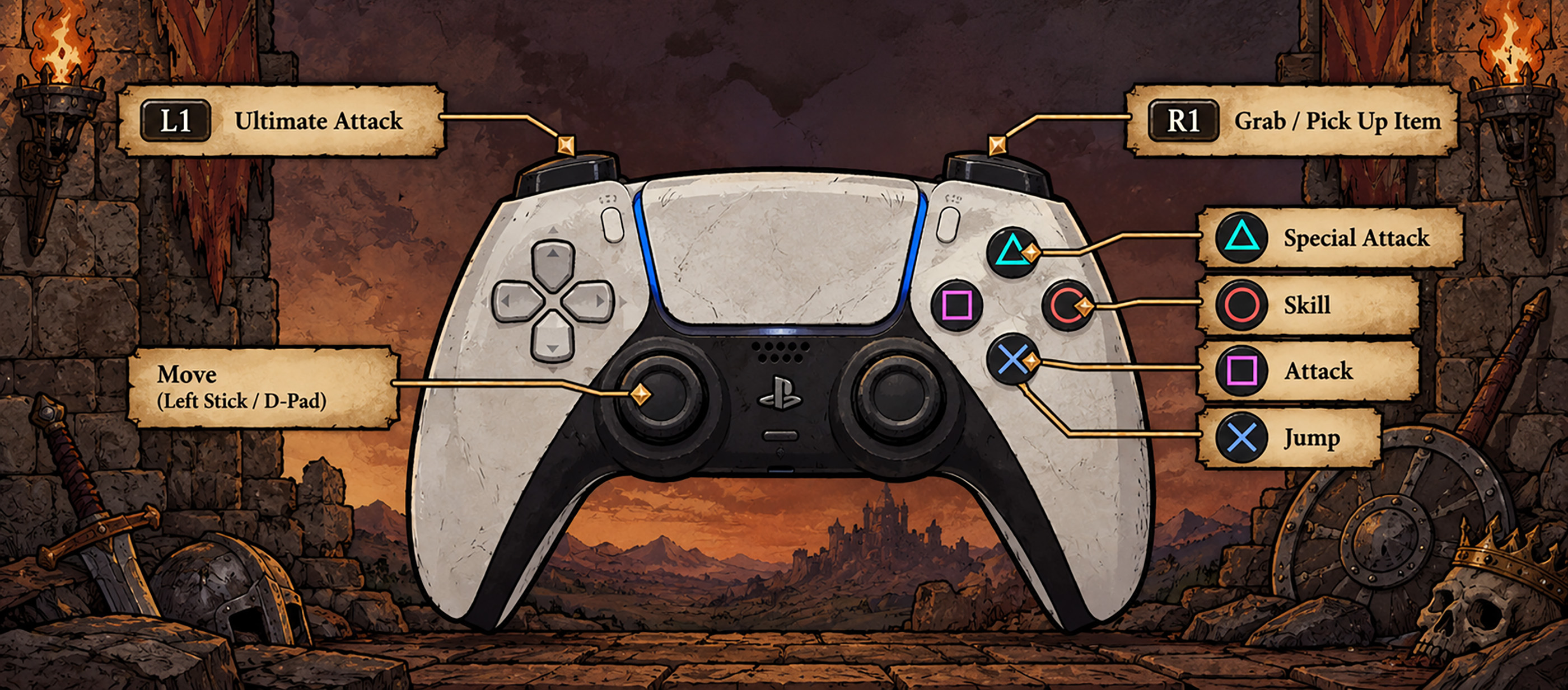
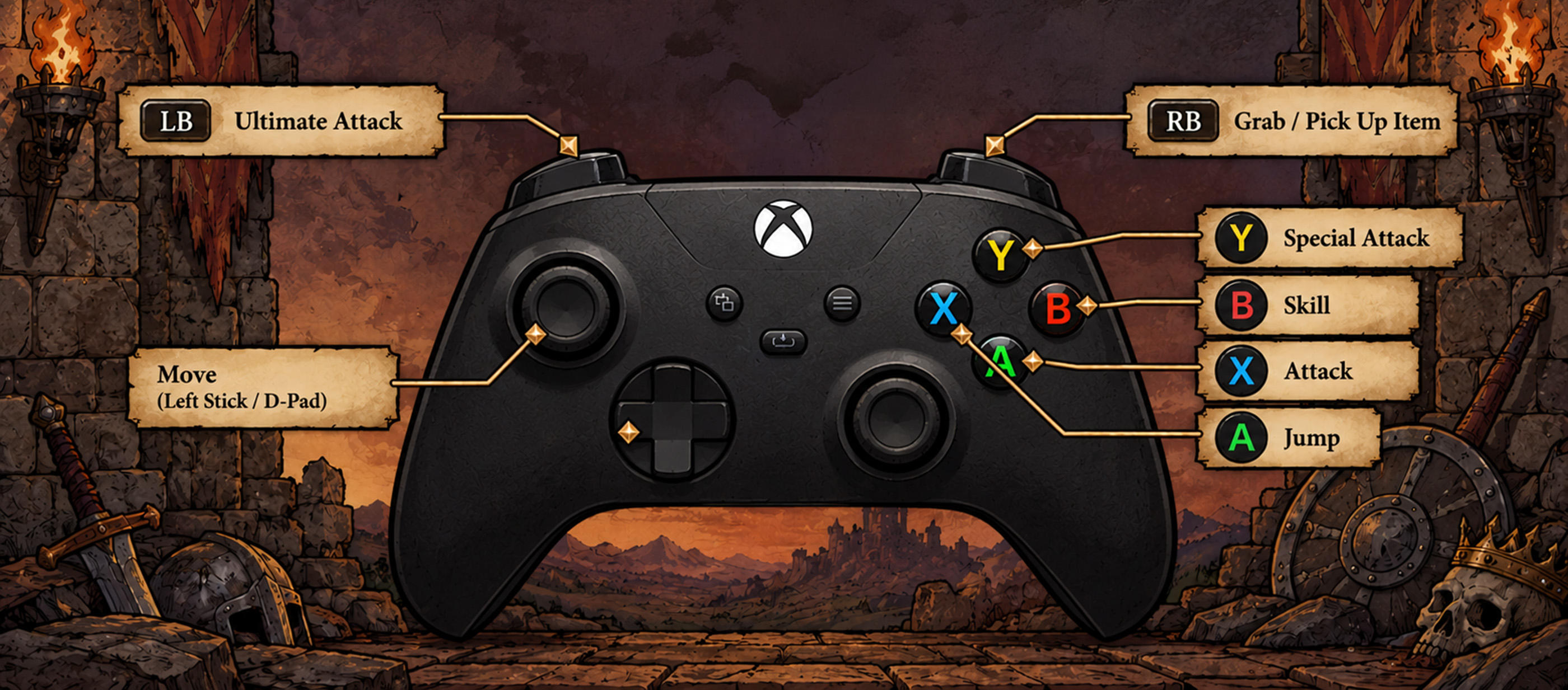
The screenshot confirms all six main PlayStation combat buttons. The Xbox column translates these actions to the corresponding Xbox controller layout.
King's Blade also supports keyboard controls on PC, but the exact default keyboard assignments are not visible in the supplied screenshot. Check the game's keyboard settings rather than assuming that common action game shortcuts apply.
How to Attack in King's Blade
Press Square on PlayStation or X on Xbox to perform a regular attack.
Basic attacks are the foundation of the combat system. Use them to damage enemies, maintain pressure and begin learning your character's attack combinations.
King's Blade features six playable heroes with different fighting styles, so it is worth experimenting with each character's normal attacks.
Pay attention to attack range and recovery time. Repeatedly pressing the attack button without watching nearby enemies can leave you vulnerable.
How to Use Special Attacks
Press Triangle on PlayStation or Y on Xbox to perform a special attack.
Special attacks are separate from regular attacks and can provide additional offensive options depending on the character.
The game features a combat system built around combinations, special moves and different hero abilities.
Try alternating between regular and special attacks to discover which sequences work best against individual enemies and larger groups.
How to Use Skills
Press Circle on PlayStation or B on Xbox to activate your character's skill.
Skills are an important part of what makes the playable heroes feel different.
Instead of relying on the same attack pattern with every character, spend time learning how each hero's abilities fit into combat.
Experiment during easier encounters before attempting more difficult fights.
How to Jump
Press Cross on PlayStation or A on Xbox to jump.
Jumping is useful for movement and positioning during combat.
It can also help you respond to situations where remaining stationary would leave you exposed.
Practise combining movement and jumping so you can reposition without losing track of nearby enemies.
How to Grab and Throw Enemies
Press R1 on PlayStation or RB on Xbox to grab an enemy or pick up an available item.
Grabbing is particularly useful when an enemy gets close enough for direct contact.
To throw an enemy, press the Special Attack button while holding the opponent.
On PlayStation, grab the enemy and press Triangle. On Xbox, grab the enemy and press Y.
This combination is confirmed by the game's developer and is worth learning early because throwing enemies gives you another option during crowded encounters.
How to Use Ultimate Attacks
Press L1 on PlayStation or LB on Xbox to activate an ultimate attack.
Ultimate attacks provide another combat option beyond normal strikes and character skills.
Learn how your chosen hero's ultimate works before relying on it during a difficult encounter.
Rather than using every powerful move immediately, consider whether the current group of enemies presents a good opportunity.
How to Pick Up Items and Use Environmental Weapons
King's Blade includes environmental weapons and interactive objects that can influence combat.
Use R1 on PlayStation or RB on Xbox to pick up an available item.
Pay attention to objects in the environment as you move through each level.
An available weapon or useful item can change how you approach an encounter, especially when several enemies are attacking at once.
Does King's Blade Support Controllers on PC?
Yes. King's Blade supports controllers on PC, including PlayStation and Xbox controllers.
The developer recommends using a gamepad, although keyboard play is also supported.
For the most straightforward experience, use the controller layout shown in the table above.
If you prefer a keyboard, check the game's input settings to identify the assigned keys for Attack, Special Attack, Skill, Jump, Grab and Ultimate Attack.
King's Blade Controls FAQ
What is the attack button in King's Blade?
Press Square on PlayStation or X on Xbox.
How do you perform a special attack?
Press Triangle on PlayStation or Y on Xbox.
How do you use a character skill?
Press Circle on PlayStation or B on Xbox.
How do you grab an enemy?
Press R1 on PlayStation or RB on Xbox when the grab action is available.
How do you throw enemies?
Grab an enemy, then press the Special Attack button. Use Triangle on PlayStation or Y on Xbox.
How do you perform an ultimate attack?
Press L1 on PlayStation or LB on Xbox.
Can you play King's Blade with a keyboard?
Yes. The PC version supports keyboard controls, although the developer recommends a gamepad.
Does King's Blade support local multiplayer?
Yes. The game supports local cooperative play for up to four players and also allows AI companions.
Comments
No comments yet. Be the first to share your thoughts!