Aniimo is a creature collecting adventure where you explore the open world of Idyll, capture wild Aniimo and use their abilities to overcome obstacles and win battles. One of its most important features is Twining, which lets you transform into an Aniimo and control it directly.
This Aniimo controls guide covers PlayStation 5, Xbox Series X|S and PC, including movement, catching, Twining, combat skills, switching creatures and useful shortcuts. The PlayStation controls are taken from the game's controller settings, with corresponding Xbox buttons and researched PC keyboard commands.
Aniimo Controls for PlayStation, Xbox and PC
The table below covers the main default controls. Some actions change depending on whether you are exploring, climbing, catching an Aniimo or using Twine Mode.
| Action | PlayStation 5 | Xbox | PC |
|---|---|---|---|
| Move Character | Left Stick | Left Stick | W, A, S, D |
| Move Camera | Right Stick | Right Stick | Mouse |
| Jump / Climb | Cross | A | Space |
| Dash | Circle | B | Left Shift |
| Interact | Triangle | Y | F |
| Attack / Cancel Climb | Square | X | Left Mouse / X for Climb |
| Catch Mode | L2 | LT | Right Mouse |
| Throw Aniipod in Catch Mode | Square | X | Left Mouse |
| Twine / Untwine | R2 | RT | C |
| Skill 1 | L1 | LB | Q |
| Skill 2 | R1 | RB | E |
| Ultimate Skill | Contextual Menu Wheel | Contextual Menu Wheel | R |
| Mobility Skill | Square + Cross | X + A | T |
| Chain Ultimate | Triangle + Circle | Y + B | Y |
| Switch to Aniimo 1 | D Pad Up | D Pad Up | 1 |
| Switch to Aniimo 2 | D Pad Right | D Pad Right | 2 |
| Switch to Aniimo 3 | D Pad Down | D Pad Down | 3 |
| Switch to Aniimo 4 | D Pad Left | D Pad Left | 4 |
| Track Objective | L3 | LS | V |
| Lock On | R3 | RS | Tab |
| Open Map | Touchpad | View | N / M depending on version |
| Open Menu | Options | Menu | Esc |
| Show Menu Wheel | Hold Triangle | Hold Y | Use Menu Shortcuts |
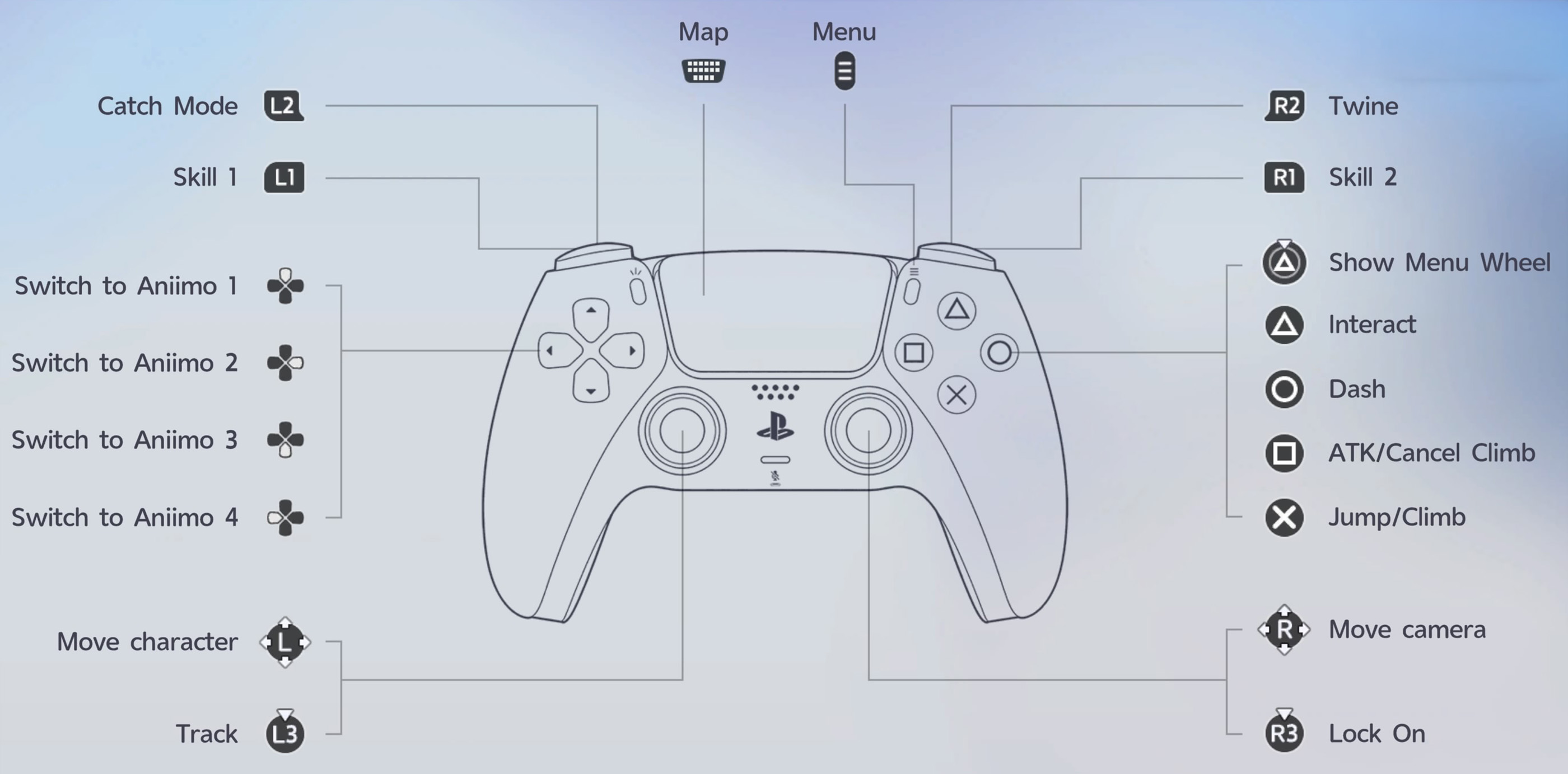
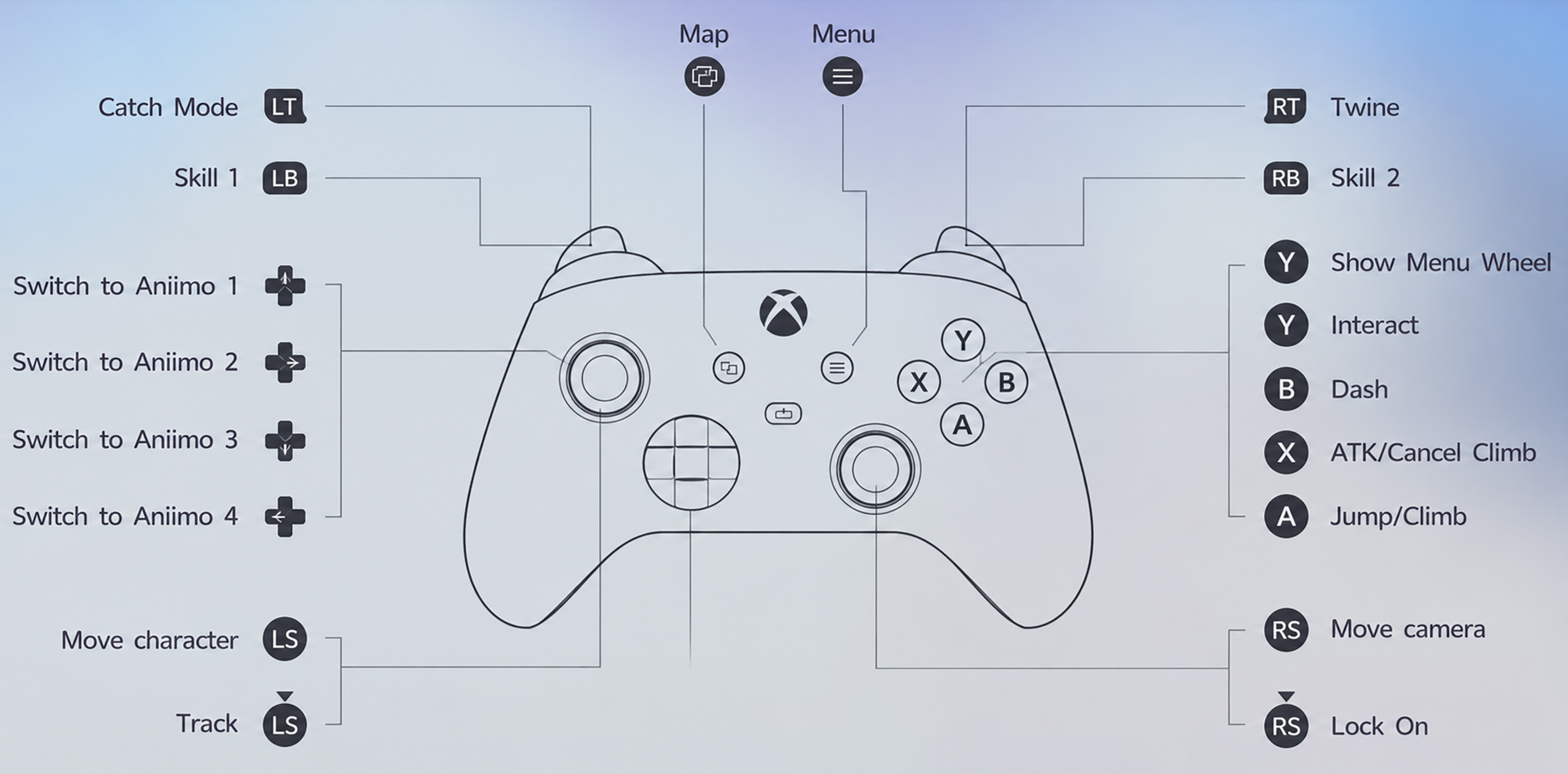
The PlayStation screenshot shows the controller's four Aniimo shortcuts, while PC uses number keys 1 through 4. Keyboard shortcuts can vary with the active mode and saved configuration, so check Settings and Controls if a key behaves differently.
How to Catch Aniimo
Catching wild creatures is one of the main activities in Aniimo. On PlayStation, press L2 to enter Catch Mode. On Xbox, use LT. PC players can enter Catch Mode with the right mouse button.
Once you are aiming, use the appropriate attack or throw input to launch an Aniipod. On PlayStation this is Square, on Xbox it is X, and on PC it is the left mouse button.
Your chance of catching a creature depends on the situation, so pay attention to the information displayed while aiming. You can also switch between available Aniipods when choosing which one to throw.
How to Twine With an Aniimo
Twining allows your Pathfinder to take the form of a selected Aniimo. Press R2 on PlayStation, RT on Xbox or C on PC to enter Twine Mode. Use the same input again to return to your normal character.
While Twined, you can move and use the creature's abilities directly. This is useful for reaching new areas, navigating difficult terrain, solving puzzles and fighting enemies.
Different Aniimo have different movement abilities. Some are suited to gliding, diving or travelling through areas your Pathfinder cannot easily reach.
How to Switch Between Aniimo
You can switch between four assigned Aniimo using the directional pad. Up selects the first creature, Right selects the second, Down selects the third and Left selects the fourth.
On PC, use the number keys 1, 2, 3 and 4. Keeping creatures with different abilities in your active party makes exploration and combat more convenient.
How to Use Skills and Lock On
L1 and R1 activate Skill 1 and Skill 2 on PlayStation. Xbox uses LB and RB, while PC uses Q and E. Certain abilities can be aimed by holding their skill button, adjusting the camera and releasing the button.
Click R3 on PlayStation or RS on Xbox to lock onto a target. PC players can use Tab. Locking on makes it easier to concentrate attacks on a particular enemy.
How to Change Aniimo Controls
Open Settings and select Controls to view the current controller layout. The menu includes an Edit option for button settings.
You can also adjust controller vibration strength. If you are playing on PC, review the keyboard bindings because some actions use different keys depending on the active Aniimo and gameplay mode.
Aniimo Controls FAQ
How do you Twine in Aniimo?
Press R2 on PlayStation, RT on Xbox or C on PC. Press the same button again to untwine.
How do you catch Aniimo?
Enter Catch Mode using L2, LT or the right mouse button, aim at the creature and throw an Aniipod.
How do you change your active Aniimo?
Use the D Pad on a controller or the number keys 1 through 4 on PC.
How do you lock onto an enemy?
Press R3 on PlayStation, RS on Xbox or Tab on PC.
Can you customize the controls?
Yes. Open Settings, select Controls and review the available editing options.


Comments
No comments yet. Be the first to share your thoughts!