WWE 2K26 has one of the deepest control schemes in the series because the same Superstar can strike, grapple, reverse, block, dodge, drag opponents, carry them into environmental attacks, climb the ropes, use weapons, perform submissions, trigger Paybacks and control tag-team partners without changing to a separate fighting mode.
The biggest thing to understand is that WWE 2K26 does not use one universal reversal button for everything. Triangle or Y handles standard reversals, blocking and directional dodges, while attacks performed during combos and the grapple state use the Breaker system. To escape those, you must predict whether the opponent is attempting a light attack, heavy attack or grapple and press the matching button.
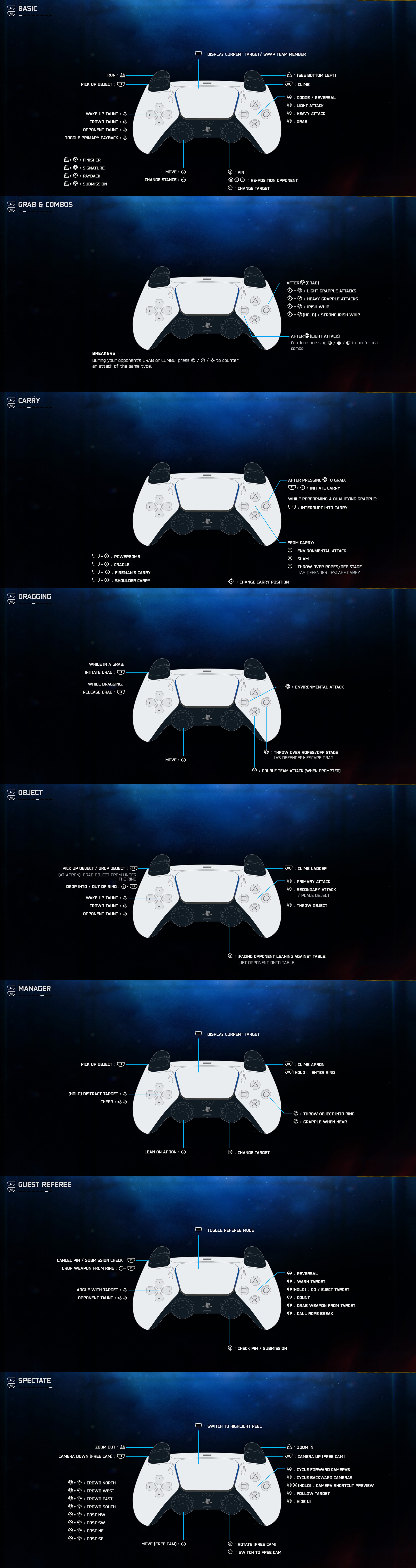
This guide covers the default PlayStation controls shown in WWE 2K26's in-game control screens, their matching Xbox and PC-controller inputs, grapple combos, Carry and Drag controls, weapons, Finishers, Signatures, submissions, Paybacks, Special Guest Referee commands, managers and Spectate controls. Custom bindings and certain Superstar-specific moves can change individual contextual prompts.
Basic WWE 2K26 Controls
| Action | PlayStation | Xbox / PC Controller |
|---|---|---|
| Move | Left Stick | Left Stick |
| Run | Hold L2 + Left Stick | Hold LT + Left Stick |
| Light Attack | Square | X |
| Heavy Attack | Cross | A |
| Grab / Enter Grapple State | Circle | B |
| Dodge / Reversal | Triangle | Y |
| Block / Guard | Hold Triangle | Hold Y |
| Climb | R1 + Direction | RB + Direction |
| Pick Up Object / Weapon | L1 | LB |
| Pin Opponent | Right Stick Down | Right Stick Down |
| Reposition Opponent | Right Stick Direction | Right Stick Direction |
| Lift Grounded Opponent | Right Stick Up | Right Stick Up |
| Change Stance | Press L3 | Press Left Stick |
| Change Target | Press R3 | Press Right Stick |
| Display Current Target / Swap Team Member | Touchpad | View Button |
| Pause | Options | Menu Button |
PC players using an Xbox-style controller can follow the Xbox column. Keyboard bindings can be changed separately in the PC control settings.
How to Run
Hold L2 or LT while moving with the left stick to run.
Do Not Run Constantly
WWE 2K26 places more importance on stamina than previous entries. Sprinting around the ring without a purpose can leave you with less stamina when you actually need to attack, reverse or escape pressure.
Run before a Running Attack
Start moving with L2 or LT and then press the required strike or grapple button as you approach your opponent. Different Superstars have different running moves.
Use Short Bursts
Running is most useful for closing distance, hitting a rebound attack or reaching an opponent before they recover.
Light Attacks
Press Square on PlayStation or X on Xbox to perform a light attack.
Use Light Attacks to Begin Combos
A successful light strike can be followed by additional light, heavy or grapple inputs to create a combo.
Do Not Repeat the Same Sequence
Against another player, repeatedly using the same combo makes your Breaker pattern easy to predict.
Build Stun Pressure
Repeated successful offense contributes to the opponent's Stun Meter. Once stunned, that Superstar temporarily loses access to normal defensive reversals, creating an ideal opening for your strongest offense.
Heavy Attacks
Press Cross or A for a heavy attack.
Heavy attacks generally have longer animations than light strikes but provide stronger offense and different combo routes.
Use Heavy Attacks after Creating an Opening
Throwing out slow attacks while an opponent is ready to reverse them can hand over momentum. Use heavies after a block, successful dodge, stun or missed opponent attack.
Mix Light and Heavy Inputs
A varied combo is harder for a human opponent to read because the defender must correctly guess the corresponding Breaker.
How to Grab
Press Circle or B to put the opponent into the Grapple State.
Once the grab connects, the face buttons change function. Square/X performs a light grapple, Cross/A performs a heavy grapple and Circle/B performs an Irish Whip.
| After Grabbing | PlayStation | Xbox |
|---|---|---|
| Light Grapple | Left Stick + Square | Left Stick + X |
| Heavy Grapple | Left Stick + Cross | Left Stick + A |
| Irish Whip | Left Stick + Circle | Left Stick + B |
| Strong Irish Whip | Left Stick + Hold Circle | Left Stick + Hold B |
| Begin Drag | L1 + Left Stick | LB + Left Stick |
| Begin Carry | R1 + Left Stick | RB + Left Stick |
How Combos Work
After landing a light attack, continue pressing combinations of Square, Cross and Circle on PlayStation or X, A and B on Xbox.
Each Superstar has a large personalized combo list, and the exact sequences can be viewed from the pause menu.
Combo Enders Matter
The final input of a combo can produce a stronger strike or a grapple-based move. Learn several endings rather than memorizing one sequence.
Use the Move List
Pause during an offline match and inspect your Superstar's combo list. Wrestling styles vary dramatically, so a combo that feels excellent for one Superstar may not exist for another.
Change Your Rhythm Online
A defender can attempt Breakers during your combo. Alternating between light, heavy and grapple endings prevents you from becoming predictable.
Breakers Explained
Combos and most moves performed after a grab are defended with Breakers rather than a normal Triangle/Y reversal.
During the opponent's combo or grapple, predict the attack type and press the corresponding button.
| Predicted Attack | PlayStation Breaker | Xbox Breaker |
|---|---|---|
| Light Attack / Light Grapple | Square | X |
| Heavy Attack / Heavy Grapple | Cross | A |
| Grapple Combo Ender / Irish Whip Type | Circle | B |
Do Not Mash All Three Buttons
Breakers are prediction-based. Guessing incorrectly during a combo can prevent another Breaker attempt until that combo sequence finishes.
Study Player Habits
If your opponent repeatedly follows a light strike with a heavy input, remember the pattern and punish it on the next exchange.
Standard Reversals
Press Triangle or Y when the reversal prompt appears.
Standard reversals are used against many ordinary strikes, initial grab attempts, diving attacks, weapon attacks, Signatures and Finishers.
Do Not Press Too Early
The prompt represents a timing window. Pressing before that window is active can waste the opportunity.
Stamina Matters in WWE 2K26
The reversal system is more closely tied to stamina this year. If your Superstar is exhausted, defensive options become more limited.
Watch the Attacker, Not Only the Icon
Learning the opening animation of common moves makes reversals easier even before you consciously notice the prompt.
Blocking
Hold Triangle or Y to raise your guard.
Use Blocking against Strikes
Guarding is safer than attempting a difficult dodge when an opponent is throwing conventional strikes or running attacks.
Blocks Do Not Stop Everything
A guard will not protect you from every grab or special move. An opponent who notices constant blocking can change tactics.
Counterattack after the Block
A successfully absorbed strike can create a small opportunity for you to answer with your own offense.
Dodging
Press Triangle or Y with a left-stick direction as the attack arrives to dodge in that direction.
Choose the Direction
Moving sideways can place you beside an opponent for an immediate counterattack, while retreating creates space.
Do Not Dodge into the Ropes
Check your ring position first. A perfect dodge is less useful when the animation leaves you trapped against a turnbuckle.
Different Superstar Classes Animate Differently
Smaller wrestlers may perform quicker evasive rolls, while larger Superstars use movements appropriate to their size.
Finishers
Press R2 + Cross on PlayStation or RT + A on Xbox when a Finisher is available and your Superstar is in the correct position.
Finishers are position-specific. Some require an opponent standing in front of you, lying on the mat, leaning against a corner, seated on the top rope or positioned outside the ring.
Check the Move List before the Match Gets Important
Know where your Finisher begins before earning it. Searching for the correct position after the opponent is already stunned wastes the opportunity.
Some Positions Have Two Finishers
When two Finishers share the same position, holding the button combination may activate the alternate move instead of tapping it.
Super Finishers Require More Resources
Super Finishers use three stored Finisher segments and are designed as major match-ending attacks.
Signatures
Press R2 + Square or RT + X when the Momentum Meter is full.
Land the Signature before Thinking about the Finisher
Successfully performing a Signature grants a Finisher, making the two systems naturally flow into one another.
Do Not Force the Signature
If the opponent has recovered or moved out of the required position, rebuild control first rather than running directly into a reversal.
Paybacks
Press R2 + Triangle or RT + Y when the selected Payback is available.
The D-Pad Down command toggles the primary Payback when a Superstar has multiple options.
Paybacks Are Contextual
Different Paybacks have different conditions. Some are defensive, some create sudden offense and others depend on Superstar-specific abilities.
Resiliency Can Save a Match
When the required resource is available, Resiliency can provide an immediate escape from a dangerous pin situation.
Submissions
Press R2 + Circle or RT + B to attempt a submission from a valid position.
WWE 2K26's default wheel submission system gives the attacker and defender separate markers. R2/RT rotates one direction and L2/LT rotates the opposite direction.
Attack Damaged Body Parts
A submission is far more threatening after repeatedly targeting the relevant limb or body region.
Do Not Chase Forever
Changing direction instead of continuously following the defender can cut off their escape route inside the submission wheel.
Use the Speed Boost Carefully
Cross or A can boost movement during the submission minigame when that option is enabled. Do not waste the extra speed moving in the wrong direction.
Alternative Submission Settings Exist
Gameplay Options can switch the submission mechanic to an alternate input-based system if you prefer it.
Pinning an Opponent
Flick the right stick down to attempt a pin when the opponent is grounded and the match rules permit it.
Pin after Major Damage
A random pin after a basic strike rarely threatens a healthy opponent. Signatures, Finishers and high-impact sequences make the kick-out minigame considerably harder.
Watch for Rope Position
Dragging or repositioning an opponent away from the ropes before pinning can reduce the chance of a rope-break escape.
How to Kick Out
The default timed kick-out minigame requires you to flick the right stick up when the moving indicator reaches the target zone.
Stay Calm as the Target Shrinks
Lower health makes the target window more difficult, but rapidly flicking the stick outside the zone does not help.
Alternative Button-Mash Kick-Out
Gameplay Options can switch to the alternate system where Cross on PlayStation or A on Xbox is repeatedly pressed to fill the escape meter.
Hold Instead of Mash
Accessibility options can replace certain repeated-button minigames with hold inputs.
Taunts
| Taunt | PlayStation | Xbox |
|---|---|---|
| Wake Up Taunt | D-Pad Up | D-Pad Up |
| Crowd Taunt | D-Pad Left | D-Pad Left |
| Opponent Taunt | D-Pad Right | D-Pad Right |
| Toggle Primary Payback | D-Pad Down | D-Pad Down |
Use Wake-Up Taunts to Set Up Finishers
When your Finisher requires a standing opponent, a Wake-Up Taunt can bring the grounded Superstar back to their feet while you prepare the correct position.
Do Not Taunt in Striking Distance
Taunt animations create an obvious opening. Make space first.
Entering, Exiting and Climbing the Ring
R1 or RB is the primary contextual traversal command.
| Traversal Action | PlayStation | Xbox |
|---|---|---|
| Climb | R1 + Direction | RB + Direction |
| Enter / Exit Ring | Hold R1 + Direction | Hold RB + Direction |
| Climb Top Rope | Hold R1 + Direction | Hold RB + Direction |
| Move to Apron / Middle Rope | Tap R1 + Direction | Tap RB + Direction |
| Lean toward Ropes for Springboard | Tap L1 + Direction | Tap LB + Direction |
Dragging an Opponent
Enter the Grapple State with Circle or B, then press L1/LB with the left stick to begin dragging.
| Drag Action | PlayStation | Xbox |
|---|---|---|
| Initiate Drag | L1 + Left Stick | LB + Left Stick |
| Move while Dragging | Left Stick | Left Stick |
| Release Drag | L1 | LB |
| Environmental Attack | Square | X |
| Throw over Ropes / Off Stage | Circle | B |
| Escape Drag as Defender | Circle | B |
| Double-Team Attack when Prompted | Cross | A |
Drag before a Pin
Moving a damaged opponent away from the ropes can create a cleaner pin attempt.
Drag toward Environmental Opportunities
Barricades, tables, ropes and other contextual locations may unlock attacks that are unavailable in the center of the ring.
Carry Controls
After grabbing the opponent, use R1/RB with a left-stick direction to initiate a carry.
| Carry Action | PlayStation | Xbox |
|---|---|---|
| Powerbomb Carry | R1 + Left Stick Up | RB + Left Stick Up |
| Cradle Carry | R1 + Left Stick Down | RB + Left Stick Down |
| Fireman's Carry | R1 + Left Stick Left | RB + Left Stick Left |
| Shoulder Carry | R1 + Left Stick Right | RB + Left Stick Right |
| Interrupt Qualifying Grapple into Carry | R1 | RB |
| Move while Carrying | Left Stick | Left Stick |
| Change Carry Position | Right Stick Direction | Right Stick Direction |
| Slam Opponent | Cross | A |
| Environmental Attack | Square | X |
| Throw over Ropes / Off Stage | Circle | B |
| Escape Carry as Defender | Circle | B |
Carry with a Destination in Mind
Do not lift an opponent just because the option appears. Decide whether you are aiming for the ropes, a barricade, a table, ringside equipment or another environmental target.
Change Carry Position
The right stick lets you rotate between available carry holds, which can make positioning much easier.
Weapons and Object Controls
| Weapon / Object Action | PlayStation | Xbox |
|---|---|---|
| Pick Up / Drop Object | L1 | LB |
| Retrieve Weapon from under Ring | L1 at Apron | LB at Apron |
| Primary Weapon Attack | Square | X |
| Secondary Weapon Attack / Place Object | Cross | A |
| Throw Object | Circle + Direction | B + Direction |
| Throw Object Into / Out of Ring | L1 + Direction | LB + Direction |
| Set Up Table / Ladder | Cross | A |
| Lift Opponent onto Table | Right Stick Up | Right Stick Up |
| Climb Ladder | R1 | RB |
| Rotate Standing Ladder | Hold L1 + Right Stick | Hold LB + Right Stick |
| Set Up Ladder Bridge near Apron | L1 + R1 | LB + RB |
Use the Correct Attack
Square/X and Cross/A can trigger different weapon interactions. Experiment with both instead of repeatedly using the same strike.
Objects Have More Physical Reactions in WWE 2K26
The updated physics system allows bodies to react more naturally when landing on chairs, titles, steel steps, tables and other ringside objects.
New Hardcore Toys Matter
WWE 2K26 adds interactive Shopping Carts, thumbtacks and stackable tables, giving environmental matches significantly more possibilities than a simple chair attack.
Tag-Team Commands
When an AI-controlled illegal tag partner is standing outside the ring, L1/LB plus the D-Pad can issue contextual instructions.
| AI Partner Command | PlayStation | Xbox |
|---|---|---|
| Remove Turnbuckle Pad | L1 + D-Pad Up | LB + D-Pad Up |
| Retrieve and Set Up Table | L1 + D-Pad Left | LB + D-Pad Left |
| Retrieve Weapon and Slide It into Ring | L1 + D-Pad Down | LB + D-Pad Down |
| Attack Opposing Illegal Partner | L1 + D-Pad Right | LB + D-Pad Right |
Press the Touchpad or View button when the match allows you to display the current target or swap control to another team member.
Manager Controls
Managers have their own contextual control layout when they are playable at ringside.
| Manager Action | PlayStation | Xbox |
|---|---|---|
| Move / Lean on Apron | Left Stick | Left Stick |
| Display Current Target | Touchpad | View |
| Pick Up Object | L1 | LB |
| Climb Apron | R1 | RB |
| Enter Ring | Hold R1 | Hold RB |
| Throw Object into Ring | Circle | B |
| Grapple when Close | Circle | B |
| Change Target | R3 | Press Right Stick |
Manager taunts and distraction commands are contextual and shown on the D-Pad during the match.
Special Guest Referee Controls
| Referee Action | PlayStation | Xbox |
|---|---|---|
| Toggle Referee / Wrestler Mode | Touchpad | View Button |
| Check Pin / Submission | Right Stick Down | Right Stick Down |
| Count | Cross | A |
| Call Rope Break | Circle | B |
| Cancel Pin / Submission Check | L1 | LB |
| Warn Target | Square | X |
| Disqualify / Eject Target | Hold Square | Hold X |
| Take Weapon from Wrestler | Circle | B |
| Drop Weapon from Ring | L1 + Direction | LB + Direction |
| Argue with Target | D-Pad Up | D-Pad Up |
Referee Mode and Wrestler Mode Are Different
Use the Touchpad or View button when you need to switch between officiating duties and full wrestling control.
Do Not Rush the Count
Guest Referee gameplay is about controlling the match as much as fighting. Watch positioning, rope breaks and submissions before committing to a decision.
Spectate Controls
| Spectate Action | PlayStation | Xbox |
|---|---|---|
| Switch to Highlight Reel | Touchpad | View Button |
| Zoom Out | L2 | LT |
| Zoom In | R2 | RT |
| Camera Down in Free Cam | L1 | LB |
| Camera Up in Free Cam | R1 | RB |
| Cycle Forward Cameras | Triangle | Y |
| Cycle Backward Cameras | Square | X |
| Follow Target | Cross | A |
| Hide UI | Circle | B |
| Move Free Camera | Left Stick | Left Stick |
| Rotate Free Camera | Right Stick | Right Stick |
| Switch to Free Cam | R3 | Press Right Stick |
Third-Person Camera Controls
WWE 2K26 supports a controllable third-person camera during supported gameplay and entrance situations.
When free camera movement takes over the right stick, actions normally assigned directly to right-stick directions can require R2/RT plus the corresponding right-stick direction instead.
Remember This before Trying to Pin
If Right Stick Down suddenly controls the camera rather than starting a pin, use the modifier required by the active camera configuration.
Pulling Down Superstar Straps
Certain Superstars with compatible attire can pull down their straps during a match.
Hold R2 and press D-Pad Down on PlayStation, or hold RT and press D-Pad Down on Xbox.
This is a presentation feature rather than a combat advantage, and it is only available to supported Superstars and attires.
Frequently Asked Questions
How do you punch in WWE 2K26?
Press Square on PlayStation or X on Xbox for a light attack.
How do you perform a heavy attack?
Press Cross on PlayStation or A on Xbox.
How do you grab an opponent?
Press Circle or B to enter the Grapple State.
How do you reverse?
Press Triangle or Y when the standard reversal prompt appears.
Why does Triangle/Y not reverse some grapples?
Combos and many moves performed after a grab use Breakers instead. Predict the attack type and press Square/X, Cross/A or Circle/B accordingly.
How do you block?
Hold Triangle on PlayStation or Y on Xbox.
How do you dodge?
Press Triangle/Y with a left-stick direction as the incoming attack reaches you.
How do you perform a Signature?
Press R2 + Square on PlayStation or RT + X on Xbox when the Momentum Meter is ready.
How do you perform a Finisher?
Press R2 + Cross or RT + A while your Superstar is in a valid Finisher position.
How do you perform a Submission?
Press R2 + Circle or RT + B from a valid submission position.
How do you use a Payback?
Press R2 + Triangle or RT + Y when the active Payback is available.
How do you pin?
Flick the right stick down when the opponent is grounded.
How do you lift an opponent from the floor?
Flick the right stick up.
How do you drag an opponent?
Grab with Circle/B, then press L1/LB with a left-stick direction.
How do you carry an opponent?
Grab first, then use R1/RB with a left-stick direction to select the desired carry position.
How do you pick up a chair or weapon?
Press L1 or LB while standing close to the object.
How do you climb the top rope?
Hold R1/RB while moving toward the corner.
How do you change targets?
Press R3 or the right stick.
Can WWE 2K26 controls be customized?
Available controller, gameplay and accessibility settings can change how several inputs and minigames behave. Check the in-game settings if your layout differs from the defaults above.
Final Control Advice
Start by learning six commands: Square/X for light attacks, Cross/A for heavy attacks, Circle/B for grabs, Triangle/Y for reversals, R2/RT plus Cross/A for Finishers and Right Stick Down for pins. Those inputs cover the basic flow of almost every normal match.
The next step is learning what Triangle/Y cannot solve. Breakers are essential in WWE 2K26. When you are caught inside a combo or grapple, predict whether the opponent is using a light, heavy or grapple input and answer with the matching face button.
Finally, protect your stamina. WWE 2K26 deliberately gives stamina a stronger relationship with defense and reversals, so unnecessary running and frantic offense can leave you vulnerable exactly when you need to escape.
See our WWE 2K26 Tips and Tricks Guide for reversal timing, Breaker strategy, stamina management, Finishers, submissions, weapons, online play and match-specific advice.
Comments
No comments yet. Be the first to share your thoughts!