Marvel's Spider-Man Remastered is easy to pick up, but its controller layout becomes much deeper once combat, gadgets, aerial movement, wall running and advanced swinging start working together.
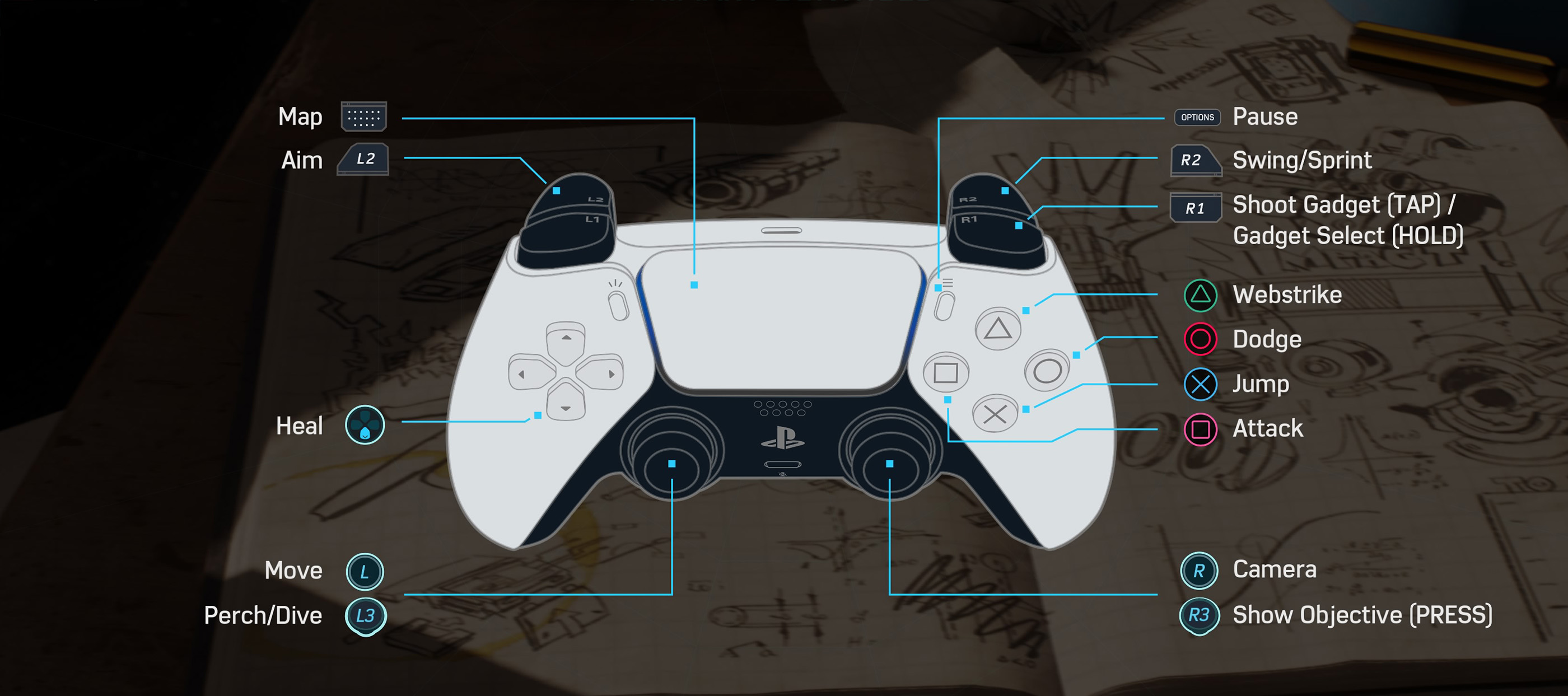
The most important buttons are positioned so you can move through Manhattan without constantly taking your thumbs off the sticks. R2 handles swinging and sprinting, Cross handles jumping, Square attacks, Circle dodges and Triangle closes distance with a Web Strike. R1 controls your selected gadget while L2 lets you aim more precisely.
The table below follows the standard PlayStation controller layout shown in the game's controls screen. PC players using a PlayStation controller will see essentially the same button prompts, while custom mappings may differ.
Marvel's Spider-Man Remastered Controls
| Action | PlayStation |
|---|---|
| Move | Left Stick |
| Camera | Right Stick |
| Attack | Square |
| Dodge | Circle |
| Jump | Cross |
| Web Strike | Triangle |
| Swing / Sprint | Hold R2 |
| Shoot Gadget | Tap R1 |
| Select Gadget | Hold R1 |
| Aim | L2 |
| Heal | D Pad Down |
| Perch / Dive | Press L3 |
| Show Objective | Press R3 |
| Map | Touchpad |
| Pause | Options |
Some commands change according to context. Combat, environmental interactions, stealth takedowns and traversal can add temporary prompts that take priority over the standard action assigned to a button.
Movement and Camera
Use the left stick to move Spider-Man and the right stick to control the camera.
Camera control matters far more than it first appears. Looking toward the next building helps the swinging system choose a useful web anchor, while keeping enemies visible makes dodging much easier during crowded fights.
Turn Before You Swing
Point the camera roughly toward the route you want before holding R2. This produces much cleaner turns than trying to force Spider-Man into another direction after a swing is already underway.
How to Swing
Hold R2 while airborne to begin web swinging when suitable buildings or structures are nearby.
Release R2 near the forward part of the swing to preserve momentum, then fire another web once Spider-Man begins falling.
Do Not Hold R2 Forever
Good traversal comes from timing your release. Letting go at the right moment gives Spider-Man height and forward speed that can be carried into the next swing.
Use Jump at the End of a Swing
Pressing Cross as you release a swing can give you extra distance and helps maintain flow across wider streets.
How to Sprint and Wall Run
Hold R2 while moving on the ground to sprint. When Spider-Man reaches a suitable wall with enough momentum, he can transition into wall running automatically.
Use Wall Running to Maintain Speed
If a building interrupts your route, running across or up the surface is often faster than dropping to street level and starting again.
Jumping
Press Cross to jump.
Jumping is also part of traversal chains. Use it after swings, while moving across rooftops and when transitioning away from walls.
Do Not Wait Until You Hit the Ground
Spider-Man is fastest when you connect aerial movement continuously. Swing, release, jump and immediately prepare the next web instead of falling all the way to the street.
Diving and Perching
Press L3 when the current situation allows Spider-Man to dive or perch.
Use a Dive to Build Speed
When you have plenty of height, diving before beginning the next swing can create substantially more momentum.
Perch before a Stealth Encounter
High ledges provide a clear view of enemy routes and make it easier to identify isolated targets.
Basic Attacks
Press Square to perform a standard melee attack.
Repeated presses create attack combinations, while movement input helps Spider-Man shift toward nearby enemies.
Do Not Stay on One Enemy Too Long
Large encounters are easier when you keep moving between targets. Staying stationary gives ranged enemies and attackers behind you more time to land a hit.
How to Dodge
Press Circle when an incoming attack is indicated by Spider-Sense or when you need to reposition quickly.
Dodging is one of the most important combat skills in the game. A perfectly timed dodge can completely change the flow of an encounter.
React to Spider-Sense
Do not stare only at the enemy directly in front of you. Watch the warning around Spider-Man's head and dodge when it becomes urgent.
How to Web Strike
Press Triangle to perform a Web Strike against a valid enemy.
This quickly closes distance and is especially useful against ranged enemies or targets standing away from the main group.
Use Web Strike to Control the Battlefield
Instead of running across an arena, move instantly toward the enemy causing the biggest problem.
Using Gadgets
Tap R1 to fire the currently selected gadget. Hold R1 to access gadget selection.
Gadgets are much more powerful when combined with the environment and melee attacks rather than treated as separate weapons.
Web Enemies to Walls
Webbed enemies near walls, floors or environmental surfaces can often be removed from the fight quickly.
Use Gadgets before You Are Surrounded
Crowd control tools are at their strongest before enemies close in from every direction.
Aiming
Hold L2 to enter precise aiming when the current action supports it.
Aiming is useful for gadgets, environmental interactions and situations where automatic targeting selects the wrong object.
Check the Environment
Many combat arenas contain objects that can be pulled, thrown or otherwise used against enemies. Looking around before starting a fight often reveals easier solutions.
Healing
Press D Pad Down when healing is available.
Healing uses available Focus, so there is a tactical choice between restoring health and spending Focus on offensive actions such as Finishers.
Heal before Your Health Becomes Critical
Waiting until the final possible moment can be risky during encounters with firearms, explosives or several enemies attacking at once.
Map and Objectives
Press the touchpad to open the map. Press R3 to display your current objective.
The map is useful for selecting missions, locating districts and checking nearby activities throughout Manhattan.
Use R3 When the Route Is Unclear
If you arrive near an objective but cannot immediately see where to go, displaying the objective again can help you identify the correct building or direction.
Stealth Controls
Stealth uses the same movement, aiming, Web Strike and perch controls as regular gameplay, but contextual takedown prompts appear when Spider-Man is positioned correctly.
Check Whether a Takedown Is Safe
Do not immediately attack the first enemy below you. Observe nearby guards and wait until a target is isolated when possible.
Move between Elevated Positions
Perches, beams and rooftops are safer than repeatedly dropping to ground level. Use height to study patrol routes before committing to another takedown.
Combat Controls You Should Learn First
You do not need to memorize every advanced move immediately. Start with Square for attacks, Circle for dodging, Triangle for Web Strike and R1 for gadgets.
Once those inputs become automatic, begin mixing launches, aerial combos, environmental attacks, perfect dodges and suit powers into the same encounter.
Can You Remap the Controls?
Marvel's Spider-Man Remastered provides control customization options, and the PC version offers additional keyboard, mouse and controller configuration.
If you change the default mapping, always check your current bindings when following a guide because on screen prompts will reflect your custom setup.
Frequently Asked Questions
How do you attack in Marvel's Spider-Man Remastered?
Press Square on a PlayStation controller.
How do you dodge?
Press Circle when an attack is incoming or whenever you need to reposition.
How do you web swing?
Hold R2 while airborne near suitable buildings.
How do you sprint?
Hold R2 while moving on the ground.
How do you jump?
Press Cross.
How do you perform a Web Strike?
Press Triangle while targeting an enemy.
How do you shoot a gadget?
Tap R1 to use the currently selected gadget.
How do you change gadgets?
Hold R1 to access gadget selection.
How do you aim?
Hold L2.
How do you heal?
Press D Pad Down when enough Focus is available.
How do you open the map?
Press the touchpad.
How do you show the current objective?
Press R3.
How do you dive?
Press L3 while airborne when diving is available.
Does Marvel's Spider-Man Remastered support controller remapping?
Yes. Available customization depends on platform and input device.
Build Muscle Memory around Movement and Dodge
The best place to start is not memorizing every combo. Become comfortable with R2 swinging, Cross jumping, Circle dodging and Triangle Web Strike first. Those inputs keep Spider-Man moving, and movement is the foundation of both traversal and combat.
Once dodging feels automatic, add gadgets and environmental attacks. The combat system becomes much easier when enemies are constantly being moved, webbed, launched or separated instead of surrounding you on the ground.
See our Marvel's Spider-Man Remastered Tips and Tricks Guide for combat, swinging, gadgets, stealth, upgrades and exploration advice.
Comments
No comments yet. Be the first to share your thoughts!