Sniper Elite: Resistance gives you far more to manage than aiming a rifle and pulling the trigger. Harry Hawker can scout with binoculars, tag soldiers, adjust scope zeroing, steady his aim with Empty Lung, crawl through cover, use traps, switch ammunition, distract guards and quietly eliminate enemies before anyone knows he is there.
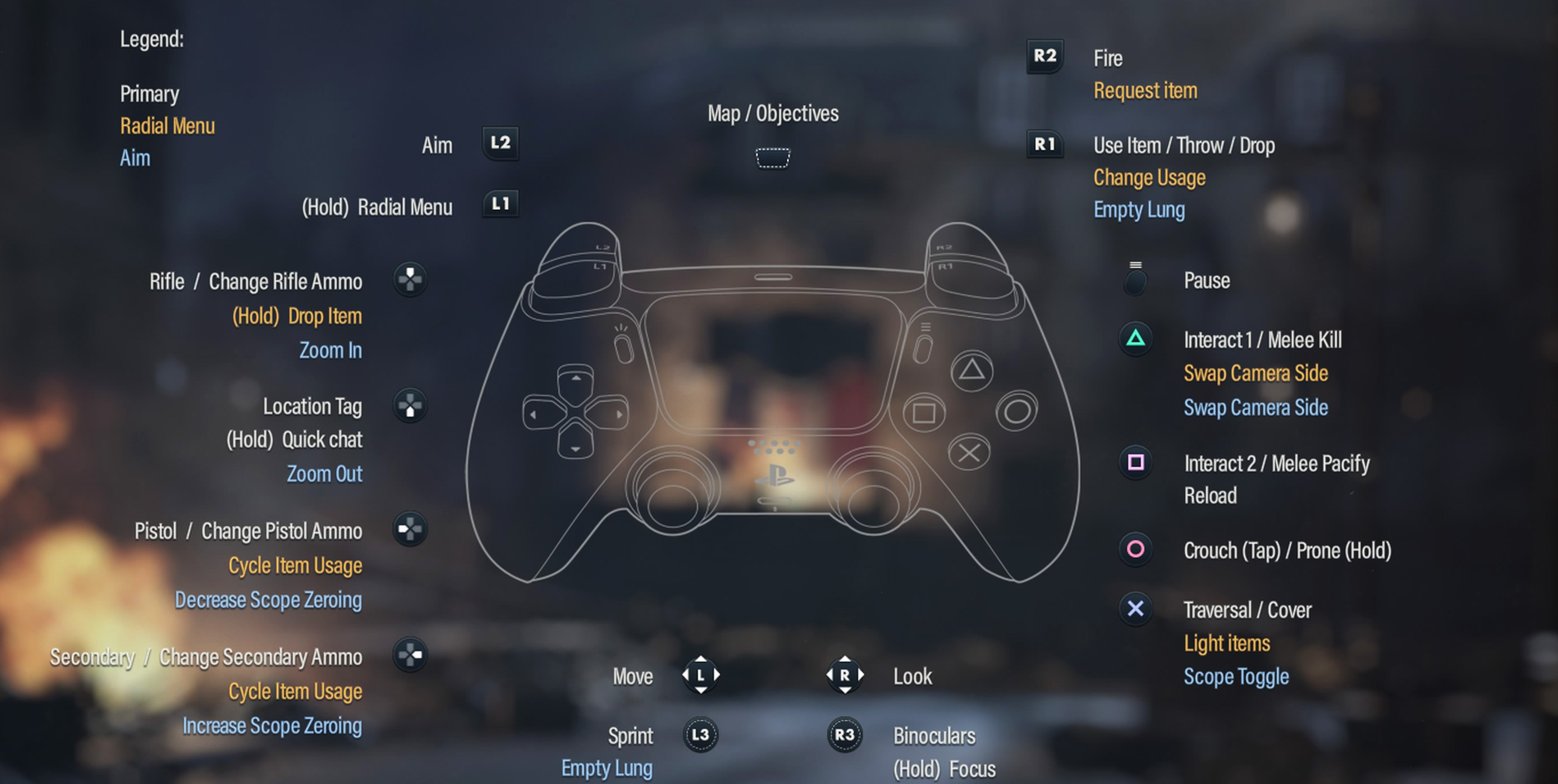
The default controller layout is designed around that mix of sniping and stealth. L2 or LT aims, R2 or RT fires, L1 or LB opens the radial menu and R3 controls binoculars and Focus. Several buttons also change function depending on whether you are aiming, standing beside an enemy or using an item.
This Sniper Elite: Resistance controls guide covers the standard PlayStation and Xbox layout plus the main keyboard and mouse controls on PC.
PlayStation and Xbox Controls
| Action | PlayStation | Xbox |
|---|---|---|
| Move | Left Stick | Left Stick |
| Look | Right Stick | Right Stick |
| Sprint | L3 | Press Left Stick |
| Binoculars | R3 | Press Right Stick |
| Focus | Hold R3 | Hold Right Stick |
| Aim | L2 | LT |
| Fire | R2 | RT |
| Radial Menu | Hold L1 | Hold LB |
| Use or Throw Selected Item | R1 | RB |
| Empty Lung while Scoped | R1 | RB |
| Reload | Square | X |
| Pacify Enemy | Square when Prompted | X when Prompted |
| Interact | Triangle | Y |
| Melee Kill | Triangle when Prompted | Y when Prompted |
| Swap Camera Side | Hold Triangle | Hold Y |
| Traversal / Vault / Climb | Cross | A |
| Scope Toggle | Cross while Aiming | A while Aiming |
| Crouch | Circle | B |
| Prone | Hold Circle | Hold B |
| Select Rifle | D Pad Up | D Pad Up |
| Select Pistol | D Pad Left | D Pad Left |
| Select Secondary Weapon | D Pad Right | D Pad Right |
| Tag Location | D Pad Down | D Pad Down |
| Quick Chat | Hold D Pad Down | Hold D Pad Down |
| Map / Objectives | Touchpad | View Button |
| Pause | Options | Menu Button |
Aiming and Shooting
Hold L2 or LT to aim and press R2 or RT to fire. With a scoped rifle, Cross or A can change between the scope and the closer aiming view when available.
Use Empty Lung for Difficult Shots
While looking through a rifle scope, use R1 or RB when Empty Lung is available. This steadies your aim and provides extra ballistic information, making long distance shots much easier to judge.
Do not use it for every soldier you see. Save it for small targets, difficult angles and shots where wind or bullet drop matters.
Binoculars and Focus
Press R3 to use binoculars. Holding R3 activates Focus when available.
Binoculars are one of the most useful tools in the game because tagged soldiers remain much easier to track after you leave your observation position.
Scout before Entering a Compound
Scan windows, towers, rooftops and roads before moving forward. Tagging officers, snipers and alarm locations can reveal a much safer route through an objective.
Use Focus in Tight Areas
Focus is especially useful when walls, buildings or vegetation make it difficult to understand where nearby enemies are positioned.
Crouching and Going Prone
Press Circle or B to crouch. Hold the same button to go prone.
Crouching is ideal for most stealth movement because you remain reasonably mobile while reducing your visibility. Going prone is slower but useful when hiding in low vegetation, crossing exposed areas or setting up a stable firing position.
Reloading and Silent Takedowns
Square or X normally reloads your weapon. Near an unaware enemy it can also perform the contextual pacify action when offered.
Triangle or Y handles many interactions and can perform a lethal melee kill when the appropriate prompt appears.
Choose between Killing and Pacifying
You do not have to kill every soldier. A quiet non lethal takedown can remove a guard without firing a shot, while a lethal takedown permanently removes the threat.
Radial Menu and Equipment
Hold L1 or LB to open the radial menu. Select the weapon, item or explosive you want, then use the appropriate contextual command.
The radial menu is important because Harry can carry much more than his rifle. Depending on your loadout and what you have collected during the mission, you may have grenades, mines, TNT, bottles, bandages, med kits and specialised ammunition available.
Prepare Equipment before the Fight Starts
Select the item you want while you are still hidden. Searching through equipment after several soldiers have already spotted you is much harder.
Weapon Quick Select Controls
| Weapon Action | PlayStation | Xbox |
|---|---|---|
| Select Rifle | D Pad Up | D Pad Up |
| Select Pistol | D Pad Left | D Pad Left |
| Select Secondary Weapon | D Pad Right | D Pad Right |
| Change Relevant Ammo / Item Usage | Contextual D Pad Input | Contextual D Pad Input |
Different ammunition can dramatically change how a weapon behaves. Suppressed or quieter ammunition is valuable for stealth, while specialised rounds can be useful against tougher targets or equipment.
Scope Zoom and Zeroing
Scoped rifles allow you to change zoom level and adjust scope zeroing when the equipped scope supports those functions.
Zoom helps with target identification, while zeroing compensates for distance. The longer the shot, the more useful correct range estimation becomes.
Do Not Confuse Zoom with Zeroing
Magnifying the target only makes it appear larger. Zeroing changes the distance your sight is calibrated for.
PC Keyboard and Mouse Controls
| Action | Default PC Control |
|---|---|
| Move | W / A / S / D |
| Sprint | Left Shift |
| Walk | Z |
| Crouch / Prone | Left Ctrl / Hold Left Ctrl |
| Traversal / Cover | Space |
| Aim | Right Mouse Button |
| Fire | Left Mouse Button |
| Scope Toggle | C |
| Empty Lung | Space while Scoped |
| Increase Scope Zeroing | E |
| Decrease Scope Zeroing | Q |
| Zoom In | Mouse Wheel Up |
| Zoom Out | Mouse Wheel Down |
| Swap Camera Side | Middle Mouse Button |
| Select Rifle | 1 |
| Select Secondary Weapon | 2 |
| Select Pistol | 3 |
| Select Grenade | 4 |
| Select Bandage | 5 |
| Select Med Kit | 6 |
| Select Bottle | 7 |
| Radial Menu | Q |
| Map / Current Objective | M |
| Tutorial / Collectible / Scoreboard | Tab |
| Quick Save | F5 |
| Quick Load | F9 |
| Quick Chat / Whistle | T |
| Voice Chat | V |
How to Remap the Controls
Open Options and enter the Controls menu to review the current layout and available customization settings.
Sniper Elite: Resistance provides extensive control and accessibility options, including adjustable stick sensitivity, stick inversion, vibration settings, adaptive trigger settings and control reminders.
If you change the layout, prioritize Aim, Fire, Empty Lung, Crouch, Focus and the radial menu. These are used constantly and should feel comfortable without requiring you to reposition your hands.
Frequently Asked Questions
How do you aim in Sniper Elite: Resistance?
Hold L2 on PlayStation or LT on Xbox. On PC, use the right mouse button.
How do you shoot?
Press R2 on PlayStation, RT on Xbox or the left mouse button on PC.
How do you hold your breath?
Use Empty Lung while aiming through a rifle scope. On the standard controller layout this uses R1 or RB when the ability is available.
How do you use binoculars?
Press R3 or the right stick to enter binocular view.
How do you use Focus?
Hold R3 or the right stick when Focus is available.
How do you crouch?
Press Circle on PlayStation or B on Xbox. Hold the button to go prone.
How do you change weapons quickly?
Use D Pad Up for the rifle, D Pad Left for the pistol and D Pad Right for the secondary weapon.
How do you open the equipment wheel?
Hold L1 on PlayStation or LB on Xbox.
How do you tag enemies?
Use your binoculars to identify enemies and keep the reticle over a target to mark it. D Pad Down is also used for location tagging.
Can you change the controls?
Yes. The game provides configurable controls and a wide selection of controller and accessibility settings.
Get Comfortable with Scouting First
The easiest way to learn Sniper Elite: Resistance is not by immediately searching for the longest possible shot. Learn the scouting loop first: reach cover, use binoculars, tag important targets, identify an escape route and only then decide where to shoot from.
Once aiming, Empty Lung, quick weapon selection and crouching become automatic, the controller stops feeling complicated and starts functioning like a proper sniper toolkit.
See our Sniper Elite: Resistance Tips and Tricks Guide for stealth, sniping, sound masking, loadouts, workbenches, Propaganda Missions and Axis Invasion advice.
Comments
No comments yet. Be the first to share your thoughts!