Looking for the complete Firefighting Simulator: Ignite controls? This guide covers the default controls for PlayStation 5, Xbox Series X|S, and PC, including on-foot firefighter controls, vehicle controls, aerial platform controls, squad commands, and interaction shortcuts. Whether you're responding to your first emergency or coordinating a full crew during large-scale incidents, knowing every control will help you work faster and save more lives.
The controls below are based on the default controller layout shown in-game. PC players use equivalent keyboard and mouse bindings, which can also be customized through the Settings menu.
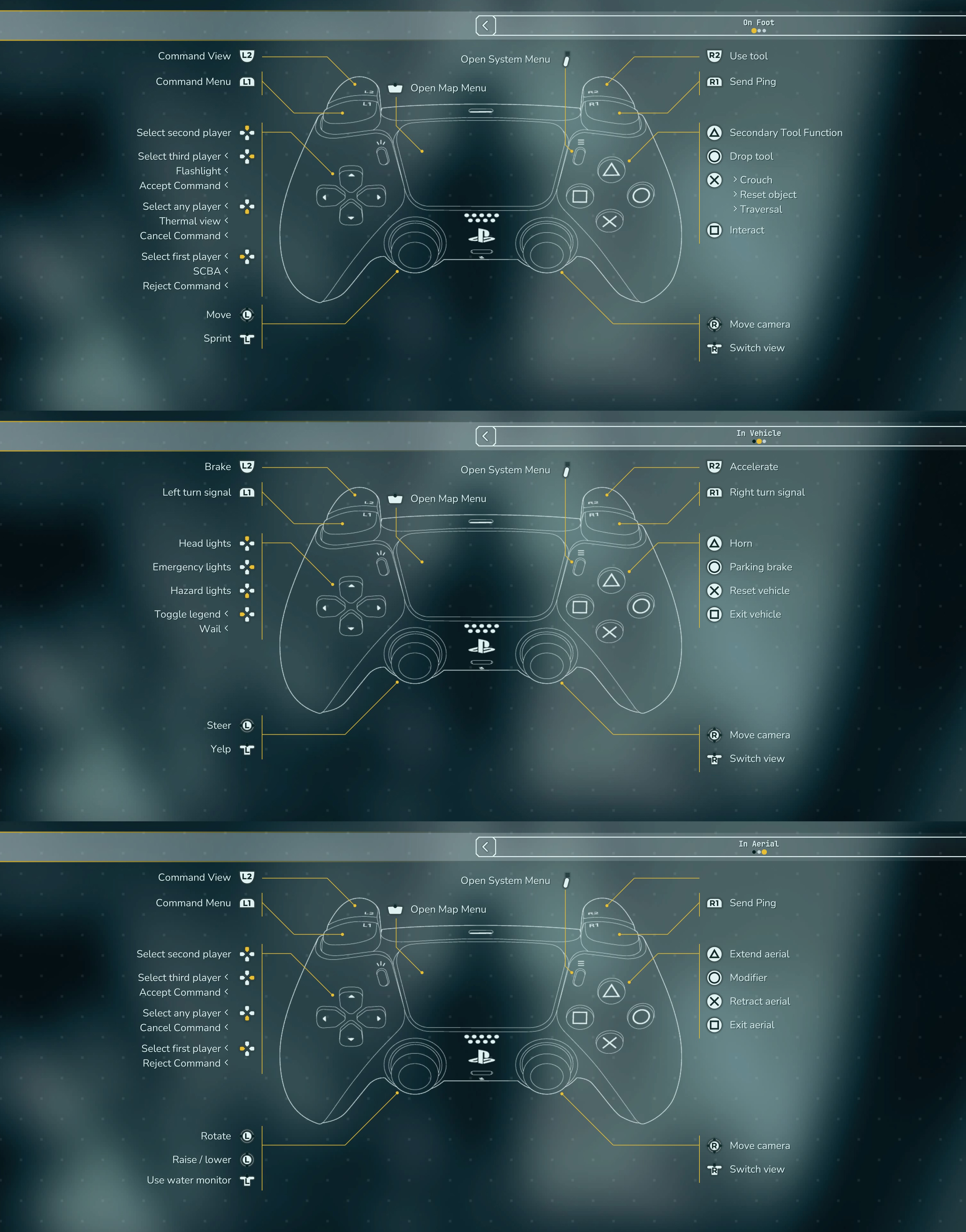
Firefighting Simulator: Ignite On-Foot Controls
| Action | PlayStation | Xbox | PC |
|---|---|---|---|
| Move | Left Stick | Left Stick | WASD |
| Look Around | Right Stick | Right Stick | Mouse |
| Sprint | L3 | LS | Left Shift |
| Move Camera | Right Stick | Right Stick | Mouse |
| Switch Camera View | R3 | RS | V |
| Use Tool | R2 | RT | Left Mouse Button |
| Send Ping | R1 | RB | Middle Mouse Button |
| Secondary Tool Function | Triangle | Y | Right Mouse Button |
| Drop Tool | Circle | B | G |
| Crouch | Cross | A | Left Ctrl |
| Traversal | Cross | A | Space |
| Reset Object | Cross | A | R |
| Interact | Square | X | E |
| Command View | L2 | LT | Tab |
| Command Menu | L1 | LB | Q |
| Open Map | Touchpad | View | M |
| Open System Menu | Options | Menu | Esc |
Squad Command Controls
Firefighting Simulator: Ignite places a strong emphasis on teamwork. While playing solo, you'll command AI firefighters to carry equipment, extinguish fires, rescue civilians, and complete objectives. These shortcuts are available while Command View is active.
| Command | PlayStation | Xbox | PC |
|---|---|---|---|
| Select First Firefighter | D-Pad Left | D-Pad Left | 1 |
| Select Second Firefighter | D-Pad Up | D-Pad Up | 2 |
| Select Third Firefighter | D-Pad Right | D-Pad Right | 3 |
| Select Any Firefighter | D-Pad Down | D-Pad Down | 4 |
| Accept Command | D-Pad Left | D-Pad Left | Enter |
| Cancel Command | D-Pad Right | D-Pad Right | Backspace |
| Reject Command | D-Pad Left | D-Pad Left | Delete |
| Thermal View | D-Pad Down | D-Pad Down | T |
| Flashlight | D-Pad Up | D-Pad Up | F |
| SCBA Toggle | D-Pad Left | D-Pad Left | B |
How to Use Equipment Efficiently
Most firefighting tools share the same core inputs. The primary trigger operates the selected tool, while the secondary function changes spray modes, adjusts nozzles, rotates equipment, or activates alternate tool functions depending on what you're carrying.
- Use R2 / RT to operate hoses, extinguishers, saws, axes, and rescue tools.
- Use Triangle / Y for alternate tool functions.
- Press Circle / B to safely drop heavy equipment.
- Interact with doors, valves, hydrants, ladders, and victims using Square / X.
- Switch to Thermal View whenever smoke limits visibility.
Can You Remap Controls?
Yes. Firefighting Simulator: Ignite allows players to customize controls on PC, while console versions support controller customization through the in-game settings and platform accessibility options. If you're left-handed or prefer alternative layouts, nearly every essential action can be adjusted to better fit your playstyle.
Tips for Learning the Controls
- Practice opening the Command Menu quickly during emergencies.
- Memorize Interact since you'll constantly rescue victims and operate equipment.
- Use Sprint only when safe, as careful positioning around collapsing structures is often more important than speed.
- Keep Thermal View ready whenever visibility drops.
- Learn each tool's secondary function before attempting higher-difficulty missions.


Comments
No comments yet. Be the first to share your thoughts!