Everspace 2 gives you full six axis movement in space, so learning the controller is more important than in a typical action game. You are not simply steering left and right. Your ship can thrust, strafe, hover vertically, pitch, yaw and roll while you manage two weapon types, devices, consumables, an Ultimate ability and several travel drives.
The console version includes two controller layouts. Scheme A is aimed at players familiar with first person shooters, while Scheme B is recommended for racing game players and anyone comfortable with the original Everspace. Both keep weapons and ship abilities in similar places, but they handle forward movement and vertical movement differently.
This guide explains both default schemes shown in the PlayStation controller menu, along with Xbox equivalents and practical advice for choosing the layout that feels right.
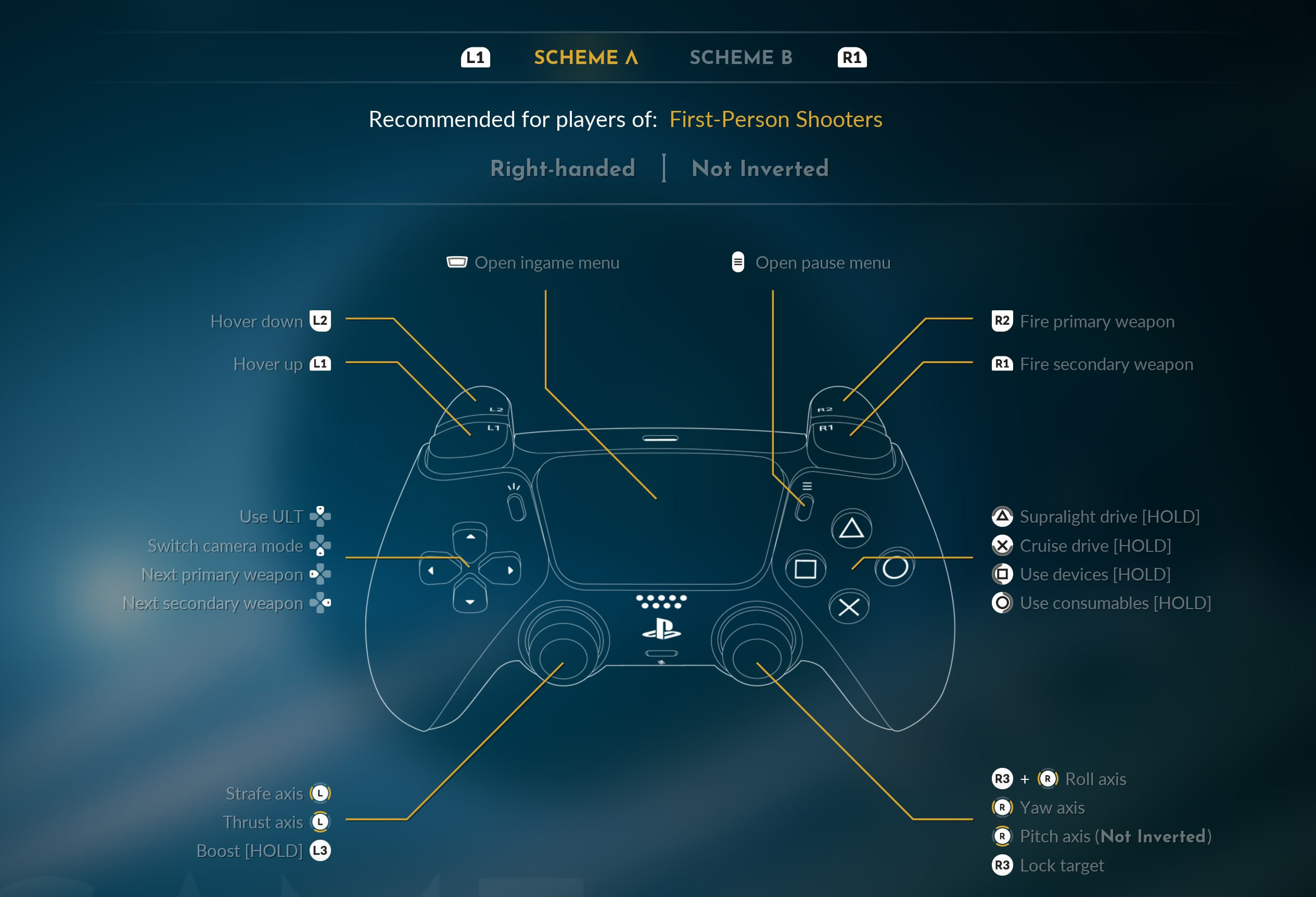
Everspace 2 Scheme A Controls
Scheme A places regular forward and backward thrust on the left stick while L1 and L2 control vertical movement. It feels familiar if you are used to moving with the left stick in shooters.
| Action | PlayStation | Xbox |
|---|---|---|
| Strafe Left / Right | Left Stick Left / Right | Left Stick Left / Right |
| Thrust Forward / Backward | Left Stick Up / Down | Left Stick Up / Down |
| Hover Up | L1 | LB |
| Hover Down | L2 | LT |
| Boost | Hold L3 | Hold Left Stick |
| Pitch | Right Stick Up / Down | Right Stick Up / Down |
| Yaw | Right Stick Left / Right | Right Stick Left / Right |
| Roll | Hold R3 + Right Stick Left / Right | Hold Right Stick + Right Stick Left / Right |
| Lock Target | R3 | Press Right Stick |
| Fire Primary Weapon | R2 | RT |
| Fire Secondary Weapon | R1 | RB |
| Use Ultimate | D Pad Up | D Pad Up |
| Switch Camera Mode | D Pad Left | D Pad Left |
| Next Primary Weapon | D Pad Right | D Pad Right |
| Next Secondary Weapon | D Pad Down | D Pad Down |
| Supralight Drive | Hold Triangle | Hold Y |
| Cruise Drive | Hold Cross | Hold A |
| Use Devices | Hold Square | Hold X |
| Use Consumables | Hold Circle | Hold B |
| Open In Game Menu | Touch Pad | View Button |
| Pause Menu | Options | Menu Button |
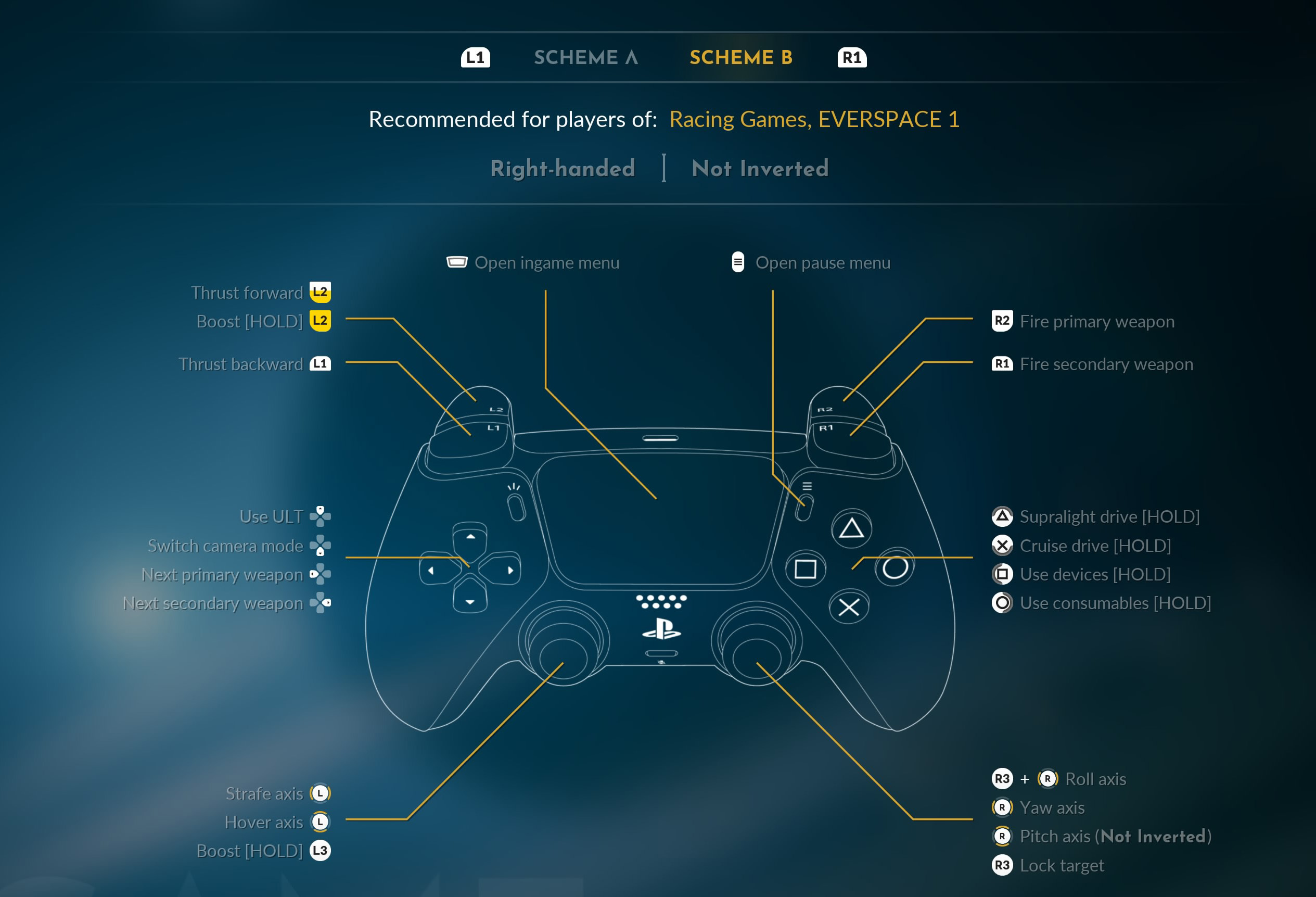
Everspace 2 Scheme B Controls
Scheme B moves forward and backward thrust onto the triggers. This gives the left stick responsibility for strafing and vertical movement, which can feel more natural if you approach the game like a racing title or traditional space game.
| Action | PlayStation | Xbox |
|---|---|---|
| Strafe Axis | Left Stick Left / Right | Left Stick Left / Right |
| Hover Axis | Left Stick Up / Down | Left Stick Up / Down |
| Thrust Forward | L2 | LT |
| Boost | Hold L2 or Hold L3 | Hold LT or Hold Left Stick |
| Thrust Backward | L1 | LB |
| Pitch | Right Stick Up / Down | Right Stick Up / Down |
| Yaw | Right Stick Left / Right | Right Stick Left / Right |
| Roll | Hold R3 + Right Stick Left / Right | Hold Right Stick + Right Stick Left / Right |
| Lock Target | R3 | Press Right Stick |
| Fire Primary Weapon | R2 | RT |
| Fire Secondary Weapon | R1 | RB |
| Use Ultimate | D Pad Up | D Pad Up |
| Switch Camera Mode | D Pad Left | D Pad Left |
| Next Primary Weapon | D Pad Right | D Pad Right |
| Next Secondary Weapon | D Pad Down | D Pad Down |
| Supralight Drive | Hold Triangle | Hold Y |
| Cruise Drive | Hold Cross | Hold A |
| Use Devices | Hold Square | Hold X |
| Use Consumables | Hold Circle | Hold B |
| Open In Game Menu | Touch Pad | View Button |
| Pause Menu | Options | Menu Button |
Which Control Scheme Should You Use?
Start with Scheme A if moving a character with the left stick already feels automatic to you. Forward, backward and sideways movement remain on one stick, while the shoulder buttons raise and lower the ship.
Scheme B is worth trying if you naturally expect acceleration to be controlled by a trigger. It also gives the left stick a more direct role in lateral and vertical positioning, which can feel good when circling enemies or navigating tight structures.
Do Not Judge a Scheme in the First Minute
Everspace 2 has unusual movement because your ship can move freely along several axes. Spend a few encounters with each scheme before deciding which one feels more intuitive.
How Ship Movement Works
Successful flying comes from combining thrust, strafe and hover instead of steering directly toward everything you want to reach.
Strafe during Dogfights
Sideways movement lets you keep an enemy near the center of the screen while avoiding incoming fire.
Use Hover to Break Predictable Movement
Moving above or below an opponent can be more effective than simply turning left or right around it.
Use Reverse Thrust when Enemies Rush You
Backing away while keeping your weapons pointed at an approaching target can preserve firing distance without forcing you to turn around.
Pitch, Yaw and Roll
The right stick controls the direction your ship is facing. Vertical input handles pitch and horizontal input handles yaw.
Roll is available through R3 combined with horizontal right stick movement.
Roll when Orientation Matters
You do not need to roll constantly during ordinary combat. It becomes more useful when navigating structures, lining up with narrow openings or correcting an awkward ship orientation.
Use Small Aim Adjustments
Large stick movements make precision weapons harder to line up. Make smaller corrections once the target is near your reticle.
Boost Controls
Boost gives your ship an immediate speed increase and is one of the most important tools for both aggression and survival.
Scheme A places Boost on L3. Scheme B allows boost through forward thrust on L2 and also shows L3 as a dedicated Boost input.
Boost Sideways as Well as Forward
Escaping enemy fire does not always mean flying directly away. A fast strafe or vertical move can break an enemy's firing solution while keeping you close enough to fight back.
Watch Your Energy
Boosting consumes energy that may also be needed for weapons or other ship systems. Do not arrive at the perfect firing angle with nothing left to power the attack.
Primary and Secondary Weapons
R2 or RT fires the active primary weapon. R1 or RB fires your selected secondary weapon.
Use D Pad Right to cycle primary weapons and D Pad Down to change the active secondary weapon.
Switch Primary Weapons according to Range
A weapon that performs brilliantly against a nearby target may be inefficient at long distance. Keep more than one useful engagement range available.
Do Not Waste Secondary Ammunition
Missiles and other secondary weapons are best used against enemies that justify the ammunition rather than every weak ship you encounter.
Target Lock Controls
Press R3 or the Right Stick to lock a target.
Lock before Beginning a Serious Attack
A target lock helps you keep track of a fast moving enemy during a chaotic battle.
Do Not Become Fixated on One Ship
Your locked target may not remain the biggest threat. Watch the radar and battlefield when additional enemies enter the fight.
Devices
Hold Square or X to access and use your equipped devices.
Devices provide some of the most useful combat tools in Everspace 2. Their exact purpose depends on your current loadout and upgrades.
Use Devices before Hull Damage Becomes Critical
Defensive equipment is most valuable when it prevents a bad situation rather than being activated after several enemies already have clear shots at your hull.
Build Device Choices around Your Ship
A fast close range ship may value different abilities from a heavier vessel intended to hold position and exchange sustained fire.
Consumables
Hold Circle or B to access consumables.
Consumables provide temporary or immediate assistance and should be treated as practical mission resources rather than collectibles to save forever.
Restock before Difficult Encounters
Check your consumable slots before beginning an important mission or challenging activity.
Use Them while They Can Still Change the Fight
Waiting until the ship is nearly destroyed can make an otherwise useful recovery item too late to matter.
Using Your Ultimate
D Pad Up activates your Ultimate ability when it is ready.
Match the Ultimate to a Real Opportunity
Use it when several important enemies are present or when its effect can significantly shorten a dangerous engagement.
Do Not Keep a Full Ultimate Forever
An ability that remains ready through several difficult fights is providing no value. Use it when the situation clearly benefits from it.
Cruise Drive
Hold Cross or A to activate Cruise Drive when conditions allow.
Cruise Drive is useful for moving quickly across local space without engaging the much longer distance Supralight system.
Point toward Open Space First
Align your ship before activating Cruise Drive so you do not immediately need to correct course around nearby structures.
Supralight Drive
Hold Triangle or Y to engage Supralight Drive when travelling between suitable destinations.
Think of Supralight as your long distance travel system rather than an ordinary combat boost.
Finish Nearby Business before Leaving
Check for loot, mission items and nearby objectives before committing to the next destination.
Changing Camera View
Press D Pad Left to switch camera mode.
Try More than One View
The best camera depends on what you are doing. A wider external view can make spatial awareness easier, while another perspective may feel better for precise flying.
Use a Familiar View for Tight Spaces
Changing camera perspective in the middle of navigating wreckage can make judging distance harder. Pick the view you trust before entering confined areas.
Left Handed and Inverted Controls
The controller preset screen also includes options for left handed controls and inverted pitch.
If normal vertical aiming feels unnatural, try inverted pitch before changing schemes entirely. Sometimes the movement layout is comfortable and only the pitch direction needs adjustment.
DualSense Features on PS5
The PlayStation 5 version uses DualSense feedback to communicate ship activity through the controller. Weapons, boosting and other ship systems can provide physical feedback while you play.
If the resistance or vibration becomes tiring during longer sessions, check the controller and game settings for available feedback options.
Useful PC Controls
| Action | Default PC Input |
|---|---|
| Fire Primary Weapon | Left Mouse Button |
| Fire Secondary Weapon | Right Mouse Button |
| Lock / Unlock Target | Middle Mouse Button |
| Move / Thrust / Strafe | W, A, S, D |
| Roll Left | Q |
| Roll Right | E |
| Hover Up | Space |
| Hover Down | Ctrl |
| Boost | Shift |
| Cruise Drive / Interact | Hold F |
| Supralight Travel | Hold C |
| Cycle Secondary Weapon | R |
| Change Camera | V |
| Open Inventory | Tab |
| Open Map | M |
PC allows extensive input customization, so your own keyboard, mouse or flight control setup may differ from these defaults.
Frequently Asked Questions
Which controller scheme is best in Everspace 2?
Scheme A is the easiest starting point for players used to first person shooters. Scheme B may feel more natural if you prefer trigger based acceleration or have experience with racing games and the original Everspace.
How do you fire the primary weapon?
Press R2 on PlayStation or RT on Xbox.
How do you fire secondary weapons?
Press R1 on PlayStation or RB on Xbox.
How do you lock onto a target?
Press R3 or the Right Stick.
How do you boost?
Scheme A uses L3. Scheme B provides boost through its forward thrust setup and also lists L3 as a dedicated Boost input.
How do you roll the ship?
Hold R3 and move the right stick horizontally.
How do you use devices?
Hold Square on PlayStation or X on Xbox.
How do you use consumables?
Hold Circle on PlayStation or B on Xbox.
How do you activate your Ultimate?
Press D Pad Up when the Ultimate is ready.
How do you change primary weapons?
Press D Pad Right.
How do you change secondary weapons?
Press D Pad Down.
How do you activate Cruise Drive?
Hold Cross on PlayStation or A on Xbox.
How do you activate Supralight Drive?
Hold Triangle on PlayStation or Y on Xbox.
Can you use inverted controls?
Yes. The preset screen includes an inverted pitch option.
Does Everspace 2 support left handed controls?
Yes. A left handed controller option is available from the preset screen.
Master Movement before Chasing Damage
The fastest improvement in Everspace 2 usually comes from learning how the ship moves rather than finding a more powerful gun. Practise strafing around targets, adding vertical movement to your dodges and reversing away from enemies while keeping your weapons pointed forward.
Once those movements become automatic, weapon cycling, devices, consumables and Ultimates become much easier to manage because you are no longer fighting the controller while fighting the enemy.
See our Everspace 2 Tips and Tricks Guide for combat, equipment, ships, perks, exploration, crafting and progression advice.
Comments
No comments yet. Be the first to share your thoughts!