The 7th Guest Remake turns Stauf's mansion into a fully explorable first-person puzzle house, so its controls are very different from the mouse-driven 1993 original. You can freely walk through rooms, crouch under obstacles, pick up and physically manipulate objects, inspect clues and use two supernatural tools that are central to progression: the Spirit Lantern and Spirit Board.
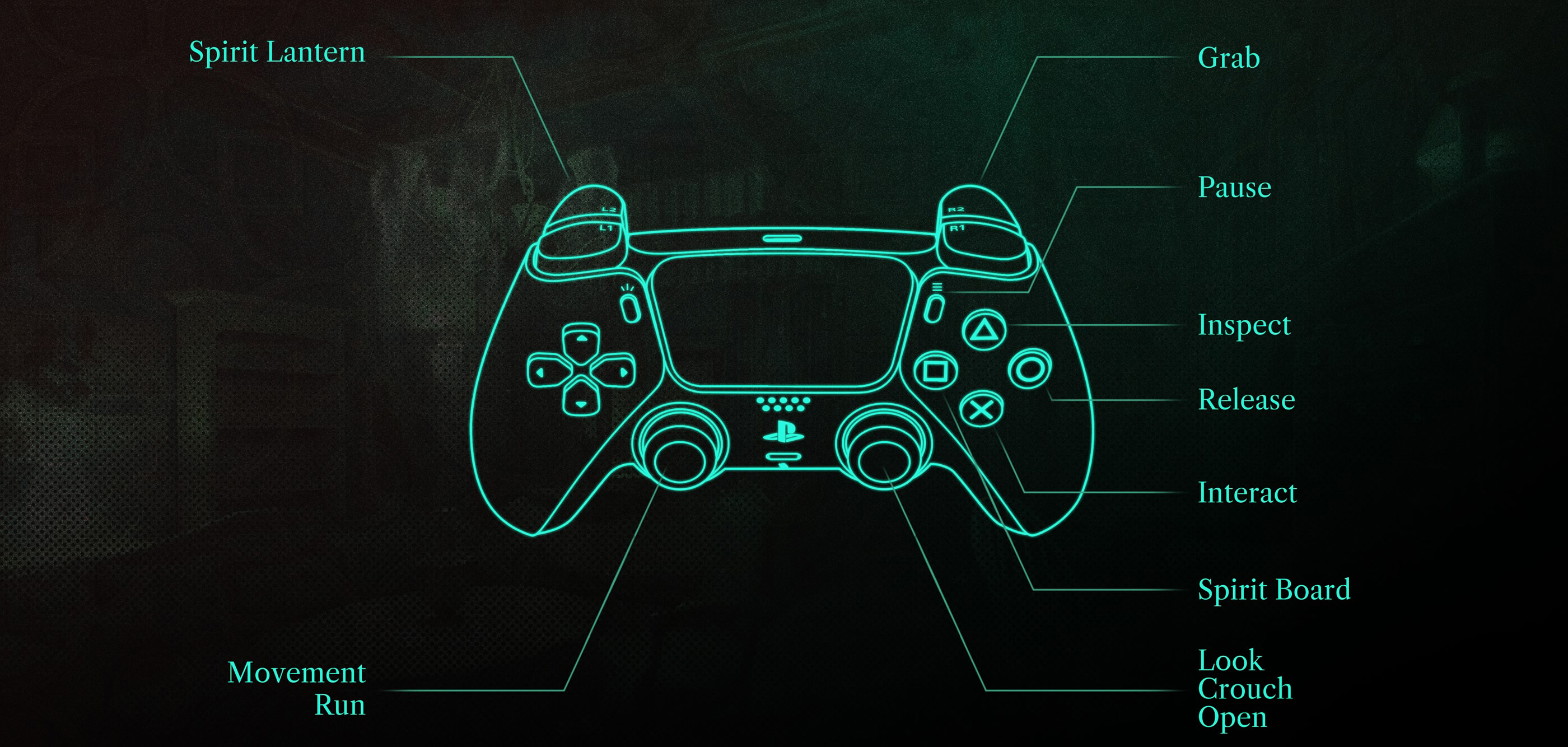
The PlayStation controls shown in the in-game menu are refreshingly compact. L2 summons the Spirit Lantern, R2 grabs objects, Cross interacts, Triangle inspects, Circle releases an object, Square brings up the Spirit Board, L3 runs and R3 crouches or performs contextual opening actions. The right stick handles looking while the left stick moves you around Stauf's mansion.
This guide covers those default PlayStation controls, their matching Xbox inputs, object manipulation, doors, puzzle interaction, the Spirit Lantern, Spirit Board, hints, Stauf Coins and several control behaviors that are not immediately obvious when you first enter the mansion. PC supports keyboard, mouse and controllers, but individual keyboard bindings can be changed, so the live Controls menu should be treated as the final reference for a customized PC setup.
Default Controls
| Action | PlayStation | Xbox |
|---|---|---|
| Move | Left Stick | Left Stick |
| Look | Right Stick | Right Stick |
| Run | Press L3 | Press Left Stick |
| Crouch / Contextual Open | Press R3 | Press Right Stick |
| Interact | Cross | A |
| Inspect | Triangle | Y |
| Release Object | Circle | B |
| Spirit Board | Square | X |
| Spirit Lantern | L2 | LT |
| Grab / Manipulate Object | R2 | RT |
| Pause | Options | Menu Button |
| Back in Menus | Circle | B |
The screenshot above comes directly from the current PS5 build. Individual puzzle interfaces can introduce their own contextual interactions, so pay attention to the prompt shown when examining a puzzle.
Movement and Looking Around
Use the Left Stick to move and the Right Stick to look around the mansion.
Unlike the fixed viewpoints of the original game, the remake lets you freely explore Stauf's house. That freedom is important because clues can be hidden above, below and behind the most obvious puzzle surface.
Look above Furniture
Do not restrict your search to eye level. Shelves, paintings, hanging objects and upper sections of puzzle mechanisms can all contain something worth examining.
Turn around after entering a Room
The first thing visible through a doorway is rarely the whole story. Check the wall behind you, the area beside the door and both corners before concentrating on the room's main puzzle.
Move closer when an Interaction Is Difficult
If an object refuses to highlight, reposition slightly instead of repeatedly pressing Interact. The remake uses precise object targeting, and some smaller items require you to face them quite directly.
How to Run
Press L3 on PlayStation or the Left Stick on Xbox while moving to run.
Run through Completed Corridors
Once you know a hallway contains nothing else you need, running makes revisiting unlocked bedrooms and puzzle rooms considerably faster.
Slow Down in Unexplored Rooms
Stauf Coins, records, photographs, Chronicles and other collectibles can sit on surprisingly ordinary furniture. Sprinting straight toward the obvious puzzle makes them easy to miss.
How to Crouch
Press R3 on PlayStation or the Right Stick on Xbox to crouch.
Crouching is used to reach low spaces and inspect areas that are difficult to see from standing height.
Check underneath Furniture
When a room appears fully searched, crouch beside desks, tables, beds and low cabinets. The game's three-dimensional exploration means a useful item may be obscured from normal standing height.
Remember to Stand Again
Remaining crouched can make puzzle surfaces and higher shelves awkward to inspect. Toggle back to normal height when the low passage or search is finished.
Interacting
Press Cross on PlayStation or A on Xbox when an interactive object is highlighted.
Interact is used for many simple contextual actions such as activating mechanisms, selecting puzzle elements and engaging with objects that do not need to be physically held.
Wait for the Interaction Indicator
If the game has not recognized the object, pressing the button repeatedly will not help. Adjust the camera until the intended interaction becomes active.
Try Grab instead of Interact
Some objects are designed to be physically moved rather than simply activated. If Cross or A does nothing useful, try the Grab command.
Grabbing and Manipulating Objects
Use R2 on PlayStation or RT on Xbox to grab an object.
This is one of the remake's most important controls because many puzzles were originally created around hands-on VR interaction. Doors, handles, puzzle pieces and movable objects may need to be pulled, rotated or repositioned instead of activated with a single button press.
Hold the Grab Input while Moving the Object
When something behaves like a physical object, keep the trigger engaged and use your movement or camera input to manipulate it.
Use Small Movements
Large camera swings can make levers, dials and delicate puzzle pieces harder to control. Short deliberate movements usually work better.
Change Your Viewing Angle
If a piece refuses to move in the expected direction, step to another side of the mechanism and try again. The correct movement can be easier to understand from a different perspective.
Releasing an Object
Press Circle on PlayStation or B on Xbox to release the object you are currently manipulating.
Release before Moving Away
If the camera begins behaving strangely after using a puzzle piece, make sure you are no longer holding it.
Do Not Fight a Snapped Object
Some puzzle components automatically lock into their correct position. Once this happens, release them rather than continuing to drag against the snap point.
Inspecting Objects
Press Triangle on PlayStation or Y on Xbox to inspect an object when the option is available.
Inspect mode brings an item into a better viewing position so you can search it for symbols, writing, mechanical details or other clues.
Rotate Your Attention around the Whole Object
The obvious front face is not necessarily the important one. Look at edges, undersides and backs whenever the inspection view allows it.
Read before Returning to the Puzzle
Numbers, letters, illustrations and repeated shapes can provide the information needed somewhere else in the room.
Using the Spirit Lantern
Press L2 on PlayStation or LT on Xbox to use the Spirit Lantern.
The Spirit Lantern is the remake's defining exploration mechanic. Its supernatural light can reveal how damaged objects and areas looked in the past, expose information that cannot be seen normally and restore certain objects to a usable historical state.
Use the Lantern before Assuming Something Is Broken
A damaged picture, machine, record or piece of furniture may be intentionally incomplete in the present. Shine the Spirit Lantern over it and watch how the object changes.
Sweep Slowly across the Room
The lantern works best as an investigative tool, not as a flashlight you wave around randomly. Move the beam slowly over suspicious walls, broken objects and puzzle components.
Watch for the Past Version of an Object
Sometimes the important information is not an item you can collect. The restored appearance itself may contain the clue you need.
Revisit Old Rooms with the Lantern
When progression stalls, return to rooms you previously explored and deliberately scan objects you may have dismissed before understanding how the lantern works.
Using the Spirit Board
Press Square on PlayStation or X on Xbox after obtaining the Spirit Board.
The Spirit Board acts as more than a simple menu. It helps you understand progression around Stauf's mansion, shows which areas are available and provides access to puzzle assistance.
Check It after the Clock Chimes
The mansion's grandfather clock signals major progression. When it chimes after completing important puzzles, check the Spirit Board to see what has changed or which rooms have opened.
Use It when You Cannot Decide Where to Go
The Spirit Board is especially useful after several bedrooms become available at once and you no longer remember which sections have been completed.
Do Not Auto-Solve Puzzles if You Want the Related Trophy
There is a trophy and achievement for completing the game's puzzles without relying on Spirit Board solutions. If you care about earning it, avoid the auto-solve function throughout that playthrough.
Hints and Stauf Coins
Stauf Coins are hidden throughout the mansion and are connected to the Spirit Board's puzzle-assistance system.
The game contains 50 Stauf Coins, and finding all of them is also tied to its own achievement or trophy.
Search Containers
Open drawers, cabinets and other manipulable objects instead of assuming they exist only as decoration.
Check Windowsills and Small Tables
Coins can sit in locations that are easy to overlook when your attention is fixed on the room's central puzzle.
Collect Coins Even if You Never Use Hints
They still count toward completion and provide a useful reason to explore every room thoroughly.
Opening Doors and Physical Mechanisms
Some interactions retain the physical feel of the VR version. Instead of pressing one button and watching a door open automatically, you may need to grab and move part of the object.
Grab the Handle
Place the camera directly over the interactive section, hold R2 or RT and then move in the direction the object naturally travels.
Think Like You Are Using Your Hand
If the object is a drawer, pull it outward. If it is a hinged door, move it along its arc. If it is a dial, rotate around the pivot rather than moving straight across the screen.
Use Interact when the Game Offers It
Some contextual objects can also be handled through a simplified interaction. Follow the current prompt rather than insisting on manual manipulation.
Puzzle Controls
The 7th Guest Remake contains a large variety of puzzle types, so there is no single universal puzzle button layout. Some puzzles involve selecting pieces, others involve physically moving objects, rotating elements, arranging tiles, manipulating machinery or investigating the room with the Spirit Lantern.
Determine whether the Puzzle Is Physical or Selectable
If a component highlights for Grab, use R2 or RT. If it behaves like a button or selectable tile, use Cross or A.
Inspect the Environment before Touching Everything
Many puzzles have clues built into the room itself. Moving every component immediately can make the puzzle appear more complicated than it actually is.
Use the Lantern around the Puzzle
The supernatural past often provides context for the solution. Scan the puzzle, nearby furniture and surrounding walls before deciding you are missing information.
Watching Ghostly Scenes
The volumetric performances are not merely cutscenes detached from the environment. You can move around them and observe the characters from different positions.
Listen to the Full Scene
Dialogue explains relationships between Stauf's guests and can provide useful context for why a room or puzzle has been designed in a particular way.
Move around the Actors
Because the performances exist volumetrically inside the mansion, changing position can reveal details that would be hidden in a traditional flat video.
Grandfather Clock Progression
The clock in Stauf's mansion is an important progression signal.
Listen for the Chime
A chime after completing a major puzzle sequence indicates that the mansion has progressed and additional areas may now be accessible.
Return to the Foyer
When you are unsure what changed, the central areas of the mansion are a good place to reassess your available routes.
Check the Spirit Board
Use the board instead of searching every locked door again manually.
PC Controls and Controller Support
The PC release supports keyboard and mouse as well as gamepads. Movement uses a conventional first-person keyboard-and-mouse setup, while object manipulation is performed by selecting or grabbing interactive elements and moving the mouse.
Keyboard bindings can be customized, so exact keys may differ between players. If you are creating a permanent PC layout, keep Grab, Interact, Spirit Lantern, Spirit Board and Crouch within comfortable reach because those actions are used repeatedly throughout the mansion.
Consider a Controller for Physical Puzzles
The remake originated from a VR design, and many mechanisms revolve around analog-style object movement. Some players may find twin-stick controller input more comfortable for these interactions.
Lower Mouse Sensitivity for Fine Manipulation
If small dials or movable puzzle pieces feel difficult to control, reducing sensitivity can make precision interactions less frustrating.
Frequently Asked Questions
How do you use the Spirit Lantern in The 7th Guest Remake?
Press L2 on PlayStation or LT on Xbox and shine it over damaged, suspicious or historically significant objects.
How do you open the Spirit Board?
Press Square on PlayStation or X on Xbox after obtaining it.
How do you grab an object?
Use R2 on PlayStation or RT on Xbox.
How do you release an object?
Press Circle on PlayStation or B on Xbox.
How do you inspect something?
Press Triangle on PlayStation or Y on Xbox when Inspect is available.
How do you interact?
Press Cross on PlayStation or A on Xbox.
How do you run?
Press L3 or the Left Stick while moving.
How do you crouch?
Press R3 or the Right Stick.
How do you get hints?
Use the Spirit Board after obtaining it. Stauf Coins are connected to the board's puzzle-assistance and solution system.
How many Stauf Coins are there?
There are 50 Stauf Coins hidden around Stauf's mansion.
Should I use the Spirit Board to solve puzzles?
You can if you become stuck, but avoid auto-solving if you want the trophy or achievement for completing the puzzles without Spirit Board solutions.
How do you know when new rooms have opened?
Listen for the grandfather clock to chime after major progress and then check the Spirit Board or revisit the mansion's central areas.
Does The 7th Guest Remake support controllers on PC?
Yes. The PC version supports modern controllers as well as keyboard and mouse.
Is this the same as The 7th Guest VR?
The flatscreen remake is based on the modern reimagining created for The 7th Guest VR, redesigned so the mansion can be played normally on a monitor or television without a VR headset.
Final Control Advice
Memorize the four inputs that define most of the game first: R2 or RT to grab, Cross or A to interact, L2 or LT for the Spirit Lantern and Square or X for the Spirit Board. Once those become automatic, the mansion feels much less awkward to manipulate.
More importantly, do not treat the Spirit Lantern like an optional flashlight. It is an investigative tool. When a puzzle appears incomplete, an object is broken or a room seems to be missing information, illuminating the past should be one of your first instincts.
See our The 7th Guest Remake Tips and Tricks Guide for spoiler-light puzzle strategies, Stauf Coin advice, collectibles, exploration techniques and Spirit Lantern tips.
Comments
No comments yet. Be the first to share your thoughts!