Kingdom Come: Deliverance uses a much more deliberate control system than most open-world RPGs. Henry does not instantly become an expert swordsman because you know which button attacks: combat direction, stamina, weapon skill, timing, blocking, target selection and positioning all matter, while everyday actions such as drawing a torch, calling your horse, opening the map and surrendering are placed on contextual shortcuts.
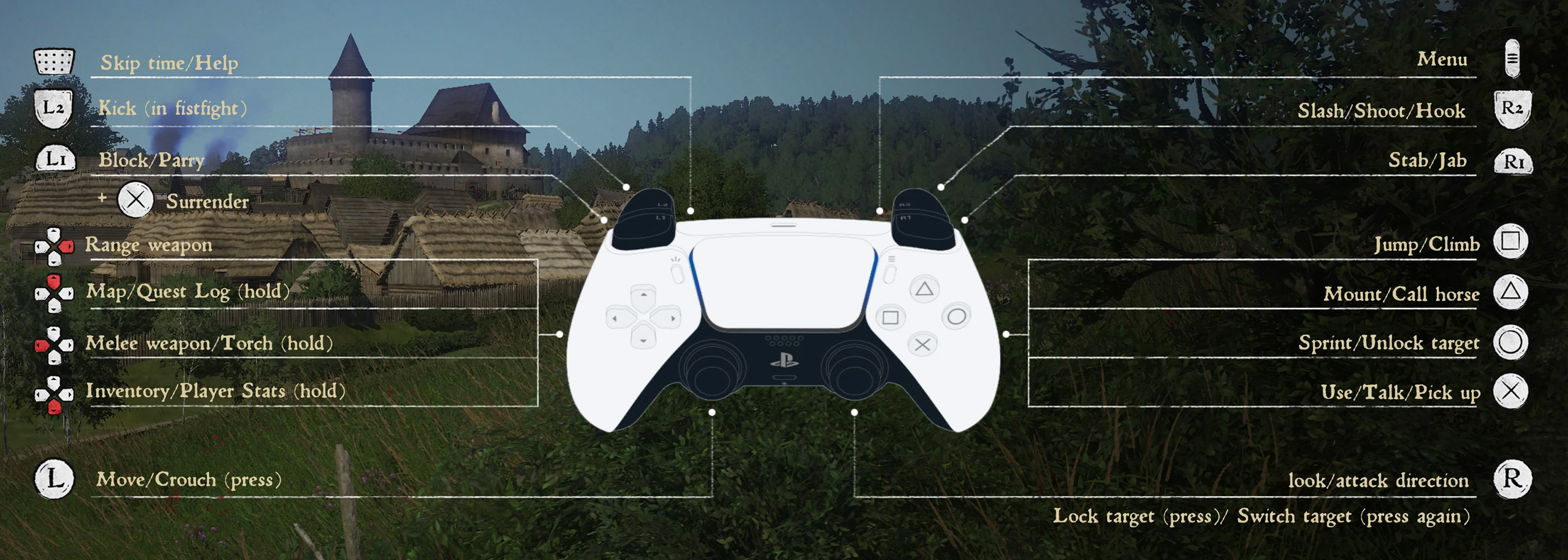
The controller layout above shows the default PlayStation configuration. R2 handles slashes, bow shots and contextual hooks, R1 performs stabs or jabs, L1 blocks and parries, L2 kicks during fistfights, Circle sprints and can release a combat lock, while the D-Pad gives fast access to Henry's ranged weapon, melee weapon, torch, map and inventory.
This guide explains the default PlayStation controls shown in-game, their Xbox equivalents, the main PC keyboard and mouse commands, melee combat, blocking and parrying, target lock, archery, horseback controls, weapon shortcuts, surrendering, crouching and several contextual actions that are easy to forget after spending time away from the game.
Default Controller Controls
| Action | PlayStation | Xbox |
|---|---|---|
| Move | Left Stick | Left Stick |
| Look / Select Attack Direction | Right Stick | Right Stick |
| Crouch | Press L3 | Press Left Stick |
| Lock Target / Switch Target | Press R3 | Press Right Stick |
| Sprint / Unlock Target | Circle | B |
| Jump / Climb | Square | X |
| Mount / Call Horse | Triangle | Y |
| Use / Talk / Pick Up | Cross | A |
| Slash / Shoot / Hook | R2 | RT |
| Stab / Jab | R1 | RB |
| Block / Parry | L1 | LB |
| Kick during Fistfight | L2 | LT |
| Surrender | L1 + Cross | LB + A |
| Equip Ranged Weapon | D-Pad Up | D-Pad Up |
| Map / Quest Log | D-Pad Right / Hold | D-Pad Right / Hold |
| Melee Weapon / Torch | D-Pad Left / Hold | D-Pad Left / Hold |
| Inventory / Player Stats | D-Pad Down / Hold | D-Pad Down / Hold |
| Skip Time / Help | Touchpad | View Button |
| Main Menu | Options | Menu Button |
Several buttons perform different actions depending on context. R2 may slash with a melee weapon, release an arrow or activate another contextual action, while Circle normally sprints but can also break your combat target lock.
PC Keyboard and Mouse Controls
| Action | Default PC Input |
|---|---|
| Move | W / A / S / D |
| Look / Attack Direction | Mouse |
| Interact / Talk / Pick Up | E |
| Jump / Climb | Space |
| Sprint | Left Shift |
| Crouch / Sneak | C |
| Toggle Walk / Run | Caps Lock |
| Call / Mount Horse | X |
| Primary Attack | Left Mouse Button |
| Secondary Attack | Right Mouse Button |
| Block / Parry | Q |
| Kick / Special Attack | F |
| Lock Target | Tab |
| Equip Melee Weapon | 1 |
| Equip Bow | 2 |
| Inventory | I |
| Map | M |
PC bindings can be changed, so use the Controls menu if a command does not match your current configuration.
Moving around Bohemia
Use the Left Stick or WASD to move Henry and the Right Stick or mouse to look around. Movement speed affects much more than travel: sprinting consumes stamina, heavy armor can make stealth harder and entering combat at the wrong angle can leave Henry surrounded before you even draw a weapon.
Walk in Towns when You Need Precision
Running through crowded streets makes it easier to overshoot doors, collide with NPCs or miss small interaction prompts. Slow down around merchants, chests and quest characters.
Save Sprinting for Open Ground
Henry's stamina is also crucial in combat. Arriving at an ambush after exhausting yourself with a long sprint is a poor way to begin a fight.
Look around while Moving
Roadside ambushes, fallen trees and suspicious groups can appear before Henry is formally engaged. Scan ahead instead of staring only at the quest marker.
How to Crouch and Sneak
Press L3 on PlayStation, the Left Stick on Xbox or C on PC to crouch.
Crouching reduces Henry's profile and is essential for stealth, pickpocketing, avoiding guards and moving quietly through restricted areas.
Clothing Matters as Much as the Button
A crouched Henry in bright, noisy plate armor is still easy to detect. Noise, visibility and conspicuousness all affect stealth.
Remove Loud Gear before Sneaking
If you know a quest requires infiltration, store or unequip unnecessary plate pieces and choose dark, quiet clothing before entering the area.
Watch NPC Facing Direction
Being crouched does not make Henry invisible. Move behind people and use walls, fences and darkness to break line of sight.
Using, Talking and Picking Up Items
Press Cross on PlayStation, A on Xbox or E on PC to interact.
The same contextual input is used to speak with NPCs, open doors, collect herbs, loot bodies, operate containers and interact with many quest objects.
Read the Prompt before Pressing
A door may offer Open, Unlock or Trespass-related actions depending on ownership and time of day. Do not assume every highlighted object is legal to use.
Check Ownership before Taking Items
Items marked as stolen can create trouble with guards and merchants. A seemingly harmless apple can become evidence if Henry is searched shortly afterward.
Jumping and Climbing
Press Square on PlayStation, X on Xbox or Space on PC to jump or climb.
Approach Ledges Straight On
Climbing works more reliably when Henry is facing the obstacle directly. Running into a ledge at an angle can result in a short jump instead of a climb.
Do Not Treat Henry like a Parkour Hero
Falls can injure Henry badly. Take slopes, walls and rooftops seriously, particularly when carrying heavy equipment.
How to Sprint
Hold Circle on PlayStation, B on Xbox or Left Shift on PC while moving to sprint.
Watch Stamina
Sprint consumes stamina. If danger appears, release sprint and recover before drawing into a fight.
Circle and B Also Affect Combat Lock
During combat the same button can help break or release your current target lock, allowing you to reposition when fighting several enemies.
Drawing a Melee Weapon
Use D-Pad Left on controller to equip Henry's melee weapon. Holding the same shortcut accesses the torch function. On PC, the default quick melee weapon command is 1.
Do Not Draw a Weapon in Every Conversation
Walking around with a weapon ready can affect how a situation feels and may cause unnecessary trouble. Sheathe it when you are no longer threatened.
Use the Correct Weapon for the Armor
Swords are excellent against lightly protected opponents, while maces and other blunt weapons are far more effective when armor becomes a major problem.
Equipping a Bow
Press D-Pad Up on PlayStation or Xbox to equip your ranged weapon. On PC, the default bow shortcut is 2.
Archery in Kingdom Come: Deliverance deliberately lacks the easy accuracy of many RPGs. Henry's bow skill, stamina, weapon requirements and your own ability to judge the center of the screen all matter.
Do Not Hold a Draw Forever
A fully drawn bow costs stamina. If you wait too long for the perfect shot, Henry's aim becomes harder to manage.
Use Distance before Enemies Reach You
The bow is strongest when you have space. Once several armored enemies reach melee range, switching weapons is usually safer than trying to fire another arrow.
Respect Bow Requirements
Using equipment Henry is not skilled enough to handle makes the weapon far less comfortable and effective.
Slash and Shoot
Press R2 on PlayStation or RT on Xbox for the primary attack. With a melee weapon this performs a slash based on your current attack direction; with the bow it is used as part of firing the shot.
Choose Direction before Attacking
The Right Stick or mouse selects the direction Henry intends to strike from. Watch the combat star rather than repeatedly attacking from the same angle.
Change Sides to Open Guards
Alternating attack direction makes Henry less predictable and helps set up combos once he has learned them.
Do Not Drain All Stamina
Attacking without reserve stamina makes Henry vulnerable when the opponent retaliates.
Stabbing and Jabbing
Press R1 on PlayStation or RB on Xbox for a stab or jab.
A thrust can be quicker and more direct than a sweeping slash, particularly against an exposed face or lightly armored opponent.
Aim High against Open Helmets
When a target's face is poorly protected, a well-placed thrust can be more useful than repeatedly striking armor.
Do Not Spam Stabs into Heavy Plate
Armor changes weapon effectiveness dramatically. If thrusts are producing poor results, change target area or weapon type.
Blocking and Parrying
Press L1 on PlayStation, LB on Xbox or Q on PC to block.
Blocking is only the beginning. Once Henry receives proper combat training, timed defenses become much more powerful than simply holding the guard button.
Watch the Opponent, Not Only the Shield Indicator
The green perfect-block prompt helps while learning, but reading shoulder and weapon movement makes you much more consistent.
Train with Captain Bernard
Early training with Bernard is one of the most important combat investments in the game. Continue his advanced training until you understand perfect blocks and the stronger defensive techniques Henry can learn.
Preserve Stamina
A block can still cost you resources. If Henry is exhausted, even a technically correct defense may leave him in serious trouble.
Perfect Blocks and Master Strikes
Kingdom Come: Deliverance becomes dramatically easier once you stop treating defense as passive blocking. Perfect blocks are timed defenses that avoid the normal stamina punishment, while Master Strikes are advanced counters that must first be learned through combat training.
Do Not Mash Block
React to the enemy's attack startup. Repeatedly pressing the button makes your timing less consistent.
Train before Challenging Strong Bandits
Henry's early incompetence is intentional. Training increases both your own understanding and Henry's relevant skills.
Defense Creates Your Safest Offense
Instead of forcing an attack into an opponent's guard, defend correctly and punish the opening that follows.
Kicking and Fistfights
Press L2 on PlayStation or LT on Xbox for a kick during unarmed combat. On PC, the equivalent special attack is normally F.
Use Kicks at Close Range
A kick is not a long-range attack. Use it when the opponent is already close enough for a clinch or short-range exchange.
Watch Your Stamina
Fistfights still punish reckless aggression. Step out, recover and re-enter instead of throwing attacks continuously.
Locking and Switching Targets
Press R3 on PlayStation or Xbox to lock the camera onto an enemy. Press it again or shift your target selection to move between nearby opponents. On PC, Tab is used for target locking by default.
Lock-On Is Best in Duels
Target lock gives precise directional combat against one opponent but can become restrictive when several attackers surround Henry.
Break Lock to Escape Groups
Use Circle or B when necessary to disengage from the hard lock and create space.
Never Let Enemies Stand behind You
Three mediocre bandits attacking from different directions can be more dangerous than one skilled swordsman. Back away and keep the group inside your field of view.
Surrendering
Press L1 + Cross on PlayStation or LB + A on Xbox when the surrender option is available.
Surrender Can Save More Than Pride
If guards have caught Henry committing a crime or a fight is clearly unwinnable, surrender may lead to a fine or other consequences instead of death.
Do Not Keep Attacking after Choosing to Yield
Continuing aggressive inputs can turn a recoverable situation back into combat.
Calling and Mounting Your Horse
Press Triangle on PlayStation, Y on Xbox or X on PC to call your horse when it is available. The same controller button is used contextually to mount or dismount.
Call the Horse from Open Ground
Whistling beside walls, fences or dense woodland can result in an awkward approach. Move to a road or clearing first.
Store Heavy Loot on Your Horse
Your horse provides additional inventory capacity. Transfer excess armor, weapons and loot instead of becoming overencumbered far from town.
Horse Riding Controls
| Horse Action | PlayStation | Xbox |
|---|---|---|
| Steer | Left Stick | Left Stick |
| Look Around | Right Stick | Right Stick |
| Canter | Hold Circle | Hold B |
| Gallop | Double Tap Circle, Hold Second Press | Double Tap B, Hold Second Press |
| Mount / Dismount | Triangle | Y |
Use Canter for Long Roads
Holding Circle or B gives you a useful middle speed that is easier to control and less demanding than a full gallop.
Double Tap and Hold for Full Gallop
For maximum speed, tap the sprint button twice and hold it on the second press. Galloping consumes the horse's stamina.
Let Roads Help You
Horses naturally behave better along established roads. Small steering corrections are usually more stable than fighting the path continuously.
Do Not Exhaust the Horse before an Escape
Leave stamina in reserve when riding through hostile territory so you still have the speed to flee an ambush.
Map and Quest Log
Use D-Pad Right for the map and hold the shortcut for the Quest Log. PC players can open the map directly with M.
Read Quest Descriptions
Many objectives give clues through dialogue rather than a precise marker. The journal often contains information that the HUD does not repeat.
Do Not Assume Every Quest Waits Forever
Some activities are time-sensitive. When an NPC tells you to arrive in the morning or meet someone immediately, treat the instruction seriously.
Inventory and Player Stats
Use D-Pad Down to open inventory-related screens and hold the shortcut for player information. PC players can use I for Inventory.
Sort by Weight and Value
Heavy low-value equipment can overload Henry quickly. Keep high-value loot and discard or sell poor weight-to-value items first.
Watch Item Condition
Damaged armor protects less effectively and damaged weapons perform worse. Repair kits, craftsmen and grindstones should become part of your routine.
Torch Controls
Hold the D-Pad Left shortcut to equip or put away Henry's torch.
Use a Torch in Settlements at Night
Walking through guarded towns after dark without a visible light can attract attention from guards.
Put It Away before Sneaking
A burning torch is the opposite of stealth equipment. Extinguish or stow it before approaching a restricted location.
Skip Time
Use the Touchpad on PlayStation or View Button on Xbox to access Skip Time / Help.
Advance Time for Shops and Quests
Waiting is useful when merchants are closed or an objective requires a particular part of the day.
Watch Hunger and Energy
Time passes for Henry even while waiting. Do not skip many hours without considering food and sleep.
Frequently Asked Questions
How do you attack in Kingdom Come: Deliverance?
Use R2 or RT for a directional slash and R1 or RB for a stab or jab.
How do you block?
Press L1 on PlayStation, LB on Xbox or Q on PC.
How do you parry?
Time the block input with the incoming attack instead of simply holding it. Training improves the defensive techniques available to Henry.
How do you lock onto an enemy?
Press R3 on controller or Tab on PC.
How do you unlock from an enemy?
Use Circle or B to break away from the target lock when necessary.
How do you kick?
Use L2 or LT during fistfights. PC uses the special-attack input, F by default.
How do you surrender?
Use L1 + Cross on PlayStation or LB + A on Xbox when surrender is available.
How do you crouch?
Press L3 on PlayStation/Xbox or C on PC.
How do you equip a bow?
Press D-Pad Up on controller or 2 on PC.
How do you equip a torch?
Hold D-Pad Left on controller.
How do you call your horse?
Press Triangle on PlayStation, Y on Xbox or X on PC after Henry has access to a horse.
How do you gallop?
Double tap Circle or B and hold the second press while riding.
How do you open the map?
Use D-Pad Right on controller or M on PC.
Can you remap controls?
The PC version offers configurable key bindings. Console controls are built around the game's standard controller layout.
Final Control Advice
Do not judge Kingdom Come: Deliverance's combat by Henry's first few fights. The controls deliberately represent an inexperienced young man who has not yet learned how to fight. Train with Captain Bernard, learn proper blocking and counter timing, preserve stamina and stop treating every encounter like a button-mashing action game.
Outside combat, memorize the four D-Pad shortcuts. Fast access to your bow, melee weapon, torch, map and inventory makes everyday exploration much smoother, while understanding the contextual nature of Circle, Triangle and the shoulder buttons prevents many of the most common controller mistakes.
See our Kingdom Come: Deliverance Tips and Tricks Guide for combat training, saving, money, armor, stealth, lockpicking, archery, horses, reputation and beginner progression advice.
Comments
No comments yet. Be the first to share your thoughts!