Dragon Marked For Death is not the kind of action RPG where learning one attack button is enough. Each of its six playable Dragonblood characters has a distinct movement style, different Dragon Skills and its own relationship with the shared Dragon Point (DP) resource. The Empress can weave sword attacks into Dragon Sword and Dragon Shot, the Warrior can guard and charge heavy attacks, the Shinobi relies on lock-ons and extreme mobility, while the Witch and Oracle turn combinations of inputs into powerful magic.
The screenshot above shows the default Empress controls on PlayStation: Square for Slash or Thrust, Cross for Jump, L1 for Dash, Circle for Dragon Shot, R1 for Dragon Sword and Triangle for Running Thrust. The equivalent Nintendo Switch and Xbox-style PC controller buttons are included below so you do not have to translate the layout yourself.
This guide covers the standard movement and Empress controls, attack combinations, Dragon Skills, DP management, weapon-dependent actions, controller equivalents, PC configuration and important differences between the six playable characters. Because Dragon Marked For Death lets you change button assignments, always treat the current in-game prompt as the final authority if you have customized your setup.
Empress Default Controls
| Action | PlayStation | Nintendo Switch | Xbox-Style Controller on PC |
|---|---|---|---|
| Move | Left Stick / D-Pad | Left Stick / D-Pad | Left Stick / D-Pad |
| Slash / Thrust | Square | Y | X |
| Jump | Cross | B | A |
| Dash | L1 | L | LB |
| Dragon Shot | Circle | A | B |
| Dragon Sword | R1 | R | RB |
| Running Thrust | Triangle | X | Y |
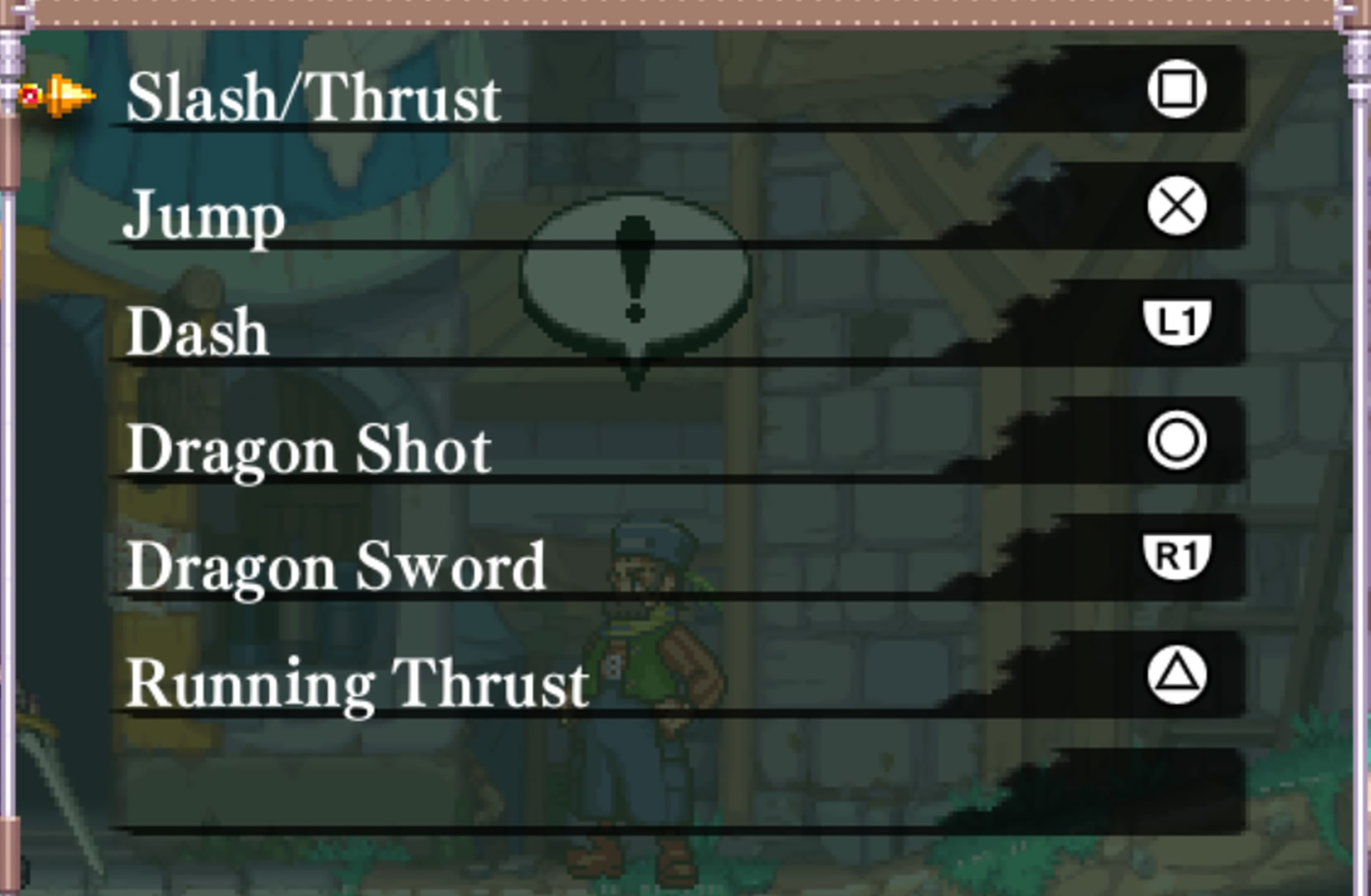
The table above follows the default Empress layout. Dragon Marked For Death is also available on PC, where keyboard assignments can be configured separately. The PC version works especially well with a gamepad because the combat system was designed around several simultaneous movement and attack inputs.
Movement Controls
Use the Left Stick or directional controls to move. Dragon Marked For Death is a side-scrolling action RPG, but movement is considerably more technical than a traditional platformer. Dashing, jump attacks, aerial Dragon Skills and character-specific mobility all become part of combat once quests grow more demanding.
Do Not Walk through Every Encounter
Normal movement is useful for precise positioning, but the Dash should become part of your regular navigation. It is faster, helps create distance from dangerous enemies and can flow directly into attacks.
Learn the Shape of Every Character's Movement
The same stage can feel completely different with another member of the Dragonblood Clan. The Empress has straightforward platforming, while the Shinobi can exploit considerably more vertical and aerial mobility. Do not assume a route that feels awkward with one character is equally difficult with another.
Use Movement to Control Enemy Spacing
Many bosses punish players who remain at one fixed distance. Step away from close-range swings, then move back into your preferred attack range during the recovery animation.
How to Jump
Press Cross on PlayStation, B on Nintendo Switch or A on an Xbox-style PC controller to jump as the Empress.
Use Short Jumps for Aerial Attacks
You do not always need maximum height. A small hop followed immediately by Slash lets the Empress begin an aerial attack while remaining close enough to continue with a grounded combo after landing.
Attack while Falling
Aerial attacks are not reserved for approaching enemies. They can also cover your descent and help you keep pressure on a target while returning to the ground.
Respect Stage Hazards
Later quests combine enemy pressure with pits, spikes and other terrain hazards. A badly timed jump may cost more health than the attack you were trying to avoid.
How to Dash
Press L1 on PlayStation, L on Switch or LB on an Xbox-style controller to Dash.
Dash is both a traversal command and an important part of several offensive techniques. The direction held during the input and your current character can change the resulting action.
Dash to Reposition before Attacking
Instead of swinging from maximum range and missing, Dash into the edge of your weapon range and begin the combo there.
Do Not Dash Blindly through Bosses
Mobility does not automatically mean invulnerability. Learn which attacks you can safely cross and which ones require you to retreat or jump.
Use Dash to Beat Quest Timers
Quests are timed, so efficient movement matters even outside combat. Once you know a stage layout, Dash through already-understood sections and save exploration time for treasure routes or objectives that matter.
Slash and Thrust Attacks
Press Square on PlayStation, Y on Switch or X on an Xbox-style controller for the Empress's primary weapon attack.
The exact physical attack depends on her equipped weapon. Swords emphasize slash combinations, while small-sword style equipment gives her a quicker thrust-oriented moveset.
Use the Full Ground Combo when Safe
Repeated primary attacks form the Empress's basic grounded sequence. Against enemies with a long recovery animation, finishing the sequence gives you a strong opportunity to transition into Dragon Sword or Dragon Shot.
Stop the Combo when the Boss Starts Moving
Finishing every attack string is a common beginner mistake. If the target begins an attack animation, cancel your offense and reposition rather than trading damage unnecessarily.
Use Aerial Slashes to Stay Active
Jump attacks let the Empress continue dealing damage while crossing small hazards, reaching elevated enemies or preparing to land into another ground sequence.
Dragon Sword
Press R1 on PlayStation, R on Switch or RB on an Xbox-style controller to perform Dragon Sword as the Empress.
Dragon Sword is one of her signature Dragon Skills. It consumes DP and can be integrated into both grounded and aerial offense, making it far more useful than a move you save only for bosses.
Chain into Dragon Shot
Dragon Sword can flow into Dragon Shot, giving the Empress a natural way to finish a close-range sequence with a Dragon-powered follow-up.
Use It after a Ground Combo
A practical Empress sequence is to land several normal sword attacks, use Dragon Sword and then follow with Dragon Shot when the target remains vulnerable.
Watch Your DP
Dragon Sword is powerful because it spends a resource. If you empty your DP gauge immediately, you may not have enough available when the boss exposes a much better damage opportunity.
Dragon Shot
Press Circle on PlayStation, A on Switch or B on an Xbox-style controller to use Dragon Shot.
Dragon Shot gives the Empress a ranged Dragon Skill whose characteristics can change according to her Dragon Contract. This makes it useful for both safe damage and combo extensions.
Finish Combos from Range
If Dragon Sword knocks or carries an enemy outside your comfortable melee range, Dragon Shot can continue the sequence without forcing you to immediately chase the target.
Use Dragon Shot in the Air
The move is not restricted to grounded combat. An airborne Dragon Shot can help the Empress remain offensive while avoiding attacks that cover the floor.
Learn Your Contract's Version
Do not assume Dragon Shot behaves identically after changing Dragon Contracts. Element, DP economy and attack behavior can vary, so test the move whenever you alter your build.
Dragon Cannon
The Empress can turn Dragon Shot into the more powerful Dragon Cannon by using its charging behavior. On modern versions of the game, you can also hold Down while pressing the Dragon Shot command to begin charging without first firing a normal shot.
Use It during Long Boss Openings
Dragon Cannon is not something to force into every encounter. Start charging when a boss is locked into a long animation, recovering after a major attack or unable to reach your position.
Do Not Sacrifice Safety for a Full Charge
If the boss begins approaching, abandon the damage opportunity and move. Taking a large hit to finish one Cannon is rarely a good trade.
Check Your DP before Charging
A powerful Dragon attack is only useful if your resource gauge supports it. Learn how much DP your current contract and equipment allow you to spend safely.
Running Thrust
Press Triangle on PlayStation, X on Switch or Y on an Xbox-style controller for the Empress's Running Thrust command.
Use It to Close a Small Gap
Running Thrust is useful when an enemy stands just beyond the range of your normal first attack. It combines forward movement with offense instead of making you walk into range first.
Do Not Charge into Telegraphs
Forward momentum can become a liability. If the enemy is already preparing a large attack, approaching with Running Thrust may carry you directly into the hitbox.
Small-Sword Users Should Practise It
The Empress's physical options change with weapon type, and small-sword setups particularly reward understanding her faster thrust-based movement and attack tools.
Understanding Dragon Points
The Dragon Point gauge, usually shortened to DP, fuels many character-specific Dragon Skills. Learning to generate and spend DP is one of the most important parts of Dragon Marked For Death combat.
Normal Attacks Help Sustain Dragon Skills
Do not think of physical attacks as filler between special moves. Your ordinary offense is part of the resource loop that lets you return to Dragon Skills repeatedly.
Do Not Empty the Gauge without a Reason
Spending everything on minor enemies can leave you without your strongest tools during the next dangerous encounter.
Boss Knowledge Improves DP Efficiency
Once you know when a boss becomes vulnerable, you can save DP beforehand and spend it during the exact window where your Dragon Skills are least likely to miss.
A Reliable Empress Combo
One of the Empress's most useful habits is moving naturally between ordinary sword attacks and her Dragon Skills rather than treating each command separately.
- Approach to reliable sword range.
- Begin the grounded Slash combo.
- Watch the enemy instead of automatically finishing every hit.
- If the opening remains safe, finish the normal sequence.
- Use Dragon Sword.
- Follow with Dragon Shot when appropriate.
- Dash away or jump if the enemy begins its counterattack.
- Rebuild DP with normal attacks before repeating the Dragon-heavy sequence.
Against bosses, shorten this sequence whenever their vulnerability window is small. A safe two-hit punish is better than losing a large amount of health while trying to finish the entire combo.
Controls Change by Character
The most important thing to understand about Dragon Marked For Death is that the Empress layout does not mean every character performs the same actions on those buttons. The basic physical positions remain familiar, but character-specific commands change dramatically.
Playable Character Control Styles
| Character | Main Style | Important Mechanics |
|---|---|---|
| Empress | Balanced melee / ranged attacker | Slash or Thrust, Running Thrust, Dragon Sword, Dragon Shot and Dragon Cannon |
| Warrior | Heavy offense / defense | Charged attacks, Dragon Guard, Berserk, tackle-style Dragon attacks and high durability |
| Shinobi | Fast mobile attacker | Lock-on attacks, kunai, Dragon Dash, aerial mobility and rapid target pressure |
| Witch | Spellcaster | Incantations, stored spells, elemental magic, support magic and Dragon Surge |
| Oracle | Advanced magic / support | Spell commands, Dragon Contract interactions, support effects and Dragon Advent |
| Bandit | Agile technical attacker | Relics, Dragon Relics, claw attacks, shuriken and contract-dependent abilities |
Warrior Controls and Playstyle
The Warrior is slower than the Empress but gains powerful charged attacks and defensive options. His core kit includes normal Slash attacks, Dragon Guard and Berserk, with additional Dragon attacks depending on the situation and contract.
Hold Attack for Charged Strikes
The Warrior can charge his physical attack for significantly stronger damage. Begin charging during an enemy's recovery rather than while standing directly in front of an active attack.
Dragon Guard Is an Active Tool
Dragon Guard is not merely a panic button. Learning what it can safely absorb lets the Warrior remain close to dangerous enemies while characters with weaker defenses may need to disengage.
Berserk Changes the Risk
Berserk is designed around committing to stronger offense. Learn its DP behavior and your current Dragon Contract before relying on it during long encounters.
Shinobi Controls and Playstyle
The Shinobi has some of the fastest traversal and most technical target management in the roster. His lock-on mechanics, kunai and Dragon Dash encourage constant movement.
Use Lock-On Deliberately
The Shinobi becomes dramatically more effective when you understand which enemy is currently marked and how his attacks behave against locked targets.
Dragon Dash Is Also Traversal
Directional Dragon Dashes can be used to navigate spaces other characters approach more slowly. Practise movement outside boss fights before trying advanced routes under pressure.
Do Not Confuse Speed with Safety
The Shinobi can move rapidly, but rushing through an enemy's attack is still dangerous. Control his mobility rather than holding forward constantly.
Witch Controls and Spellcasting
The Witch is intentionally more complicated than a conventional one-button mage. Her magic revolves around entering incantations, preparing spells and choosing which spell is appropriate for the encounter.
Learn a Small Spell Set First
Do not try to memorize every incantation immediately. Start with your most reliable attack, a healing or support option and one situational spell.
Prepare Magic before the Boss Is on Top of You
Spellcasting becomes much easier when you anticipate the next opening instead of beginning a long input sequence after an enemy has already closed the distance.
Element Matters
Dragon Marked For Death uses elemental weaknesses and resistances. Pay attention to damage feedback rather than repeatedly using a spell the target resists.
Oracle Controls and Playstyle
The Oracle is another highly technical character whose effectiveness comes from understanding magic, Dragon Contracts and support-oriented tools rather than simply repeating a basic attack.
Use Her as More Than a Damage Dealer
Party utility can be as important as personal damage, particularly in higher-level multiplayer quests.
Learn Contract Effects
Oracle abilities can interact strongly with the selected Dragon Contract, so switching contracts without adjusting your playstyle may make a previously familiar rotation less effective.
Bandit Controls and Playstyle
The Bandit combines agile physical offense with the Dragon Relic system, giving him one of the more unusual resource and ability loops in the game.
Understand Relics before Chasing Damage
Different relic effects change how the Bandit approaches groups and bosses. Learn what you currently have available before activating it automatically.
Use Mobility to Choose the Fight
The Bandit is much more effective when you control spacing rather than allowing enemies to dictate it.
Elemental Weakness and Damage Colors
Elemental damage is a major part of Dragon Marked For Death. Enemies can resist certain elements or take increased damage from others, so changing your Dragon Contract, weapon or spell selection can make a noticeable difference.
Do Not Brute-Force Resistant Enemies
If your elemental attacks are consistently being resisted, change your approach instead of assuming the enemy simply has an enormous health pool.
Prepare before High-Level Quests
Equipment and contract choices matter much more as quest levels rise. A setup that destroyed ordinary enemies may perform poorly against a boss with unfavorable resistance.
Controller Remapping
Dragon Marked For Death allows character controls to be reassigned. This is especially useful because each class has a very different number of commonly used commands.
Keep Attack and Jump Comfortable
These inputs are used constantly and should remain easy to press while simultaneously controlling movement.
Put Dragon Skills where You Can Reach Them Quickly
For the Empress, Dragon Sword and Dragon Shot are frequently used in attack strings. Avoid bindings that force you to release the movement controls every time you use them.
Use Different Character Layouts if Necessary
A layout that feels perfect for the Empress may be awkward for the Witch's incantations or the Shinobi's rapid mobility. Configure around the character you actually play.
PC Keyboard Controls
The Steam version supports keyboard play and allows keyboard assignments to be changed from the main menu. Because keyboard input is translated into the game's controller-style action system, the exact key you use for Slash, Jump, Dash and Dragon Skills can differ after customization.
PC also provides additional convenient interface shortcuts. The default menu shortcuts include:
| PC Interface Action | Default Keyboard Shortcut |
|---|---|
| Equipment | E |
| Log | L |
| Chat | ` |
| Status | T |
| Quests | Q |
| Quick Command / Action Shortcuts | F1-F8 / Shift + F1-F8 when assigned |
If you primarily play on PC, a controller is worth trying before settling on a permanent keyboard configuration. The game relies heavily on simultaneous direction, jumping, dashing and character-specific attacks, so some players find a gamepad more natural for moment-to-moment combat.
Multiplayer Control Advice
Dragon Marked For Death supports solo play and online parties of up to four players. Multiplayer changes the practical importance of positioning, aggro and support actions.
Do Not Stack on One Spot
Several players standing directly on top of one another make boss attacks harder to read. Spread just enough to keep visual information clear.
Know Your Role before the Boss
A Warrior may hold dangerous positions differently from a Witch or Shinobi. Use the strengths of the character rather than forcing everyone into identical melee behavior.
Use Quick Commands
The game supports assignable quick chat and action shortcuts. Set useful messages before joining public groups so you can communicate without stopping to type during a fight.
Frequently Asked Questions
How do you attack in Dragon Marked For Death?
With the default Empress layout, press Square on PlayStation, Y on Nintendo Switch or X on an Xbox-style PC controller for Slash or Thrust.
How do you jump?
Press Cross on PlayStation, B on Switch or A on an Xbox-style controller.
How do you Dash?
Press L1 on PlayStation, L on Switch or LB on an Xbox-style controller with the default Empress configuration.
How do you use Dragon Shot?
Press Circle on PlayStation, A on Switch or B on an Xbox-style controller.
How do you use Dragon Sword?
Press R1 on PlayStation, R on Switch or RB on an Xbox-style controller.
How do you use Running Thrust?
Press Triangle on PlayStation, X on Switch or Y on an Xbox-style controller.
Can Dragon Sword combo into Dragon Shot?
Yes. The Empress can transition from Dragon Sword into Dragon Shot, making the two Dragon Skills useful as part of the same offensive sequence.
Can the Empress use Dragon Shot in mid-air?
Yes. Dragon Shot and several of her Dragon attacks can be incorporated into aerial combat.
What are Dragon Points?
DP is the resource used by Dragon Skills and other character-specific powers. Normal combat and class mechanics help you manage and replenish it.
Do all characters use the same controls?
No. Shared movement inputs are similar, but Empress, Warrior, Shinobi, Witch, Oracle and Bandit have different attacks and Dragon Skills.
Can controls be remapped?
Yes. Button assignments can be changed, and the Steam release also provides configurable keyboard controls.
Is Dragon Marked For Death on Xbox?
There is no native Xbox console release. Xbox-style controller inputs in this guide refer to using an Xbox-compatible gamepad with the PC version.
Which platforms is Dragon Marked For Death available on?
The game is available for Nintendo Switch, PlayStation 4 and PC via Steam.
How many playable characters are there?
There are six playable characters: Empress, Warrior, Shinobi, Witch, Oracle and Bandit.
Does Dragon Marked For Death have online multiplayer?
Yes. The game can be played solo, while online multiplayer supports parties of up to four players.
Final Control Advice
If you are starting with the Empress, memorize six inputs first: Slash, Jump, Dash, Dragon Shot, Dragon Sword and Running Thrust. Those actions form nearly everything you need to move through early quests and begin experimenting with real attack sequences.
After that, stop thinking of Dragon Skills as isolated special attacks. Dragon Marked For Death becomes much more fluid once ordinary attacks generate your openings and DP while Dragon Sword, Dragon Shot and other class skills become natural extensions of the same combat rhythm.
Most importantly, relearn the controls when switching characters. A Warrior, Shinobi or Witch is not simply the Empress with different animations. Each character has a separate combat language, and mastering that difference is a major part of the game's depth.
See our Dragon Marked For Death Tips and Tricks Guide for character advice, stat builds, Dragon Contracts, quest progression, bosses, loot, treasure chests and multiplayer strategies.
Comments
No comments yet. Be the first to share your thoughts!